TL;DR
- AI SOC integration adds an investigation and response layer on top of your SIEM, EDR, cloud, and identity tools.
- Your SIEM stays the log store and audit trail, and your EDR keeps its agents and policies.
- The compatibility matrix spans SIEM, EDR, cloud, identity, email, network, and ticketing tools through bidirectional APIs.
- Judge integrations by the response actions they support, such as isolating a host, more than by connector count.
- A phased rollout starts in shadow mode, and detection tuning takes weeks to a few months after go-live.
Table of contents
- Q1: What Does ‘AI SOC Integration’ Actually Mean, And Where Does It Sit in Your Existing SOC Architecture?
- Q2: How Does an AI SOC Connect to Your SIEM, Specifically Splunk, Microsoft Sentinel, Elastic, and QRadar?
- Q3: How Does an AI SOC Layer Into Your EDR/XDR, Including CrowdStrike Falcon, Microsoft Defender, and SentinelOne?
- Q4: How Does AI SOC Integrate With Cloud Platforms, Specifically AWS, Azure, and GCP?
- Q5: What About SOAR, Identity, Email, and Ticketing Integrations?
- Q6: Which SOC Tools Best Complement an Agentic AI Security Operations Stack?
- Q7: What Actually Changes in Your SOC Workflow, and What Metrics Prove It’s Working?
- Q8: How Does AI SOC Keep You in Control, Covering Human-in-the-Loop, Approval Gates, and Auditability?
- Q9: What Integration Friction Should You Expect, and How Do You Solve It?
- Q10: How Do Traditional MDR Providers Handle Integration Compared to an AI SOC With Human Ally?
- Q11: How Do You Deploy an AI SOC Without Disrupting the SOC You’re Already Running?
- Frequently Asked Questions
Q1: What Does ‘AI SOC Integration’ Actually Mean, And Where Does It Sit in Your Existing SOC Architecture?
AI SOC integration means connecting an AI investigation and response layer to the SIEM, EDR, cloud, and identity tools you already run, so their alerts are triaged, correlated, and acted on in one place without replacing any of them.
Here’s the operational reality: most security teams run CrowdStrike for endpoints, Splunk or Sentinel for logs, Okta for identity, and at least one cloud console, whether AWS, Azure, or GCP. Each tool generates its own alerts, its own dashboards, and its own investigation workflows. The result is a “paralysis of fragmentation”: alerts are everywhere, and understanding is nowhere. Your analysts toggle between four or five consoles at 2 AM, manually correlating what should be connected automatically.
An integration layer is the architectural answer to this mess. It sits above your existing tools, ingests telemetry from all of them, correlates it through AI, and delivers unified detection and response, while every tool you already own keeps running.
The Architecture in Plain Terms
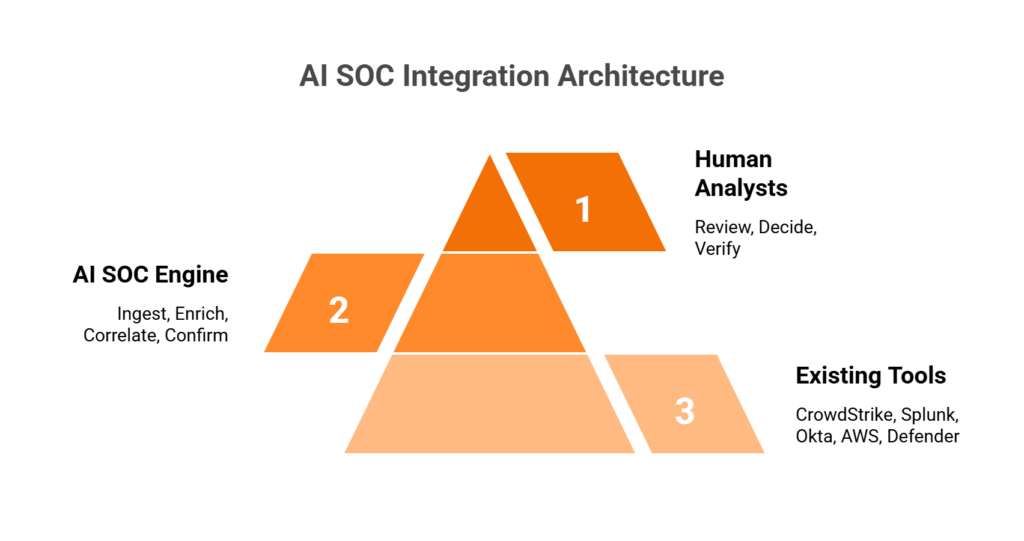
Think of it as a three-tier stack:
- Your existing tools, such as CrowdStrike, Splunk, Okta, AWS GuardDuty, and Microsoft Defender, form the bottom layer and keep generating telemetry and alerts.
- The AI SOC engine in the middle ingests alerts and raw logs through native APIs, enriches them with threat intelligence, correlates across data sources, and surfaces confirmed or high-confidence incidents.
- Human analysts at the top review AI investigation summaries, make judgment calls on edge cases, and confirm suspicious activity directly with the affected users.
This is how security operations work when your tools actually share context.
The AI SOC Compatibility Matrix at a Glance
The matrix below shows what an AI SOC layer reads from each category of your stack and which response actions it can take there.
| Tool category | Example tools | Integration method | Data ingested | Response actions |
|---|---|---|---|---|
| SIEM | Splunk, Microsoft Sentinel, Elastic, QRadar | API and log forwarding | Correlated alerts, raw events | Query, enrich, suppress |
| EDR/XDR | CrowdStrike, Microsoft Defender, SentinelOne, Carbon Black | Bidirectional API | Endpoint telemetry, process events | Isolate host, kill process, quarantine file |
| Cloud | AWS, Microsoft Azure, Google Cloud | Native API and webhooks | Cloud alerts, API calls, config changes | Revoke session, change security group, disable key |
| Identity | Okta, Microsoft Entra ID, Duo | API and event streaming | Auth events, MFA status, user risk | Suspend credential, force MFA, revoke session |
| Microsoft Defender for Office 365, Google Workspace | API | Phishing verdicts, BEC signals, forwarding rules | Quarantine message, block sender, revoke OAuth | |
| Network | Palo Alto Networks, Fortinet, Cisco | Syslog and API | Firewall logs, IDS/IPS alerts | Block IP, update policy, isolate segment |
| ITSM | ServiceNow, Jira | Bidirectional API | Ticket status, assignment data | Create or update ticket, sync resolution |
Sections Q2 to Q5 go through each category in detail, starting with the SIEM.
The Rip-and-Replace and Escalation-Only Traps
Traditional approaches break down in two predictable ways. Some providers require their own proprietary SIEM, so you abandon the correlation rules, business logic, and automation you’ve spent years tuning just to get their monitoring.
At the other end, legacy MSSPs provide monitoring without intelligence: checkbox coverage built on rigid playbooks with no real-time threat context. Some automation-first providers over-rely on AI and return tickets without actionable context, so your team still has to investigate. These approaches either destroy existing investments or generate alert volume without resolution.
Integration as the Competitive Advantage
In 2026, the advantage comes from a system that can reason across your security tools. Detection without response is noise, and response without context is risk.
The “AI SOC + Human Ally” model represents the architectural shift: a system that ingests from SIEM, EDR, cloud, and identity, correlates through AI enrichment, and delivers confirmed-threat response with human verification. It automates the investigation grunt work, including querying the SIEM, pulling logs, and enriching with threat intel, while humans handle the edge cases that require business judgment.
How UnderDefense Fits on Top of Your Stack
If your team spent years tuning Splunk correlation rules and CrowdStrike policies, a provider that asks you to start over puts that work at risk. The UnderDefense Agentic AI SOC is designed around one principle: layer in, don’t take over. Your business logic, correlation rules, and compliance audit trails stay exactly where they are.
The Agentic AI SOC works on top of your existing tools through 250+ integrations, and deployment can be SaaS, hybrid, on-premises, or air-gapped. Before anyone escalates, analysts confirm suspicious activity with the affected user over Slack, Microsoft Teams, email, or SMS. One G2 reviewer, a VP of Technology at an enterprise, describes the result:
“SentinelOne, Microsoft Defender, and our 4TB Elastic SIEM deployment stayed in place.”
Oleksandr M., VP of Technology, Enterprise (> 1000 emp.), G2 review, June 2026, submitted through a G2 invite
The same reviewer adds that “detection tuning to our multi-cloud environment took a few months before coverage was fully dialed in.” The platform is rated 4.9 out of 5 from 57 reviews on G2, as of October 2026.
The Proof
Integration without response capability is just expensive alerting, so measure the response. UnderDefense reports about 2 minutes from alert to triage, and across six years, no ransomware incident reached impact.
For a Security Director, that means a 2 AM alert from any connected tool gets triaged by 24/7 detection and response before your team wakes up.
Q2: How Does an AI SOC Connect to Your SIEM, Specifically Splunk, Microsoft Sentinel, Elastic, and QRadar?
The core principle is straightforward: an AI SOC sits on top of your SIEM and leaves it in place. It ingests alerts and raw logs through native API connectors, syslog forwarding, or data lake queries. It then enriches them with threat intelligence, correlates across multiple data sources, and triages before returning confirmed incidents to your SIEM console. Your SIEM remains the log repository and compliance audit trail, and the AI SOC becomes the investigation and response engine.
Why This Matters Operationally
This architecture preserves something many MDR providers overlook: SIEM data ownership. When a provider brings its own SIEM, all your business logic, including correlation rules, custom integrations, and automation playbooks, lives in its system. If you switch providers, you start over from scratch. That’s a lesson too many security leaders learn the hard way.
Platform-Specific Integration Breakdown
Each SIEM exposes its data differently, so the connector differs by platform.
| SIEM platform | Ingestion method | Bidirectional flow | Key capability |
|---|---|---|---|
| Splunk | REST API and HTTP Event Collector (HEC) | Queries SPL, pushes enriched findings back | Index-level access for deep log analysis |
| Microsoft Sentinel | Microsoft Graph security API and Azure Event Hubs | Alert and incident sync both ways | Native Azure correlation |
| Elastic | Elasticsearch API for direct index queries | Kibana alert forwarding, enrichment returned | Works with Elastic detection rules as code |
| QRadar | QRadar Offense API and syslog forwarding | Offense enrichment and priority adjustment | Modern AI layer over legacy deployments |
Each integration follows the same principle: read alerts and logs from your SIEM, enrich and correlate them through AI, and return only confirmed or high-confidence incidents for analyst review.
What Changes in Your SIEM Workflow
The SIEM still collects and stores every log. What changes is what happens after collection:
- Before an AI SOC, Tier 1 analysts triage alerts by hand, toggle between consoles, and chase false positives.
- After an AI SOC, the AI layer enriches every alert with threat intelligence, user context, and cross-tool correlation, and surfaces only confirmed or high-confidence incidents.
The SIEM stays the data backbone, and the AI SOC becomes the analytical layer on top of it.
The detection-as-code approach matters here, too. Security rules should be versioned, unit-tested, and deployed via CI/CD, because static signatures decay over time. When a rule triggers a false positive, you update it in version control, test it against historical data, and deploy the fix across your environment. This is how modern detection engineering works.
How UnderDefense Works With Your SIEM
If your SIEM holds years of audit history, moving it into a provider’s platform puts that record at risk. The Agentic AI SOC works with the SIEM you already run, whether Splunk, Microsoft Sentinel, Elastic, or QRadar, and accesses the data where it lives. Log ownership and your compliance audit trail stay with you, and detection rules are managed as code, so a tuning fix reaches your environment in one tested change.
“Their expert management of our SIEM has added to the value of our security investments and tools… UnderDefense has changed our approach to cybersecurity.”
Yaroslava K., IT Project Manager, G2 review
Q3: How Does an AI SOC Layer Into Your EDR/XDR, Including CrowdStrike Falcon, Microsoft Defender, and SentinelOne?
The integration model between AI SOC and EDR/XDR is API-driven and bidirectional: pull endpoint telemetry in (process executions, file modifications, network connections, and behavioral detections) and push response actions out (isolate host, kill process, and revoke credentials). The critical addition is cross-environment correlation that standalone EDR cannot deliver, linking an endpoint alert to identity behavior in Okta, cloud activity in AWS, and email compromise signals in Microsoft 365, all within a single investigation view.
Platform-Specific EDR Integration
The APIs and response actions differ by EDR platform, and so does the right approval gate.
| EDR/XDR platform | Telemetry API | Response actions | Human-in-the-loop gate |
|---|---|---|---|
| CrowdStrike Falcon | Falcon detection and prevention APIs | Real Time Response: isolate host, kill process, revoke credentials | Analyst approval for critical containment |
| Microsoft Defender for Endpoint | Defender for Endpoint API and Microsoft Graph security API | Isolation, investigation packages, remediation actions | Approval gates on cross-tenant actions |
| SentinelOne | REST API for threat ingestion | Isolation, threat rollback, network quarantine | Analyst confirmation before rollback |
Each platform follows the same pattern: the AI SOC ingests the endpoint telemetry, enriches it with context from SIEM logs, identity events, and cloud activity, and presents the analyst with a correlated investigation summary in place of a raw alert.
What Changes in Your EDR Workflow
Here’s the practical difference. Without AI SOC integration, CrowdStrike flags a suspicious PowerShell execution, an analyst opens the Falcon console, manually checks Splunk for related network activity, switches to Okta to verify the user’s identity, and spends 45 minutes before finding a developer running a legitimate script.
With AI SOC integration, CrowdStrike flags the same alert, and the AI SOC correlates it with Okta session data, Splunk network logs, and recent change tickets. An analyst reaches out to the user over Slack and closes a confirmed false positive within minutes. If the activity is malicious, containment (endpoint isolation and credential revocation) can start before the analyst’s investigation summary even lands in the queue.
Why EDR Alone Falls Short
CrowdStrike, SentinelOne, and Defender are all strong at endpoint detection. What they lack is organizational context. EDR sees what happened on the endpoint. It doesn’t know why your VP of Engineering runs unusual scripts on weekends before product launches, or that the “suspicious login” from an unusual country is your sales director traveling. That context requires either human verification or a system that can ask the user directly.
How UnderDefense Closes This Gap
If your CrowdStrike console fills with alerts nobody can chase overnight, the license pays for detections that wait until morning. The Agentic AI SOC works with your existing EDR deployment without replacing it, adds the cross-environment correlation that endpoint tools miss, and provides the concierge analyst layer that verifies suspicious activity directly with affected users over ChatOps.
“The seamless integration and optimization of the EDR platform, CrowdStrike, has been impressive. Despite the complexity involved, they delivered the deployment to 1200+ endpoints in just 23 business days.”
Oleksii M., Mid-Market, G2 review
That figure measures deployment. Tuning detections to your environment takes longer, as the timeline in Q11 explains.
Q4: How Does AI SOC Integrate With Cloud Platforms, Specifically AWS, Azure, and GCP?
Cloud environments are where most AI SOC integration falls apart. Cloud telemetry looks different from on-premises telemetry: logs are API-based, alert formats are service-specific, threats are IAM-centric, and the shared responsibility model leaves detection and response for what you deploy with you. The AI SOC must ingest from cloud-native security services and correlate them with on-premises SIEM and EDR data for unified hybrid visibility.
AWS Integration
On AWS, the integration covers five primary telemetry sources:
- CloudTrail logs API activity: who did what, when, and from where.
- GuardDuty supplies threat findings such as reconnaissance, credential compromise, and crypto-mining.
- Security Hub aggregates findings from multiple AWS security services.
- VPC Flow Logs provide the network traffic metadata used in lateral movement detection.
- IAM Access Analyzer flags overly permissive policies and external access paths.
Response actions include IAM policy revocation, security group changes, and EC2 instance isolation, all executed through AWS APIs with analyst approval gates. In a public live demo, UnderDefense shows its team detecting, investigating, and responding to an attack on Kubernetes running on AWS in real time.
Azure Integration
On Microsoft Azure, the AI SOC reads four sources:
- Microsoft Sentinel, where deployed, syncs alerts and incidents both ways.
- Defender for Cloud supplies cloud security posture management findings.
- Microsoft Entra ID provides sign-in logs, audit logs, and conditional access events.
- Azure Activity Logs record resource-level operations.
Response capabilities include Entra ID conditional access enforcement, resource isolation, account lockout, and security group policy adjustments.
GCP Integration
On Google Cloud, the AI SOC reads three sources:
- Security Command Center centralizes security findings.
- Cloud Audit Logs record admin activity and data access.
- VPC Flow Logs support network traffic analysis.
Response runs through GCP IAM and resource management APIs, for permission revocation and workload isolation.
Why Cloud Detection Requires a Specialist Approach
The biggest misconception is that moving to the cloud shifts risk away from you. The move changes the shape of the risk. Your internal IT team knows VMware and on-premises servers well, and cloud threats call for different expertise: how IAM roles chain together in AWS, or how one misconfigured S3 bucket exposes customer records. Cloud Detection & Response is a specialty of its own.
How UnderDefense Handles Cloud
If your workloads span AWS, Azure, and Google Cloud, a cloud alert at night needs someone who can act inside each account. The Agentic AI SOC works inside your cloud environments and keeps logs in your data lake. Its cloud detection and response covers Kubernetes security, misconfigurations, and DevOps vulnerabilities, and it contains threats targeting your cloud infrastructure through IAM revocation and resource isolation, with a 20-minute SLA response time for critical alerts.
Q5: What About SOAR, Identity, Email, and Ticketing Integrations?
Most conversations about AI SOC integration stop at SIEM, EDR, and cloud, but a real security operations environment runs on a much wider stack. SOAR platforms, identity providers, email security tools, network firewalls, and ITSM ticketing systems all generate signals your SOC needs to see, correlate, and act on. If your AI SOC layer can’t reach into these systems, you’re left with the same blind spots that created the problem in the first place.
SOAR: Complement, Don’t Replace
Here’s where the confusion usually starts. SOAR platforms, such as Cortex XSOAR, Splunk SOAR, and Tines, were designed to orchestrate known response actions through predefined playbooks. They execute “if X, then Y” logic extremely well. What they don’t do is reason through unknown alerts, investigate context across tools, or adapt investigation steps to novel threats.
An AI SOC absorbs the investigation work that SOAR playbooks were never designed to handle: SOAR orchestrates the downstream action, and the AI SOC handles upstream triage and enrichment. If you already run a mature SOAR instance, keep it, and let the AI SOC feed it higher-fidelity inputs. If you don’t have SOAR, an AI SOC with built-in response orchestration covers investigation and response without adding another platform to maintain.
Identity, Email, Network, and Ticketing
Four more integration categories are non-negotiable for cross-functional visibility:
- Identity platforms such as Okta, Microsoft Entra ID, and Duo supply user lifecycle events, MFA challenges, sign-in logs, and conditional access triggers, and those logs belong in your security operations center.
- Email security tools such as Microsoft Defender for Office 365 and Google Workspace supply phishing and business email compromise signals, OAuth grants, and forwarding rule changes, which need correlating with endpoint and identity data.
- Firewall logs from Palo Alto Networks, Fortinet, and Cisco, plus IDS/IPS alerts, fill gaps that endpoint agents can’t cover, especially in east-west lateral movement detection.
- ITSM tools such as ServiceNow and Jira sync ticket creation and status both ways, so your analysts stop copy-pasting between consoles at 2 AM.
Each of these categories has its own row in the compatibility matrix in Q1, with the data an AI SOC reads and the actions it can take.
Depth Over Count
Here’s the thing that matters: a few dozen deep bidirectional integrations (query, enrich, and respond) outperform hundreds of shallow, read-only connectors. A connector that can read alerts but can’t isolate a host or revoke a credential gives you a dashboard with no response capability.
Ask any provider to prove depth before go-live. Audit the connectors against your toolset, run a simulated intrusion, for example with MITRE Caldera, and check which response actions actually fire. That gives you reproducible evidence that your integrations work under pressure.
Q6: Which SOC Tools Best Complement an Agentic AI Security Operations Stack?
The best SOC tools to complement an AI SOC layer are the ones you likely already own, including your SIEM, EDR/XDR, cloud-native security services, identity platforms, and SOAR. Their value depends entirely on how deeply they integrate with your AI detection and response engine.
What Separates High-Impact SOC Tools From Shelf-Ware
Not every tool in your stack delivers equal value to an AI SOC. Evaluate each one on five points:
- It supports bidirectional APIs, so the AI SOC can ingest alerts and push response actions back.
- It produces structured alert output that the AI can enrich and correlate.
- It has native response capabilities, such as isolate, revoke, and block, that the AI SOC can orchestrate without console-switching.
- It generates audit-ready logs as compliance evidence for SOC 2, ISO 27001, and HIPAA.
- It works across multiple AI SOC platforms and keeps you out of a single proprietary ecosystem.
A tool that meets all five gives the AI SOC both the context and the controls it needs.
The Right Combination Depends on Your Environment
Each tool category, whether SIEM, EDR, cloud security, identity, or email, plays a different role in your AI SOC architecture. The right combination depends on whether you’re cloud-first or hybrid, which frameworks you operate under, and whether you need detection-only or full detection and response coverage.
A cloud-native SaaS company running AWS with Okta has fundamentally different integration priorities than a healthcare organization with on-premises Active Directory and Palo Alto firewalls. Map your compliance frameworks and your hosting model first, and the integration priorities follow.
Q7: What Actually Changes in Your SOC Workflow, and What Metrics Prove It’s Working?
The 2:47 AM Problem
It’s 2:47 AM on a Tuesday. Your phone buzzes with the 14th “critical” alert this week. You log in, spend 45 minutes investigating across three consoles (SIEM, EDR, and cloud), and discover it’s a developer running a legitimate script from an unfamiliar IP. You’ve been awake for an hour, and you still don’t know if you missed something real while chasing this false positive.
This scene repeats for SOC analysts in most teams that run a separate console for each tool. The analysts are doing their jobs well; the tools leave them without shared context.
Why This Keeps Happening
The root cause is architectural: EDR sees endpoint behavior, the identity tool sees user context, and the cloud console sees API calls, but none of them reasons across all three. You become the manual correlation layer, and every hour spent stitching consoles together is an hour an incident can grow. IBM’s 2026 Cost of a Data Breach report puts the global average cost of a breach at $4.99 million.
Before and After: How Each SOC Tier Changes
Each tier of the SOC gets different work back.
| Analyst tier | Before AI SOC | After AI SOC |
|---|---|---|
| Tier 1 | Manual triage across 3 to 5 consoles | Reviews AI summaries of confirmed threats only |
| Tier 2 | Hours reconstructing timelines by hand | Validates AI report with timeline and evidence, decides response |
| SOC manager | Scheduling, firefighting, and justifying headcount | Detection tuning, threat hunting, metrics, and board reporting |
The shift moves your most experienced people onto the work only they can do.
SOC Metrics That Prove It’s Working
Baseline these metrics before deployment, then compare them after tuning.
| Metric | Before AI SOC | After AI SOC | What drives the change |
|---|---|---|---|
| MTTD (mean time to detect) | Hours to days | Minutes | Automated cross-tool correlation |
| MTTR (mean time to respond) | Hours | Shorter, with pre-built response actions | Automated containment |
| MTTC (mean time to contain) | Depends on analyst availability | Minutes with pre-authorized actions | No wait for approval on routine actions |
| False positive rate | A large share of alerts | A small fraction after tuning | Detection tuning plus user verification |
| Analyst time on triage | Most of each shift | A minority of each shift | AI handles routine investigation |
Your board will trust your own baseline more than any benchmark, so record it in the first week.
What This Looks Like at UnderDefense
If your Tier 1 queue grows faster than your team can work it, the outcome you want is fewer alerts reaching a person without context. The Agentic AI SOC ingests from your existing stack, correlates through AI, and puts human analysts in front of affected users over Slack or Teams for real-time verification. UnderDefense reports about 99% noise reduction from that combination of AI triage, user verification, and detection tuning on each customer’s own stack.
“UnderDefense literally took care of all our problems. Not having to worry about ransomware, alert overload and reporting. Getting a clear view of my security posture, where the threats are coming from and how they are handled.”
Arlin O., CIO, Enterprise, G2 review
“They handle a lot of the alert monitoring, which saves time. And if a real problem does happen, they react quickly, which has been a lifesaver.”
Verified User in Computer Software, G2 review
Q8: How Does AI SOC Keep You in Control, Covering Human-in-the-Loop, Approval Gates, and Auditability?
Every CISO has the same question about AI in the SOC: “What happens when it’s wrong?” It’s the right question, and the answer should be specific. Human-in-the-loop controls are the governance architecture that keeps an AI SOC from taking autonomous action without appropriate oversight. Every AI decision is observable, every action is auditable, and critical response actions require explicit human authorization.
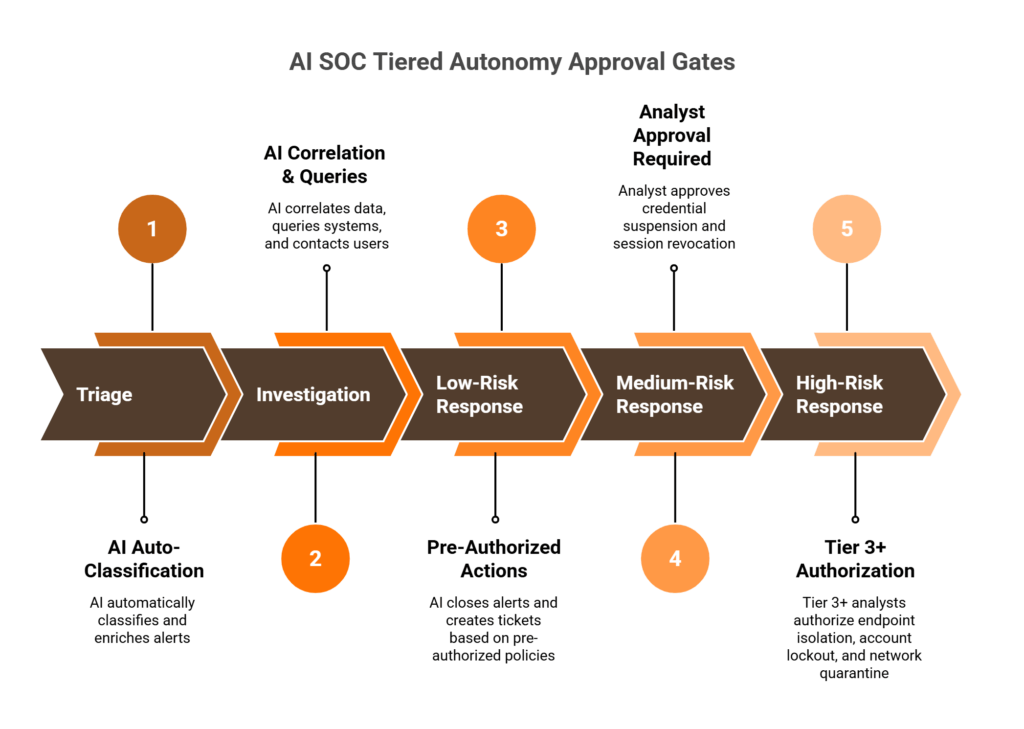
How Approval Gates Work at Each Stage
The key design principle is tiered autonomy: AI gets more freedom where the risk is low, and humans stay firmly in the loop where the risk is high.
| Workflow stage | AI action | Approval required? | Who approves |
|---|---|---|---|
| Triage | Classifies severity, enriches with SIEM, EDR, identity, and cloud context | No, read-only analysis | Nobody, no changes made |
| Investigation | Correlates tools, queries logs, asks users to verify activity | Analyst reviews summary before response | SOC analyst, Tier 1 or 2 |
| Low-risk response | Closes alerts, creates tickets, updates status | No, runs within pre-defined policy | Pre-authorized by SOC manager |
| Medium-risk response | Suspends credentials, restricts access, revokes sessions | Yes, analyst approval on dashboard or mobile | SOC analyst, Tier 2 or above |
| High-risk response | Isolates endpoints, locks accounts, quarantines segments | Yes, explicit Tier 3+ authorization | Senior analyst or SOC manager |
Your team agrees these gates during onboarding and tests them with simulated intrusions before go-live, and you decide what “low-risk” and “high-risk” mean in your environment.
Why Auditability Matters More Than You Think
Every investigative step gets logged: timestamp, data source queried, reasoning chain, evidence found, conclusion reached, and action taken or recommended. This creates an audit trail that supports SOC 2, ISO 27001, and HIPAA evidence requirements and lets you replay any investigation after the fact to understand exactly what happened.
For regulated industries, this is non-negotiable. An auditor wants to see the evidence chain: what was detected, what was investigated, what was decided, and who approved the response. Observable AI, where you can trace every decision, works very differently from black-box AI, where you get a verdict and no explanation.
How UnderDefense Approaches This
If an auditor or your board asks why an account was locked at 3 AM, you need the answer on record. In the Agentic AI SOC, every investigative step is visible and auditable, and the record shows each action taken by AI agents and by human analysts.
In a published case study, UnderDefense reports that for a US government financial organization, “the average time it took to identify, analyze, and deal with high and critical alerts was 9 minutes.” Trust in an AI SOC comes from that kind of transparency, so ask every provider to show you a full investigation record before you sign.
Q9: What Integration Friction Should You Expect, and How Do You Solve It?
If your environment mixes a legacy SIEM, hybrid on-premises and cloud infrastructure, and several EDR vendors across business units, the question is whether integration will break what you already have. That’s the right question. Any vendor who promises friction-free integration without caveats is skipping the details. Here’s what actually happens in the field, and how to solve each friction point.
Five Common Friction Points and Practical Solutions
Five friction points come up in most integrations.
| Friction point | What happens | How to solve it |
|---|---|---|
| Legacy SIEM versions | Older Splunk or QRadar lacks modern APIs; connectors fail | Syslog forwarding first, phased API upgrade during onboarding |
| On-premises-only environments | A cloud-hosted AI SOC can’t reach your data | Deploy the AI SOC on-premises or air-gapped |
| API rate limits | EDR and cloud platforms throttle queries during alert spikes | Query batching, caching, and prioritized alert processing |
| Data residency constraints | Logs must stay within specific regions | Keep logs in your data lake, process them locally |
| Custom or niche tools | Industry platforms lack standard APIs | Custom connector built during onboarding, with a date |
Each fix belongs in the onboarding plan, with an owner and a date, before the first alert source goes live.
What Good Onboarding Covers
High-quality onboarding exists to find and resolve these friction points before they reach your analysts. UnderDefense audits your existing toolset, builds custom integrations where needed, and works in SaaS, hybrid, on-premises, and air-gapped environments, keeping your logs in your data lake. Real integration means adapting to your environment, and your environment never has to adapt to the vendor.
“The platform itself is straightforward, it pulls in data from all our existing security tools, so we didn’t have to rip and replace anything. Their SOC team is responsive and knows their stuff.”
Verified User in Marketing and Advertising, G2 review
Log onboarding can still take longer than planned. One reviewer, a co-founder and CTO, puts it plainly:
“No UnderDefense’s fault entirely, but getting all our logs and stuff flowing took longer than I expected.”
Andriy H., Co-Founder and CTO, G2 review
Budget time for log onboarding in your plan, especially for legacy sources.
Q10: How Do Traditional MDR Providers Handle Integration Compared to an AI SOC With Human Ally?
The critical question when you evaluate AI SOC and managed detection providers is who can work with what you already own and actually respond to threats, beyond escalating alerts. That distinction separates vendors who protect your investment from vendors who replace it.
How Traditional Providers Approach Integration
Proprietary-SIEM providers ask you to move your data into their own platform. The architectural trade-off: your custom correlation rules, business logic, and detection tuning stay with the provider when you leave.
Single-ecosystem providers excel when every endpoint runs their EDR, with strong threat hunting on their own agents. Step outside that ecosystem, into cloud workloads, identity platforms, and third-party SIEMs, and their visibility drops.
Automation-first providers invest heavily in automated triage. A common complaint is tickets returned without investigation context, so your team starts the investigation again with its own organizational knowledge.
Side-by-Side Comparison
The table compares the three approaches with UnderDefense on the points that decide fit with an existing stack.
| Capability | Proprietary-SIEM provider | Single-ecosystem provider | Automation-first provider | UnderDefense |
|---|---|---|---|---|
| Existing stack preserved | SIEM replaced | Own EDR stays | Partly | Yes, works on top of it |
| Integration approach | Replace and ingest | Native to one vendor | API-driven | Vendor-agnostic |
| Response capability | Alert escalation | Detect and hunt | Automated tickets | Investigation and response, analysts decide |
| User verification over ChatOps | Rarely | Rarely | Rarely | Slack, Teams, email, or SMS |
| Published price | Quote | Quote | Quote | 24/7 monitoring from $11 per device per month |
| On-premises support | Limited | Agent-based | Limited | SaaS, hybrid, on-premises, or air-gapped |
Read the last column as the vendor’s own description, and ask each provider on your shortlist to show the same rows in a live demo.
What Customers Say
Fit with the customer’s environment is the point reviewers raise most. On Clutch, where UnderDefense is rated 4.9 out of 5 from 66 reviews as of October 2026, the CIO of Security at an insurance company wrote:
“UnderDefense impressed us with their ability to tailor their services to our unique needs and challenges.”
Serhii Bozhok, CIO of Security, ARX Insurance Company (501-1,000 employees), Clutch review, September 2024
Who Should Choose What
The right choice depends on what you already own:
- A proprietary-SIEM provider fits a team starting from scratch, with zero existing investments and comfort with vendor lock-in.
- A single-ecosystem provider fits a team that runs one EDR vendor everywhere and needs endpoint-only threat hunting.
- UnderDefense fits a team that wants to protect its existing stack investments, see transparent pricing up front, and have analysts verify alerts directly with affected users over ChatOps.
If your stack mixes vendors, the third option keeps every tool you’ve already paid for.
Q11: How Do You Deploy an AI SOC Without Disrupting the SOC You’re Already Running?
The biggest deployment risk is operational. You can’t afford a gap in coverage while transitioning, and your analysts need to trust the new system before they rely on it. A phased approach removes both risks.
AI SOC Integration Readiness Checklist
Score your readiness before deployment, one point for each statement that is true today:
- You have documented API access to your SIEM, EDR, and cloud platforms.
- Your existing tools generate alerts in a structured format, beyond raw syslog.
- A designated integration owner, such as a SOC engineer or security architect, is in place.
- Your environment supports shadow-mode deployment, with parallel processing and no actions taken.
- Your compliance and data residency requirements are documented.
- You have baseline SOC metrics (MTTD, MTTR, and false positive rate) to measure improvement.
- Your team is prepared for workflow changes, with AI handling triage and analysts handling confirmed threats.
Add up your points, then read your starting point below.
Score Interpretation
Your score tells you where to begin.
| Score | Readiness level | Recommended starting point |
|---|---|---|
| 6 to 7 | Ready for full deployment | Begin the phased rollout immediately |
| 3 to 5 | Start with shadow mode | Deploy on the highest-volume alert source first |
| 0 to 2 | Begin with a readiness assessment | Toolset audit and gap analysis before deployment |
A low score is a sequencing signal: it tells you what to fix first.
Phased Deployment Timeline
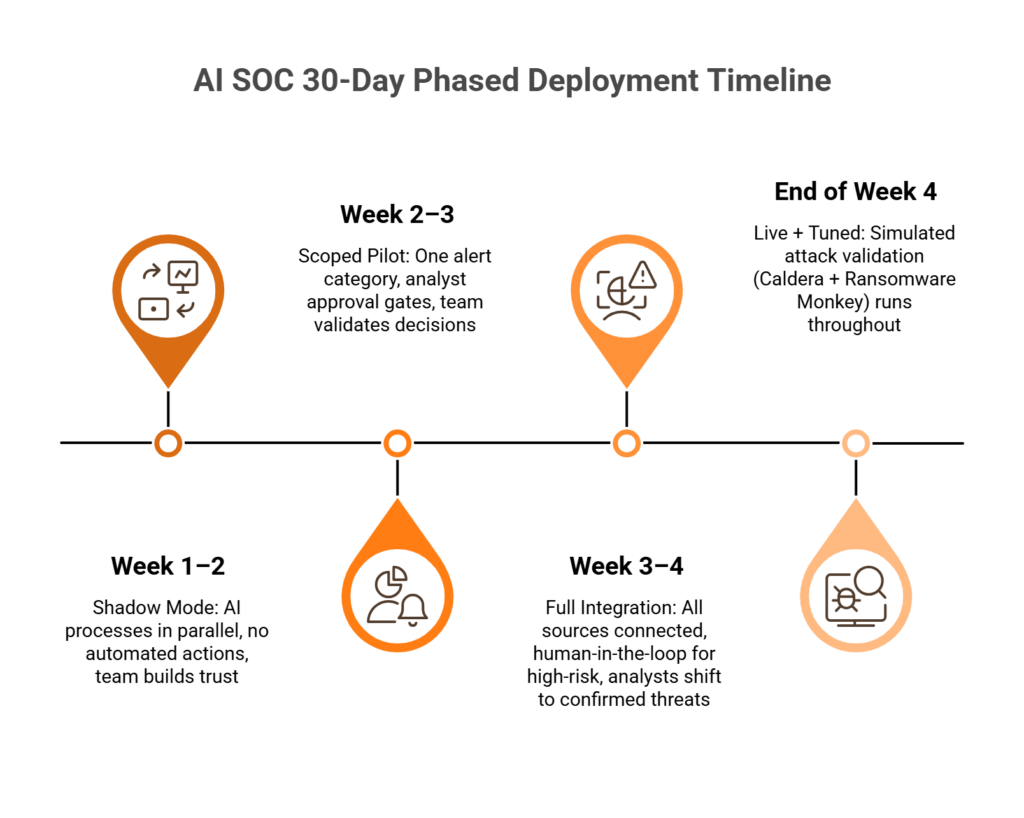
A typical phased plan runs about four weeks:
- In weeks 1 and 2, the AI runs in shadow mode, processing alerts in parallel with your existing SOC and taking no automated actions, so your team can compare its output with their own triage.
- In weeks 2 and 3, a scoped pilot has the AI triage one alert category, such as phishing or endpoint malware, with analyst approval gates on every response action.
- In weeks 3 and 4, full integration has the AI manage triage and investigation across all connected sources, with human-in-the-loop controls kept for medium-risk and high-risk response actions.
Going live is different from being tuned: detection tuning continues after week 4, and reviewers report it takes from a few weeks to a few months.
How UnderDefense Covers the Gaps
If you can’t risk a gap in coverage during the switch, the phased plan protects you: your current SOC keeps running while the AI SOC proves itself in shadow mode. The Agentic AI SOC rollout follows this sequence, from a toolset audit and shadow mode to detection tuning, before your team changes its workflow. Behind the AI agents stand 150+ incident response experts across three global centers, so a confirmed incident gets people with hands on the keyboard.
Scored below 5 on the checklist? Book an integration readiness review
Frequently Asked Questions
Can an AI SOC work with my existing SIEM without replacing it?
Yes. An AI SOC connects on top of Splunk, Microsoft Sentinel, Elastic, or QRadar through APIs and log forwarding. Your SIEM stays the log repository and the home of your correlation rules, and those rules stay with you if you ever change providers. Q2 covers each connector.
Does AI SOC integration require replacing my current EDR?
No. An AI SOC layers on top of your existing EDR investment, whether CrowdStrike, Microsoft Defender, SentinelOne, or Carbon Black. It adds cross-tool correlation with identity, cloud, and network data, plus human-verified response. Q3 shows the APIs and approval gates for each platform.
How does an AI SOC connect to AWS, Azure, and GCP?
Through each cloud’s native security services: CloudTrail, GuardDuty, and Security Hub on AWS; Defender for Cloud, Entra ID, and Activity Logs on Azure; and Security Command Center and Cloud Audit Logs on Google Cloud. Response actions run through native APIs with analyst approval. Q4 lists every source.
Do I still need SOAR if I deploy an AI SOC?
Keep a mature SOAR instance: it runs known playbooks well, and the AI SOC feeds it better inputs. Without SOAR, an AI SOC with built-in response orchestration covers investigation and response without another platform to maintain. Q5 explains how the two split the work.
How long does AI SOC integration take?
A typical phased plan runs about four weeks, from shadow mode to a scoped pilot to full integration. Detection tuning continues after that and takes from a few weeks to a few months, as reviewers report. Legacy tools may need custom connectors. Q11 has the timeline and a readiness checklist.
What happens to my SOC analysts when AI handles triage?
Analysts move from manual triage to reviewing confirmed threat investigations, tuning detections, and running threat hunting programs. Tier 2 analysts get enriched reports with timelines and evidence chains. Q7 shows the change for each tier and the metrics to baseline.
Is AI SOC integration secure for regulated industries?
Yes, when logs stay in your data lake, processing runs in your environment, and every investigation step is auditable. Tiered approval gates keep high-risk actions with senior analysts, and the audit trail supports SOC 2, ISO 27001, and HIPAA compliance evidence. Q8 covers the gates.
How much does AI SOC integration cost?
Pricing varies by provider, and many quote only on request. UnderDefense publishes 24/7 monitoring from $11 per device per month, with paid tiers quoted. Compare that with the full cost of an in-house SOC, which includes 24/7 staffing, tooling, training, and retention.