









Your annual HIPAA risk analysis is due, and in April 2026 the Office for Civil Rights (OCR) at the U.S. Department of Health and Human Services (HHS), which enforces HIPAA, settled with four ransomware victims that each “failed to conduct an accurate and thorough risk analysis.” Each paid $225,000 to $375,000 and accepted two years of monitoring.
Here is how to build an analysis that would hold up if OCR asked for yours tomorrow.
TL;DR
- A HIPAA security risk assessment covers every system that creates, receives, maintains, or transmits electronic protected health information (ePHI).
- Rate each threat and vulnerability pair by likelihood and impact, then give every fix an owner and a date.
- Build it from an asset inventory and live evidence, and treat the annual review as a checkpoint.
- The government’s free Security Risk Assessment (SRA) Tool is built for medium and small providers, and its page says it may not suit larger organizations.
Table of contents
- A HIPAA Security Risk Assessment Covers Every System That Touches ePHI
- The Elements OCR Expects to See in a Risk Analysis
- How to Run a HIPAA Security Risk Assessment in Eight Steps
- SRA Tool, NIST SP 800-66, or an Outside Assessor: Choosing a Method
- How UnderDefense MAXI Compliance AI Runs the Assessment From Live Security Data
- What OCR Required After the April 2026 Ransomware Settlements
- Keeping the Assessment Current Between Annual Reviews
- Frequently Asked Questions
The finding those four settlements share is the one your next review has to answer. A once-a-year spreadsheet struggles with it, because its answers describe the estate as it stood on the day someone filled them in.

This guide is for HIPAA security officers, compliance and privacy officers, and IT Directors at provider groups and health-tech business associates (companies that handle ePHI for a provider under contract).
It gives you an eight-step procedure, a side-by-side view of the methods, and what OCR asked for after those breaches.
Find the gaps in your HIPAA risk analysis before your next review
A HIPAA Security Risk Assessment Covers Every System That Touches ePHI
The scope is every system that creates, receives, maintains, or transmits ePHI, wherever it sits. The requirement comes from 45 CFR 164.308(a)(1)(ii)(A), in force as of November 2026, which requires “an accurate and thorough assessment of the potential risks and vulnerabilities” to that data.
Its companion, 164.308(a)(1)(ii)(B), requires security measures “sufficient to reduce risks and vulnerabilities to a reasonable and appropriate level.” So an assessment with no risk management plan attached leaves the second requirement unmet.
You’ll see the work called a HIPAA security risk analysis in regulatory text and a HIPAA risk assessment in tools and audits. Both names point at the same work here.
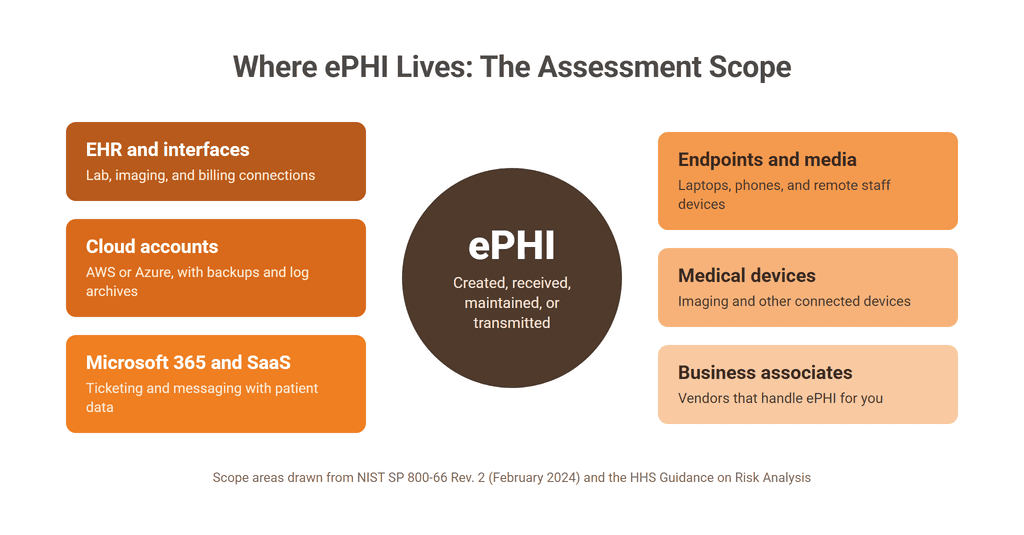
Modern estates spread ePHI well past the electronic health record (EHR) system. The National Institute of Standards and Technology’s (NIST) SP 800-66 Rev. 2 (February 2024) says the scope should take in remote workers, portable devices, external providers, and medical devices that store, process, or transmit ePHI. For a provider group or a health-tech business associate, check these places:
- The EHR and each interface that feeds it, including lab, imaging, and billing connections
- AWS or Azure accounts that hold ePHI, along with their backups and log archives
- Microsoft 365, ticketing, and messaging tools where staff store or paste patient data
- Laptops, phones, and removable media, including those used by remote staff
- Imaging and other medical devices connected to your network
- Business associates and other vendors that handle ePHI on your behalf
That last item is the one a clinic-by-clinic inventory tends to miss. HHS’s guidance asks directly whether “vendors or consultants create, receive, maintain or transmit e-PHI,” so connect the assessment to your vendor risk management records from the start.
The system list you build here also serves the rest of your information security compliance program. SOC 2 auditors and customer questionnaires ask for much of the same inventory.
The Elements OCR Expects to See in a Risk Analysis
OCR expects nine elements, whichever method you use. Its Guidance on Risk Analysis, last reviewed in August 2026, describes “several elements a risk analysis must incorporate, regardless of the method employed.”
| Element | What HHS expects | Evidence that proves it (example) |
|---|---|---|
| Scope | All ePHI, in every medium and location | Scope statement naming sites, systems, and vendors |
| Data collection | Where ePHI is stored, received, maintained, or transmitted | Asset inventory and ePHI flow map |
| Threats and vulnerabilities | Reasonably anticipated threats and vulnerabilities, documented | Threat list, scan results, and penetration test reports |
| Current security measures | Measures in place, configured and used properly | Entra ID multi-factor authentication (MFA) report and endpoint detection and response (EDR) coverage export |
| Likelihood | An estimate for each threat and vulnerability pair | Written scale and a rating per pair |
| Impact | Potential impact, qualitative, quantitative, or both | Rating per pair with its business reason |
| Level of risk | A level per pair, plus corrective actions | Risk register with levels and actions |
| Documentation | Written down, in no required format | Signed, versioned report |
| Periodic review | Updates as needed, with no fixed frequency | Review log with each trigger and date |
⏳ The row that ages fastest is current security measures. HHS asks whether safeguards are “configured and used properly,” and a screenshot from last spring can’t answer that.
Gathering those exports by hand each year leaves you with a snapshot. Compliance automation platforms such as UnderDefense MAXI Compliance AI connect to the systems already running, collect that evidence automatically, and generate the risk analysis for your team to review.
Search for a security risk assessment HIPAA template and you’ll find plenty of spreadsheets. A HIPAA risk assessment template or a HIPAA risk assessment checklist can organize the work, and each still has to end with these nine elements on paper.
HHS is plain about the limit: “there is no single method or ‘best practice’ that guarantees compliance with the Security Rule.” An assessment with ratings and no inventory can’t show that it looked everywhere, and an inventory with no ratings can’t show that anyone weighed the risks.
How to Run a HIPAA Security Risk Assessment in Eight Steps
Run the eight steps below in roughly this order, starting from the inventory. They combine the HHS elements with the seven-step process in NIST SP 800-66 Rev. 2, and add the risk management plan as its own step.
That eighth step is there because the Security Rule requires risk management, and OCR’s corrective action plans require the plan in writing. NIST notes that its steps “are not prescriptive in the order that they should be conducted,” so adapt them to your estate.
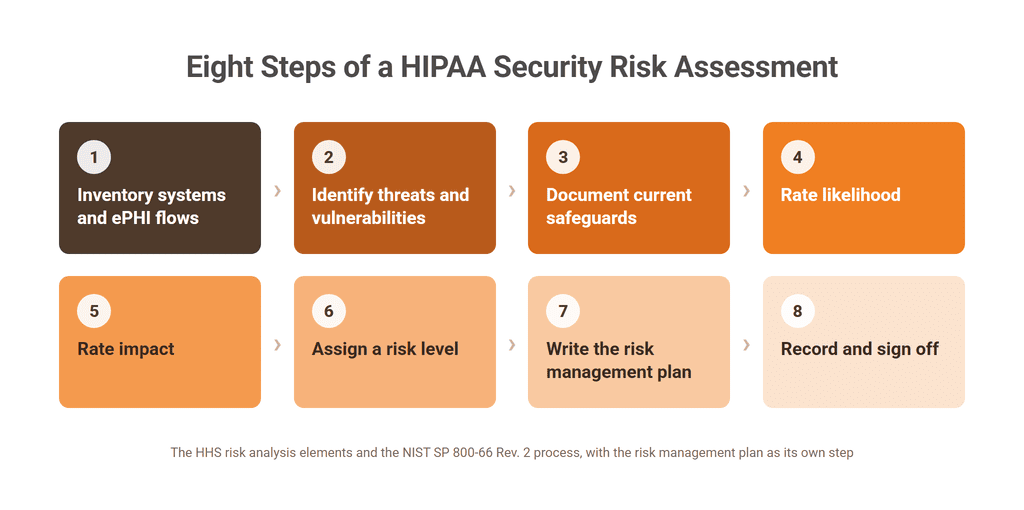
Step 1: Inventory Systems and ePHI Flows
List every system in scope, then trace how ePHI moves between them. NIST asks you to record where ePHI is generated, “where and how it enters the organization,” where it moves, where it’s stored, and where it leaves.
Note each system’s owner, any business associate involved, and whether ePHI is encrypted in storage and in transit. Draft from lists that already exist: Entra ID’s application list, AWS or Azure account inventories, your EDR’s device list, and the EHR’s interface list. Then ask clinic managers what those lists leave out.
Step 2: Identify Threats and Vulnerabilities
For each system, record the threats you can reasonably anticipate and the weaknesses they could exploit. HHS groups threats as natural, human, and environmental, and NIST tells you to consider “phishing, ransomware, or insider threat.”
Questionnaires record what people believe about a system, so back them with vulnerability scan results and penetration test findings for the systems holding the most ePHI. The output is a list of pairs, such as phishing against Entra ID accounts with weak MFA, or ransomware on an unpatched imaging server.
Step 3: Document Current Safeguards
For each pair, write down what already reduces the risk and whether it works as configured. Read the answer from the system: Entra ID’s MFA report, CrowdStrike or SentinelOne sensor coverage, AWS Config or Azure Policy results, backup job logs, and the EHR’s audit log settings.
Record the date and source of every reading. Note the exceptions as well, because a control that covers most endpoints and misses the imaging workstations is a finding in its own right.
Include the safeguards that live outside IT, such as who can approve access at each clinic, how departing staff lose access, and how workforce training is tracked. These come from interviews and records, so name the person you spoke to and the document you reviewed.
Step 4: Rate Likelihood
Estimate how likely each threat is to exploit each vulnerability, given the safeguards you found. HHS asks for “documentation of all threat and vulnerability combinations with associated likelihood estimates.”
Define the scale before anyone scores, and write down what each level means. Two reviewers should then reach the same rating. Base each rating on Step 3’s evidence and your own incident history.
Step 5: Rate Impact
Rate what happens to the confidentiality, integrity, and availability of ePHI if the pair occurs. HHS lets you use “either a qualitative or quantitative method or a combination of the two.”
For a provider group, weigh EHR downtime at the clinics, the volume of records exposed, and the effect on patient care. A health-tech business associate should also weigh the customers affected and the contract terms a breach would trigger.
Rate the pair by its effect on the organization, and leave the safeguards to the likelihood rating. That way one control isn’t counted twice. NIST adds that a business impact analysis makes this step easier.
Step 6: Assign a Risk Level
Combine the two ratings with a matrix so every pair gets a level. The example method below reproduces Table I-2 of NIST SP 800-30 Rev. 1 (September 2012); read the likelihood in the first column and the impact across the top.
| Likelihood / Impact | Very Low | Low | Moderate | High | Very High |
|---|---|---|---|---|---|
| Very High | Very Low | Low | Moderate | High | Very High |
| High | Very Low | Low | Moderate | High | Very High |
| Moderate | Very Low | Low | Moderate | Moderate | High |
| Low | Very Low | Low | Low | Low | Moderate |
| Very Low | Very Low | Very Low | Very Low | Low | Low |
A phishing pair rated High for likelihood and Moderate for impact lands at Moderate, which sets its place in the plan’s order of work.
You can use a different matrix: NIST says so, and HHS mentions averaging the two ratings as another option. Changes in level reflect changes in risk only when you keep the same matrix from one review to the next.
Step 7: Write the Risk Management Plan With Owners and Dates
Turn the levels into work. For each risk above the level you accept, record the corrective action, one named owner, a target date, and the level you expect afterward. Risks you accept need a written reason and a named approver.
Set the accepted level before you read the results, and have an executive agree to it, so nobody adjusts it to fit the findings. Review progress on a set schedule, and record when each action closes and what proves it.
If you already run integrated risk management, keep the plan in that register so compliance and security work from one list.
Step 8: Record and Sign Off
Finish with a report that someone outside the project could follow. HHS says the Security Rule “does not require a specific format,” so choose one that links each rating to its evidence, and include the scope, the scale definitions, and the plan.
NIST suggests sharing results with leadership, whose review “can be crucial to the organization’s ongoing risk management.” Have your security official and an executive sponsor sign and date it.
SRA Tool, NIST SP 800-66, or an Outside Assessor: Choosing a Method
Choose by the size of your estate and by who will have to defend the result. HHS doesn’t favor one approach, and the methods work well in combination.
The table compares four ways to run it. The SRA Tool’s audience and limits come from its own page, and the rest is this article’s view.
| Method | Who it fits (this article’s view) | What it produces | Its limits |
|---|---|---|---|
| SRA Tool v3.7 | Medium and small providers, per its page | Guided questionnaire with saved reports | May not suit larger organizations, per its page |
| NIST SP 800-66 Rev. 2 | Teams building their own documented process | A method and sample matrices you adapt | No software; your team does the work |
| Outside assessor | Teams wanting independent scope and method | A written assessment under contract | A point-in-time result unless repeated |
| Compliance automation platform | Estates with connected cloud, identity, and endpoint tools | Current evidence and tracked gaps; MAXI Compliance AI also generates the risk analysis for your team to review | Your team still reviews ratings and makes the decisions |
The HIPAA risk assessment tool from the Office of the National Coordinator for Health IT (ONC) is the natural starting point for a small practice. Its page, last updated September 18, 2026, says “The target audience of this tool is medium and small providers,” and it “may not be appropriate for larger organizations.”
The disclaimer adds, “Use of this tool is neither required by nor guarantees compliance.” The tool’s output supports your analysis, and the analysis is still yours to defend.
For fit, a group of a few hundred staff with one EHR and few cloud accounts can start with the SRA Tool and add scanning. Several sites, multiple EHR instances, or a business associate’s multi-cloud estate call for a NIST-based process that your team owns.
At that scale, add an outside assessor if you want an independent view or lack the internal hours. UnderDefense’s HIPAA compliance consulting team can run the steps above with yours, and the decisions on risk stay with you.
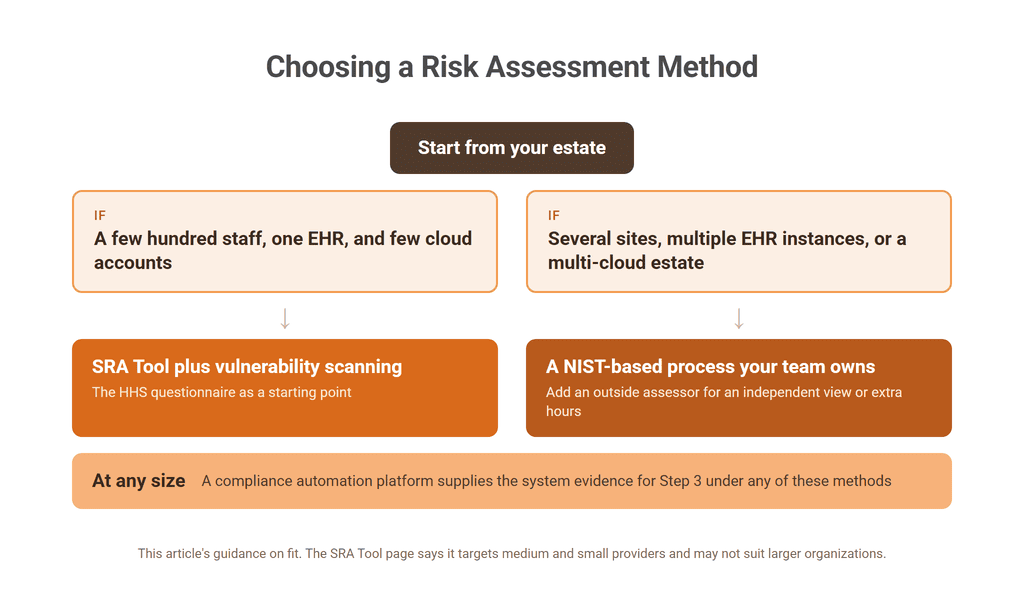
A compliance automation platform can supply the system evidence for Step 3 under any of these methods, at any of these sizes. Whichever you choose, ask how the method will produce all nine elements before you commit to it.
Score your HIPAA readiness from the tools you already run
How UnderDefense MAXI Compliance AI Runs the Assessment From Live Security Data
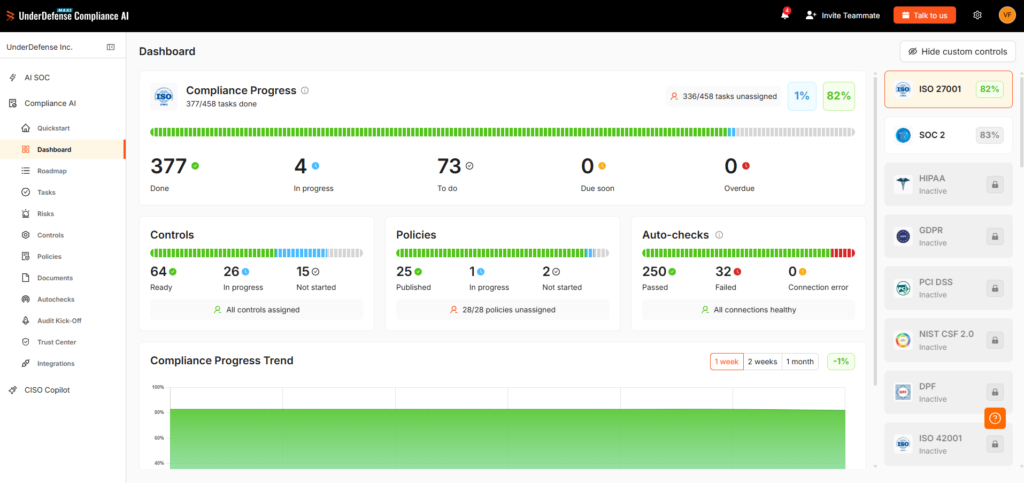
MAXI Compliance AI generates your HIPAA security risk analysis with the threats listed, scores each gap, gives every fix an owner, and keeps the safeguard evidence behind it current from the tools you connect. So the analysis you sign still matches your systems when OCR or an auditor asks for it months later. UnderDefense publishes this article and sells the platform in this walkthrough.
UnderDefense is rated 5.0 out of 5 from 83 reviews on G2 as of November 2026.
Five stages line up with the steps above:
- Connect the tools you already run: Microsoft Entra ID and Microsoft 365, AWS, and Azure are among 250+ integrations, and tools without a native connector join through MCP (Model Context Protocol).
- Generate the risk analysis. MAXI Compliance AI generates your HIPAA security risk analysis with the threats listed and scores your gaps. Your team reviews likelihood and impact, decides which risks to accept, and signs.
- Work the “Compliance Roadmap, generated directly from your Gap Assessment,” which shows “control progress and responsible colleagues.” Your risk management plan’s owners live here.
- Track your business associate agreements and run the incident and breach-notification workflow in the same place.
- Share the evidence: your auditor works with the evidence and reports in the platform, with the access you grant.
Your team doesn’t run these stages alone. Every paid package includes 24, 48, or 90 hours a year with UnderDefense compliance consultants, depending on the package, and the Audit Kick-Off screen matches you with a partner audit firm within one business day.
Custom policies and security awareness training come with the Essential package, and a custom incident response plan with Certified. Your organization still owns the analysis and signs the result, and you can try the evidence steps on your own systems on the Free tier before choosing a package.
Helpware, a global business process outsourcing (BPO) company running SOC 2 and ISO 27001 across 8 countries on the platform, reports “2× faster audit readiness” and that it “kept the same compliance team while the business doubled,” according to its case study.
Under 45 CFR 164.308(a)(6), your assessment should also find proof that incidents get identified and answered. For organizations that also run the UnderDefense Agentic AI SOC, one system on the same data, those response records sit beside the safeguard evidence.
Not sure your risk analysis covers every system? Ask an expert
What OCR Required After the April 2026 Ransomware Settlements
OCR asked each entity to prove the analysis it had failed to produce, then to show the work under monitoring. The April 23, 2026 release covers four entities and ransomware breaches affecting more than 427,000 people, reported between 2020 and 2021.
The smallest of those breaches affected 9,316 people and the largest 244,813, so the finding reached a single employer’s health plan as well as an imaging network. Size didn’t change what OCR asked for.
The four paid $1,165,000 in total, from $225,000 to $375,000 each, and the payment closed only the investigation. Each also accepted 2 years of corrective action under OCR monitoring, which keeps the analysis in front of a regulator long after the payment.
Two documents show what OCR wants to see. The release lists the steps OCR recommends to every regulated entity, and each settlement’s corrective action plan sets binding obligations. The table maps both to the steps above, using the release and the Regional Women’s Health Group plan, signed in August 2025.
| What OCR asked for | Source | Where it lands in the steps |
|---|---|---|
| Identify how ePHI enters, flows through, and leaves | Release | Step 1 |
| Complete inventory of equipment, systems, and applications | Plan | Step 1 |
| Vulnerability scans and penetration testing in the analysis | Plan | Step 2 |
| Audit controls and regular review of system activity | Release | Step 3 |
| Authentication, and encryption of ePHI when appropriate | Release | Step 3 |
| Role-specific workforce HIPAA training | Release | Step 3 |
| Risk management plan with a process and timeline | Plan | Step 7 |
| Annual risk analysis during the plan’s term | Plan | Next section |
| A process for evaluating environmental and operational changes | Plan | Next section |
🔍 The plan’s timing shows where OCR looks first.
Regional Women’s Health Group had to submit the “scope and methodology” of its analysis within 30 calendar days of the effective date, and the plan has HHS rule on that method before it sees any results. So if you can’t hand over a one-page statement of your scope and method today, start with that page.
The plan’s required policies also go beyond the analysis, covering information system activity review, security incident procedures, and breach notification. Your assessment should confirm that those exist and that staff use them, including a data breach response plan that names who does what.
Keeping the Assessment Current Between Annual Reviews
Treat the annual review as a checkpoint, and re-assess whenever the environment changes. HHS says “The Security Rule does not specify how frequently to perform risk analysis,” and notes that some organizations work annually or as needed.
The Regional Women’s Health Group plan required an annual analysis during its term. The Rule’s documentation provision, 45 CFR 164.316(b)(2)(iii), in force as of November 2026, still requires updates “in response to environmental or operational changes.”
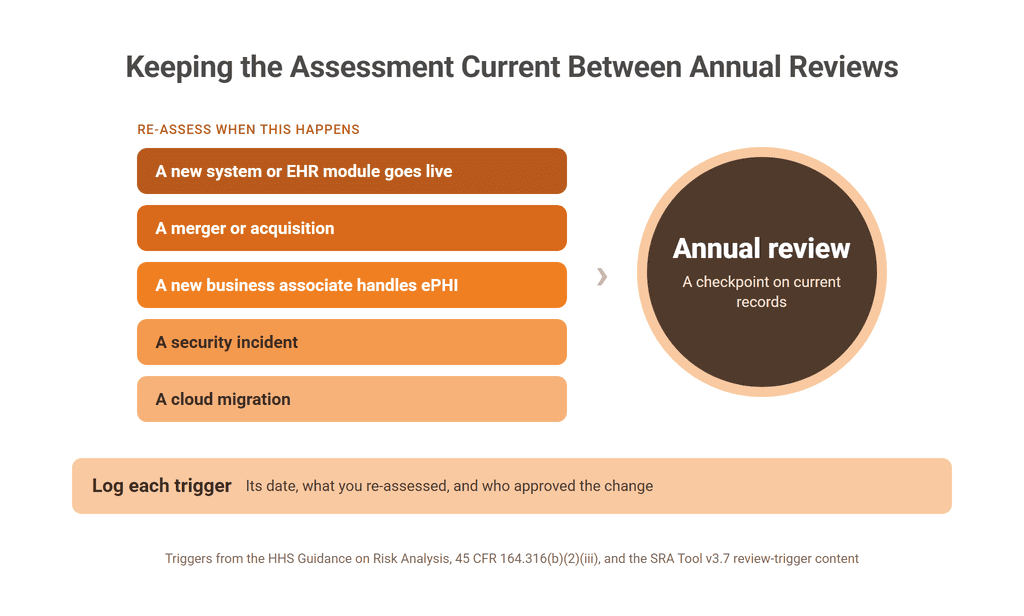
The SRA Tool’s version 3.7 added “Potential review triggers for when to update security assessments.” These five events are the common ones, and each has its own re-assessment:
- After a new system or EHR module goes live, repeat Steps 1 to 3 for it and rate its pairs.
- After a merger or acquisition, add each new site and its systems to the inventory.
- When a new business associate starts handling ePHI, add its flows and record its safeguards.
- After a security incident, re-rate the pair it exploited and have your incident response team feed its findings into Step 3.
- After a cloud migration, rebuild the inventory for the new accounts and re-check logging and encryption.
📝 Log each trigger with its date, what you re-assessed, and who approved the change. That log turns the next annual review into a check on current records, and it answers OCR’s periodic-review element directly. When the review comes due, start from what your tools show this week.
Run a gap assessment before you open last year’s spreadsheet
- See which HIPAA safeguards your connected tools already prove
- Get 24, 48, or 90 consulting hours a year, by package
- Keep a register of your business associate agreements
Frequently Asked Questions
Is the HHS SRA Tool enough for a HIPAA risk assessment?
It can start the work for medium and small providers, and it needs support. NIST SP 800-66 Rev. 2 notes that the tool “cannot identify technical vulnerabilities,” so pair it with vulnerability scanning. Version 3.7 itself reminds users that the survey alone may not identify all risks.
Who should perform the HIPAA security risk assessment?
The Security Rule leaves that to the organization and names no required role. Your security official, required under 45 CFR 164.308(a)(2), usually owns it, with input from IT, compliance, and clinical operations. An outside firm can run the steps, and the decisions on risk stay with you.
What is the difference between a HIPAA risk analysis and a risk assessment?
Risk analysis is the Security Rule’s term for the required assessment of threats and vulnerabilities to ePHI. NIST SP 800-66 Rev. 2 uses risk assessment for “the process by which a regulated entity can determine the level of risk to ePHI.” In practice, the assessment produces the analysis OCR asks to see.
Does the risk assessment have to cover business associates?
Yes, in two ways: your analysis covers ePHI that business associates handle for you, and a business associate must also run its own, because 45 CFR 164.308(a)(1)(ii)(A) applies to ePHI “held by the covered entity or business associate.” Consociate Health, a third-party administrator, was one of the four settlements OCR announced in April 2026.
What documentation should you keep from the assessment?
Keep the scope statement, asset inventory, ePHI flow map, threat and vulnerability pairs, ratings, risk levels, risk management plan, and sign-offs. 45 CFR 164.316(b)(2)(i) requires retention for 6 years from creation or from the date last in effect, whichever is later, so a 2026 assessment stays on file until at least 2032.