Q1: What should you do in the first 60 minutes of a ransomware attack?
The worst ransomware calls I take never start with a question. They start with a CISO saying, “It’s already spreading, and my IT lead just told me our runbook is a Google Doc nobody has opened since the last audit.” The encryption is moving. The team is frozen. And the clock that matters most has already started.
Here is the honest part. The first hour decides almost everything that follows. Get it right, and you contain the blast radius. Get it wrong, and you spend the next three weeks rebuilding from backups you hope still work.
If this is happening right now, stop reading. Our incident response team is available 24/7 and can be on your environment within minutes
The 60-minute answer, in plain terms
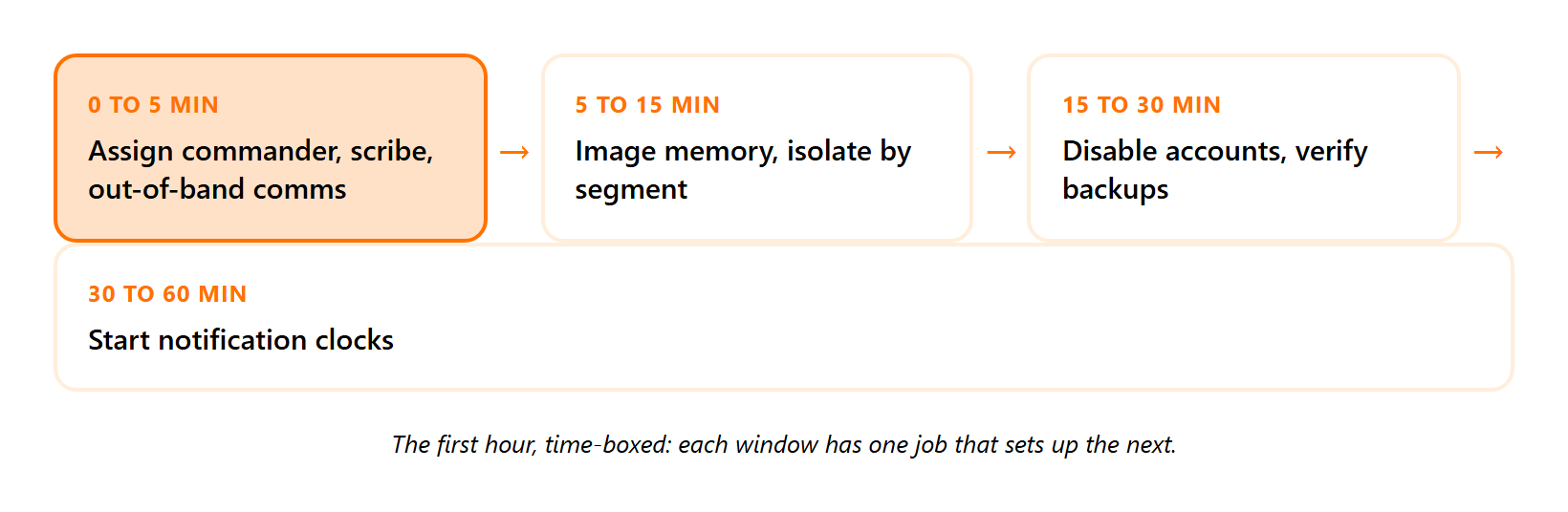
In the first 60 minutes, assign a scribe and an incident commander, then move all communication off the compromised email to an out-of-band channel. Capture a forensic memory image before you touch anything. Isolate by network segment instead of host by host. Disable compromised accounts, revoke active sessions, confirm backups are disconnected and not empty, and start the SEC and GDPR notification clocks. Do not reboot or power off.
Minutes 0 to 5: name the roles, kill the comms channel
First, name an incident commander and a scribe. The commander makes calls. The scribe writes down every action, owner, and open door.
I have walked into incident bridges with twelve smart people and zero scribes. When nobody records what got fixed, you cannot prove anything was fixed. That gap quietly undoes the whole response later.
Then assume your email is compromised and move to Signal, a phone bridge, or any channel the attacker cannot read. If your team needs a structured incident response capability before the next attack, this is where that preparation pays off.
Minutes 5 to 15: preserve, then isolate by segment
Capture a memory image of affected machines before you change their state. CISA’s #StopRansomware Guide is blunt about this. Preserve volatile evidence like system memory before it disappears.
Then isolate at the network segment, rather than one host at a time. Encryption moves faster than your hands do, so segment-level isolation stops the spread while host-by-host loses the race.
| Window | Owner action | Expected outcome |
|---|---|---|
| 0 to 5 min | Assign commander and scribe, switch to out-of-band comms | Clear authority, attacker-free coordination |
| 5 to 15 min | Memory image, then isolate by segment | Evidence preserved, lateral spread halted |
| 15 to 30 min | Disable accounts, revoke sessions, check backups | Attacker locked out, recovery path confirmed |
| 30 to 60 min | Start notification clocks, brief stakeholders | Legal exposure managed, containment holds |
Minutes 15 to 30: lock accounts and verify backups are real
Disable compromised accounts and manually revoke their sessions. Many systems, including email, do not auto-revoke a session when you change a password, so a missed revocation leaves the attacker logged in.
Then confirm backups are disconnected and actually contain data. Attackers run vssadmin.exe Delete Shadows /ALL /Quiet to wipe local restore points, so verify your offline copies survived.
Minutes 30 to 60: start the clock, hold the line
Start your regulatory notification timers now. NIST’s incident handling guidance treats containment, eradication, and recovery as one connected phase, so a clean containment sets up everything downstream.
This is the runbook we run for clients through our MDR service, with response measured in seconds and containment in minutes. It is a large part of why our MDR clients have stayed at zero ransomware cases for six years, as our Black Basta stopped in minutes case shows.
Q2: Why does ransomware containment fail in the first hour?
Most teams believe containment fails because they bought the wrong tool. After two decades doing this work, my read is the opposite. The tool is rarely the problem. The first unrehearsed hour is.
Containment fails for four boring, repeatable reasons. Someone reboots a machine and destroys the keys in memory, the team isolates host by host while encryption outruns them, they coordinate over an email the attacker already owns, or they discover their “successful” backups were copying an empty folder for months. None of that is a product gap.
“Just reformat it” is the honest advice
Here is a take the category avoids. Antivirus vendors claim they can cleanly remove malware. Most experienced responders have been burned by trusting that.
My standard advice is to reformat. It is the only way to be certain the attacker’s persistence is gone. Cleaning in place feels faster, but it leaves you guessing, and guessing is how reinfection happens a week later. A disciplined ransomware response plan bakes this rule in from the start.
The backup that was backing up nothing
I will own a humbling one. Years ago, I configured a backup job that dutifully copied an empty directory every single day, instead of the directory where everything actually lived. The green “success” light glowed for ages.
The lesson stuck. You can watch a backup report “success” weekly for years and still have nothing to restore. So we run periodic manual reviews of the variety of data actually arriving, rather than just the status code. A green light is not proof.
The fix is rehearsal, not more software
The structural trade-off with alert-forwarding services is simple. They hand you the alert, then leave you alone in the hour that matters. At UnderDefense, we fine-tune and pressure-test backups and detections during onboarding using Ransomware Monkey and Caldera, so the runbook fails over under real fire rather than on paper. If you want to stress-test your own coverage, our penetration testing teams probe the exact gaps attackers use.
Q3: Should you shut down or reboot computers hit by ransomware?
No. Do not power off or reboot a machine hit by ransomware.
Why the reboot reflex backfires
Encryption keys and attacker artifacts often live only in volatile memory, which is the data a machine holds in RAM while powered on. A reboot wipes that memory. In some ransomware strains, a restart also triggers a fresh round of encryption.
So the instinct to “turn it off and on again” destroys the evidence you need and can deepen the damage at the same time.
What to do instead
Isolate the machine while it stays powered on. Pull it off Wi-Fi, unplug the Ethernet, and drop the VPN, so it cannot talk to anything.
Then capture a memory image first. CISA’s guidance is explicit that when you cannot mitigate immediately, you should take a system image and memory capture to preserve evidence. A managed SOC service makes this capture routine rather than improvised.
The narrow exception
It does depend, and I will not pretend otherwise. If mass encryption is actively running and you have no fast way to isolate the segment, pulling power may be the lesser loss.
There is a deeper judgment call here too. Containment can tip off a sophisticated adversary, who may turn destructive or drop new backdoors. Against that kind of attacker, the right move is sometimes a scorched-earth rebuild rather than a careful surgical pause. A 24/7 responder makes this call in seconds. At UnderDefense, our UnderDefense Agentic AI SOC isolates hosts through EDR and locks cloud accounts through IAM without waiting for an on-call engineer to wake up.
Q4: Is ransomware a data-confidentiality problem or an availability problem?
Everyone treats ransomware as a confidentiality problem. The first questions are always about stolen data and leaked passwords. The standard read gets this backwards.
Ransomware is, first and foremost, an availability attack. The business-ending issue is rarely that an attacker can read your data. It is that you cannot reach it.
The hospital makes it obvious
Picture a hospital that loses access to its patient records. It cannot operate, schedule surgeries, or safely dose medication, whether or not a single file ever leaked.
The fact that an attacker cannot read your encrypted data is cold comfort when you cannot read it either. What should worry you most is data protection and preservation, because deletion, rather than disclosure, is the true catastrophe. Healthcare teams feel this first, which is why our MDR for Healthcare work centers on uptime.
Where the money goes versus where the risk lives
Here is the misalignment. Most programs pour roughly 90% of their effort into confidentiality controls, then leave availability and recovery thinly covered. That is the exact gap ransomware drives a truck through.
Compliance reinforces the habit. A framework like SOC 2 or HIPAA is a ticket to do business that regulators and customers demand. It proves you cleared a bar, and clearing that bar is worthwhile, though it does not by itself guarantee you can restore operations on a bad morning. Sound compliance services and the right virtual CISO guidance keep that bar honest.
Reallocate toward getting back up
So shift weight toward tested recovery. Immutable backups, restoration drills, and a response capability that brings systems back, rather than one that only sounds an alarm.
This is why we built UnderDefense around the “R” in response. We contain and restore, rather than only detecting and reporting, because availability is the outcome that keeps a mid-market business alive through the worst week of its year.
Q5: Should you pay the ransom?
I used to give a clean answer to this. “Never pay.” Two decades and a lot of 2 a.m. bridge calls later, my read is more honest. This question lives in gray territory.
The gray-area answer
Paying is rarely a clean yes or no. Sometimes the real choice is pay or go out of business. For a hospital that cannot reach patient records, paying may keep people alive that night.
Payment still carries hard costs. It funds the next attack, never guarantees a working decryptor, and can trigger sanctions risk if the group sits on a blocked list. A practiced incident response team helps you weigh these calmly rather than in panic.
The negotiation is just margin on a purchase
Here is a detail that reframes the whole thing. In one case I watched, the attackers were asked what a fair price was. Their answer was telling.
They said their “cost of goods” was about $5,000, because that is what it cost them to buy access to the company in the first place. The ransom was simply margin on that purchase. Most ransomware now runs on a franchise model, where a lead group rents out the malware and takes a percentage off the top, as our Medusa ransomware lessons piece details.
Weigh these before you decide
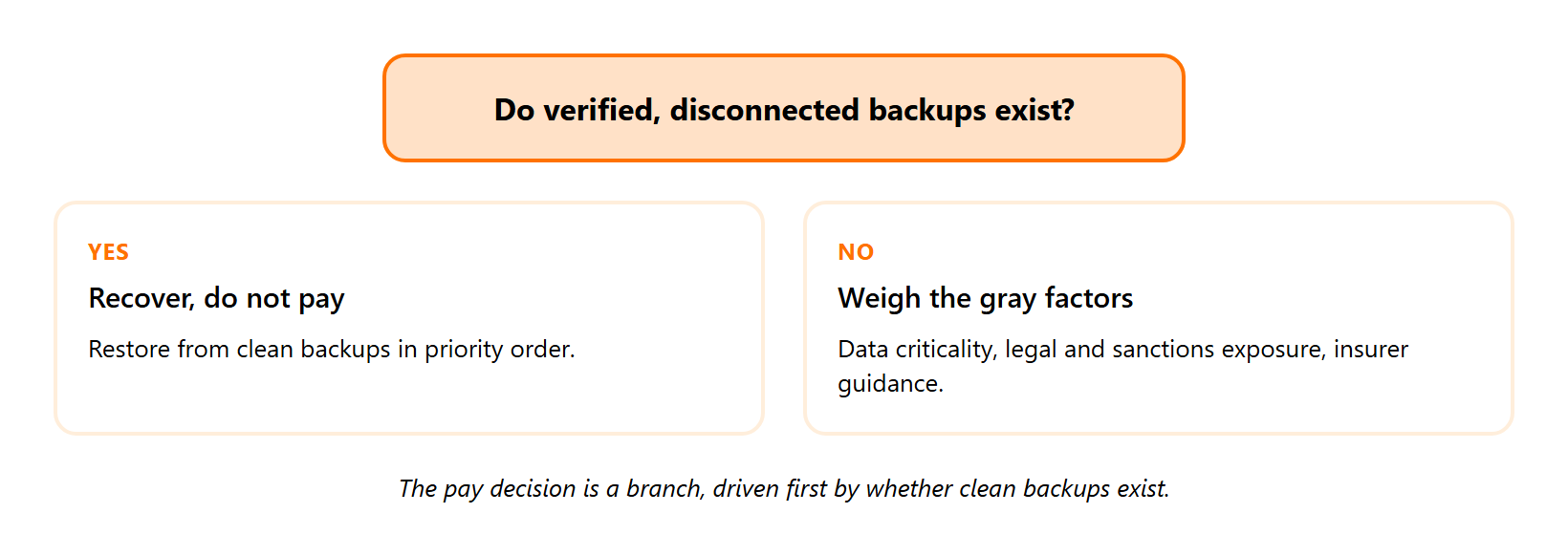
A defensible decision rests on a few concrete factors:
- Clean backups. Do verified, disconnected backups exist that you have actually restored from?
- Availability criticality. How fast does this data need to come back before the business stops?
- Legal exposure. Could the recipient be sanctioned? The U.S. Treasury’s OFAC has warned that facilitating payments to sanctioned actors may violate the law.
- Insurer guidance. Your cyber policy often dictates who negotiates and whether payment voids coverage.
Prevention is how you avoid the room entirely
The best position is never reaching this decision. That comes from tested, disconnected backups and containment fast enough to stop encryption before it locks the business.
At UnderDefense, that prevention focus is why our managed clients have stayed at zero ransomware cases for six years. You skip the pay-or-die conversation when the attack never reaches full encryption, as our $67M ransomware rescue case shows.
“Working with UnderDefense gives me peace of mind. They act like a true extension of our team.”
Verified User in Information Technology UnderDefense G2 Verified Review
Q6: How fast do attackers move, and why is your team always too late?
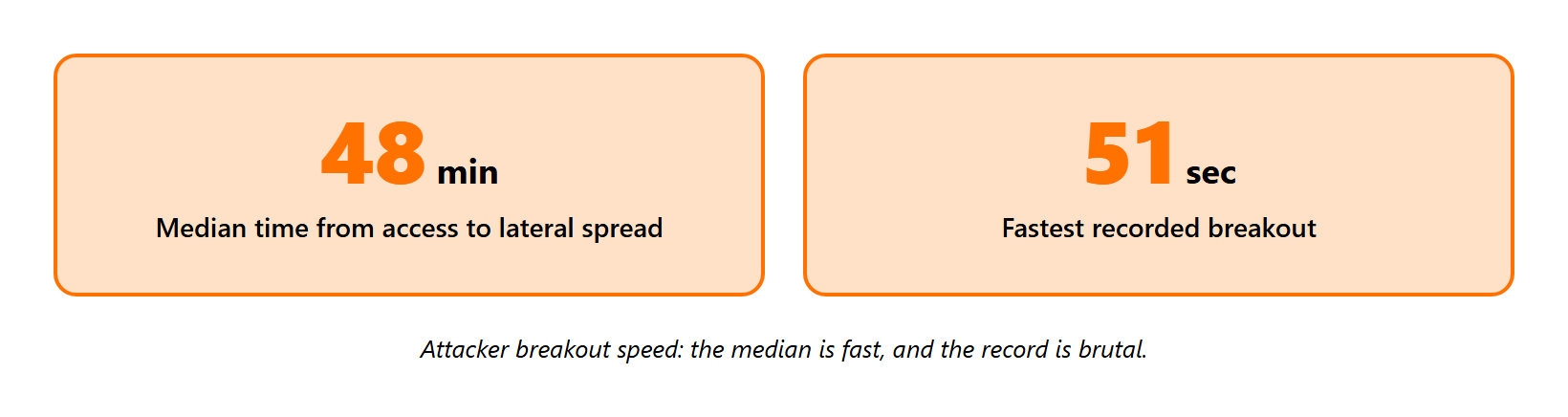
Attackers move from first access to lateral spread in a median of about 48 minutes, and the fastest recorded breakout sits near 51 seconds, per CrowdStrike’s 2025 Global Threat Report. Your team is usually late because the alert that announces it is buried under thousands of others, rather than because the tooling failed.
The 2 a.m. analyst is the real story
Picture a single Tier-1 analyst at 2 a.m., staring at a screen with thousands of daily alerts. That overload has a name, alert fatigue, the dulling that sets in when every notification looks equally urgent.
The signal that mattered was sitting right there. It just looked like the other 4,000. A managed SOC service exists to keep that one signal from drowning.
I have seen this in the worst way. We once found a financially significant server that kept blue-screening at 2 a.m. during its antivirus scan, and it was so old it had never been enrolled in monitoring at all. Our MDR service would have caught that gap on day one.
The brute-force signal that gets missed
There are early signals that scream “active attack” if someone reads them. One is Windows Event ID 4625 paired with status code 0xC000006A.
That combination means the username is correct but the password is wrong. It points to an active password-guessing attempt, rather than a user who simply forgot their login. Tuning a managed SIEM to surface this pattern turns noise into a real lead.
Closing the gap takes tuning plus humans
The fix is faster triage and tuned detections, with people verifying context at a scale one team cannot reach alone. There is a quiet craft to this work, and a mentor of mine called it “finding the zen in copying,” the repetitive tuning that keeps detections sharp.
This is where our UnderDefense Agentic AI SOC earns its place, with a 2-minute Alert-to-Triage and a 15-minute escalation for critical incidents. It also pings your users over Slack, Teams, and SMS to confirm context that competitors simply escalate back to you.
“They feel like part of our internal team and respond fast when it matters.”
Verified User, Information Technology and Services UnderDefense G2 Verified Review
Q7: Will AI run your ransomware response for you?
No, AI will not run your ransomware response on its own. I say that as someone building agentic AI every day.
What AI genuinely does well
AI is real and useful for two jobs. It enriches alerts at scale, and it triggers fast automated containment, like isolating a host the moment file-change patterns spike.
This is not theory. A 2024 patent describes a ransomware security operations center that uses honey folders, which are decoy files, and watches their information entropy, a measure of how randomly data is changing, to trigger backups the instant encryption starts. The direction of travel toward autonomous containment is patented and real, and our SOC automation guide explains where it fits.
Why a human still pulls the plug
Here is the limit the category keeps glossing over. Generative AI is a dice roll. It produces a confident answer with no way to prove that answer is correct.
So AI belongs as an assistant that augments analysts, while a human makes the irreversible call. A related point, chasing attacker attribution is mostly a distraction for defenders. Knowing a nation-state did it changes nothing about which door you close, so AI should hunt behaviors and techniques (the hard-to-change top of the “Pyramid of Pain”) rather than names. Our view on this lives in does AI kill or save your SOC.
At UnderDefense, our Agentic AI SOC works with your users to validate suspicious behavior, and every investigative step it takes is observable and auditable. Less black box, more blue team. The structural risk with AI-heavy alternatives is over-reliance on automation that escalates uncertainty straight back to you, a pattern we flag in our AI SOC red flags guide.
See how the UnderDefense Agentic AI SOC investigates, triages, and resolves real alerts.
Q8: How do you eradicate the threat and recover safely without reinfecting?
Eradicate before you recover. Rushing restoration over a still-compromised network is how teams get encrypted a second time in the same week.
Find the persistence, then rebuild clean
First, hunt for persistence, which is how attackers keep a foothold, including scheduled tasks, new admin accounts, and hidden backdoors. Assume they planted more than one.
Then rebuild affected systems from clean media instead of cleaning them in place. Reformatting is the only way to be 100% certain the attacker’s tools are gone, and I have watched “cleaned” machines reinfect because someone trusted a scan. A documented ransomware response plan makes this the default, rather than a debate.
Restore in order, rotate every credential
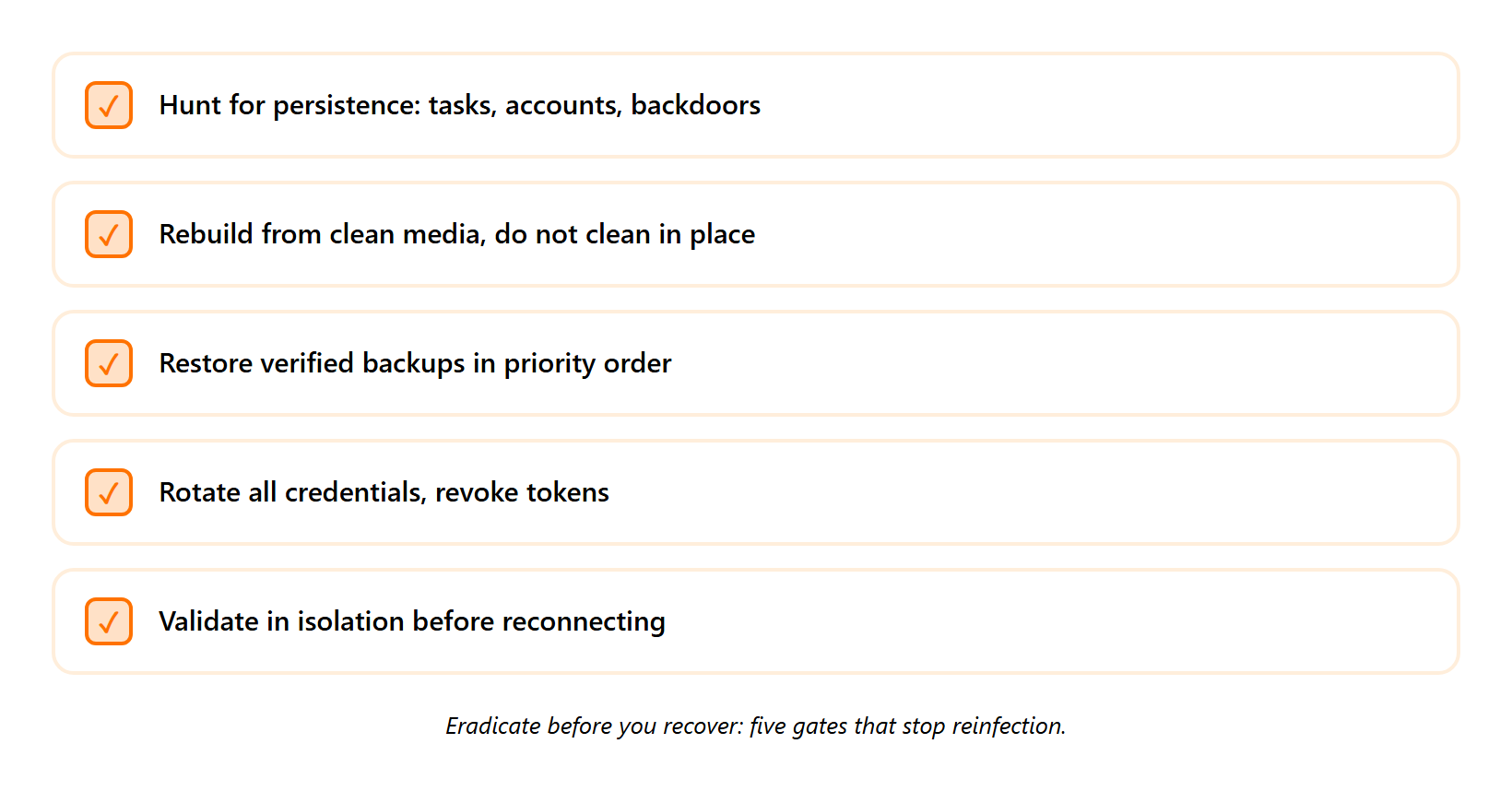
Recovery has a sequence, and the order protects you:
- Restore from verified backups, in priority order, starting with the systems the business needs most.
- Rotate all credentials and revoke tokens, because the attacker likely harvested passwords and active sessions.
- Stand systems up in an isolated segment first, sealed off from production until proven clean.
NIST’s incident handling guidance treats eradication and recovery as one connected phase for exactly this reason, since you cannot safely restore what you have not fully cleaned. Our IR plan template sequences these gates for you.
Validate before you reconnect, and skip revenge
The final gate is validation. Watch each restored system in isolation, confirm it behaves normally, and only then reconnect it to production.
There is honest debate on tempo here. Against a sophisticated adversary who planted secondary backdoors, careful surgical containment can tip them off, so sometimes a scorched-earth rebuild of the environment is the safer path. One thing carries no debate, do not hack back. Misattribution means you might hit a hospital instead of the attacker, and it can violate federal computer-fraud law under 18 U.S.C. 1030.
At UnderDefense, we stay with clients from containment through full business restoration, with an active incident response team working the recovery rather than handing over a report and walking away.
Q9: What does a ransomware response plan that actually holds up look like?
A CISO once told me, on a 2 a.m. bridge call, that her playbooks “were all on paper and would never seamlessly fail over.” She was right. The police had taken control of the breached email, her IT lead had gone quiet, and the document everyone trusted did nothing.
A plan is a rehearsed capability
A plan that holds up is a rehearsed capability, rather than a document that lives in a shared drive. The honest test is whether it fails over under live fire, and most paper playbooks never do.
It needs five things working together. Each one is something you can stand up this quarter, and our IR plan template gives you a head start.
- A named incident commander and scribe, assigned before the breach, rather than chosen in the panic.
- Out-of-band communications, ready in advance, because the attacker may control your email.
- Immutable backups you have actually restored from, where “immutable” means copies that cannot be altered or deleted.
- Detection rules tested against simulated ransomware, so you know they fire before a real attack proves they do not.
- A 24/7 team that responds in minutes, since attacks rarely respect business hours.
This maps cleanly to the Respond function in NIST’s Cybersecurity Framework 2.0, released in 2024, which treats response as a practiced operational capability across the incident life cycle. A documented ransomware response plan turns that framework into daily practice.
Build, buy a monitor, or get an ally
Think of perimeter-only defense as an M&M, hard shell outside and soft center within. Once an attacker is past the shell, you need depth and a team that responds inside the network. That reality shapes the build-versus-buy choice, which our outsourced vs in-house SOC guide breaks down in detail.
| Approach | What you get | The structural trade-off |
|---|---|---|
| 1.1 Agentic AI SOC plus human ally (UnderDefense) | Detection on the stack you own, plus analysts who contain and talk to your users | Requires trusting an external team you onboard deliberately |
| 1.2 Build an internal 24/7 SOC | Full control and context | Hiring, retention, and burnout for round-the-clock coverage are heavy and costly |
| 1.3 Monitoring-only tool or alert-forwarding service | Alerts and dashboards | Hands you the alert, then leaves the response to you in the hour that matters |
✅ At UnderDefense, our Agentic AI SOC is vendor-agnostic, so you keep the SIEM and EDR you already own. ✅ Our analysts contain threats and message your users directly to confirm context through our MDR service. ❌ Vendor-locked tools force you onto a proprietary stack you cannot fully own. ✅ We respond with that context attached, rather than escalating uncertainty back to you. ❌ Opaque, black-box pricing and investigation leave you guessing what you bought, which is why we publish clear MDR pricing.
“They feel like part of our internal team and respond fast when it matters.”
Verified User, Information Technology and Services UnderDefense G2 Verified Review
The question I am sitting with
Here is what I keep turning over. The next 18 to 24 months will push more containment into autonomous agents, and the teams that win will be the ones who rehearsed the handoff between machine speed and human judgment before they needed it. Our conversational SOCs piece explores where that goes next.
So I will leave you with a real question, rather than a pitch. When did your team last run a live ransomware drill against your actual stack, and did the plan fail over? If you want to walk through what your first hour looks like today, our incident response team is ready to talk.
Not sure your containment steps are complete? Get an IR expert on the line to validate every step while the clock is running
1. What should we do in the first 60 minutes of a ransomware attack?
The first hour decides almost everything that follows. Here is the sequence we run on live bridge calls.
- Minutes 0 to 5: Assign an incident commander and a scribe, then move all communication off the compromised email to an out-of-band channel like Signal or a phone bridge.
- Minutes 5 to 15: Capture a forensic memory image before you touch anything, then isolate by network segment rather than host by host, because encryption moves faster than your hands do.
- Minutes 15 to 30: Disable compromised accounts, manually revoke active sessions, and confirm backups are disconnected and not empty.
- Minutes 30 to 60: Start the regulatory notification clocks and brief stakeholders.
The one rule that overrides instinct is simple: do not reboot or power off. This is exactly the runbook we operate for clients through our MDR service, with response measured in seconds and containment in minutes. If you want to pressure-test your own first hour, our incident response team can walk through it with you.
2. Should we shut down or reboot computers hit by ransomware?
No. Do not power off or reboot a machine hit by ransomware. The reboot reflex backfires for two reasons.
First, encryption keys and attacker artifacts often live only in volatile memory, the data a machine holds in RAM while powered on, and a reboot wipes that evidence. Second, some ransomware strains trigger a fresh round of encryption on restart, so the instinct to turn it off and on again deepens the damage.
What to do instead:
- Isolate the machine while it stays powered on by pulling Wi-Fi, unplugging Ethernet, and dropping the VPN.
- Capture a memory image first, which preserves the evidence you will need.
There is a narrow exception. If mass encryption is actively running and you have no fast way to isolate the segment, pulling power may be the lesser loss. A 24/7 responder makes this call in seconds, which is why our SOC service treats memory capture as routine rather than improvised.
3. Is ransomware a data confidentiality problem or an availability problem?
Ransomware is, first and foremost, an availability attack. Everyone treats it as a confidentiality problem, asking about stolen data and leaked passwords, but the standard read gets this backwards.
The business-ending issue is rarely that an attacker can read your data. It is that you cannot reach it. Picture a hospital that loses access to patient records: it cannot operate, schedule surgeries, or safely dose medication, whether or not a single file ever leaked.
Here is the misalignment we see constantly. Most programs pour roughly 90% of their effort into confidentiality controls, then leave availability and recovery thinly covered. That is the exact gap ransomware drives a truck through.
So shift weight toward tested recovery: immutable backups, restoration drills, and a response capability that brings systems back rather than only sounding an alarm. Healthcare teams feel this first, which is why our MDR for Healthcare work centers on uptime above all else.
4. Why does ransomware containment fail in the first hour?
Containment rarely fails because of the wrong tool. It fails for four boring, repeatable process reasons.
- Someone reboots a machine and destroys the keys in memory.
- The team isolates host by host while encryption outruns them.
- They coordinate over an email the attacker already controls.
- They discover their successful backups were copying an empty folder for months.
I will own a humbling one. Years ago, I configured a backup job that dutifully copied an empty directory every day, and the green success light glowed for ages. You can watch a backup report success weekly for years and still have nothing to restore.
The fix is rehearsal, not more software. We fine-tune and pressure-test backups and detections during onboarding using simulated ransomware, so the runbook fails over under real fire. If you want to stress-test the exact gaps attackers exploit, our penetration testing teams probe them directly, and our ransomware response plan guide bakes these rules in.
5. Should we pay the ransom?
Paying is rarely a clean yes or no. This question lives in gray territory, and sometimes the real choice is pay or go out of business.
Payment carries hard costs: it funds the next attack, never guarantees a working decryptor, and can trigger sanctions risk if the group sits on a blocked list. A defensible decision rests on a few concrete factors.
- Clean backups: Do verified, disconnected backups exist that you have actually restored from?
- Availability criticality: How fast must this data return before the business stops?
- Legal exposure: Could the recipient be sanctioned?
- Insurer guidance: Your cyber policy often dictates who negotiates.
The best position is never reaching this decision. That comes from tested, disconnected backups and containment fast enough to stop encryption before it locks the business, as our documented ransomware rescue case shows.
6. How fast do ransomware attackers move, and why is our team always too late?
Attackers move from first access to lateral spread in a median of about 48 minutes, and the fastest recorded breakout sits near 51 seconds. Your team is usually late because the alert that announces it is buried under thousands of others, rather than because the tooling failed.
Picture a single Tier-1 analyst at 2 a.m., staring at thousands of daily alerts. That overload has a name, alert fatigue, the dulling that sets in when every notification looks equally urgent. The signal that mattered was sitting right there; it just looked like the other 4,000.
The fix is faster triage and tuned detections, with people verifying context at a scale one team cannot reach alone. This is where our Agentic AI SOC earns its place, with a 2-minute Alert-to-Triage and a 15-minute escalation for critical incidents. It also pings your users over Slack, Teams, and SMS to confirm context that competitors simply escalate back to you. Tuning a managed SIEM to surface real signals turns noise into a lead.
7. Will AI run our ransomware response for us?
No, AI will not run your ransomware response on its own, and I say that as someone building agentic AI every day. AI is real and useful for two jobs: it enriches alerts at scale, and it triggers fast automated containment, like isolating a host the moment file-change patterns spike.
Here is the limit the category keeps glossing over. Generative AI is a dice roll; it produces a confident answer with no way to prove that answer is correct. So AI belongs as an assistant that augments analysts, while a human makes the irreversible call.
At UnderDefense, our agentic AI SOC works with your users to validate suspicious behavior, and every investigative step it takes is observable and auditable. Less black box, more blue team. The structural risk with AI-heavy alternatives is over-reliance on automation that escalates uncertainty straight back to you, a pattern we flag in our AI SOC red flags guide.
8. What does a ransomware response plan that actually holds up look like?
A plan that holds up is a rehearsed capability, rather than a document that lives in a shared drive. The honest test is whether it fails over under live fire, and most paper playbooks never do. It needs five things working together.
- A named incident commander and scribe, assigned before the breach.
- Out-of-band communications ready in advance, because the attacker may control your email.
- Immutable backups you have actually restored from.
- Detection rules tested against simulated ransomware.
- A 24/7 team that responds in minutes.
This maps cleanly to the Respond function in the NIST Cybersecurity Framework, which treats response as a practiced operational capability. The real question is whether you build an internal 24/7 SOC, buy a monitoring-only tool, or get an ally that contains and recovers. Our outsourced vs in-house SOC guide breaks down that trade-off, and our IR plan template gives you a head start.