TL;DR
- Score every AI SOC vendor on one 30-item requirements checklist across seven weighted categories.
- Ask for MITRE ATT&CK coverage by tactic and sub-technique, because a single percentage hides gaps.
- Demand Level 3 automation for triage and phishing, with human approval written in for high-impact actions.
- Count the requirements a vendor sells as add-ons: six or more means an incomplete base price.
- Put KPI targets, escalation SLAs, audit rights, and exit terms into the contract before you sign.
Table of contents
- AI SOC Requirements Checklist: 30 Requirements to Score Every Vendor
- Why Do You Need an AI SOC Features Checklist in 2026, and What Happens Without One?
- What Detection Depth Should You Demand, and How Do You Measure MITRE ATT&CK Coverage Beyond a Percentage?
- What Automation Tiers Should an AI SOC Offer, and Where Must Humans Stay in the Loop?
- How Should AI SOC Threat Hunting Work, and When Do You Still Need Human Analysts?
- What Analyst Support Model Should Your AI SOC Include: Copilot, Virtual Analyst, or Concierge?
- Can You Trust the AI’s Decisions? Explainability, Case Management, and Evidence Timelines
- How Broad Should AI SOC Integration Be, and What’s the Real Cost of Vendor Lock-In?
- The Standard vs. Premium Trap: Which AI SOC Features Belong in the Base Price?
- What KPIs, SLAs, and Contractual Language Should You Demand From Your AI SOC Provider?
- Which SOC Providers Actually Deliver These Features? See the Full Comparison
- UnderDefense Score: The Checklist Applied to UnderDefense
- Frequently Asked Questions
Every AI SOC vendor now promises autonomous detection, full MITRE coverage, and less work for your team, and in a demo the pitches sound alike. This page turns the AI SOC features worth paying for into one AI SOC requirements checklist, so you can score each vendor on the same 30 requirements before you sign. The sections after the checklist explain each category and the proof to ask for.
AI SOC Requirements Checklist: 30 Requirements to Score Every Vendor
Score every vendor against the same 30 requirements, grouped into seven categories, each with its own weight. Give each requirement 0 points when it is absent, 1 when it is basic, 2 when it is strong, and 3 when the vendor shows it working on your data in a demo or proof-of-value.
| Category (weight) | # | Requirement | Proof to ask for | Red flag |
|---|---|---|---|---|
| Detection depth (20%) | 1 | ATT&CK coverage by tactic and sub-technique | Breakdown for your top five tactics | Sold as a premium tier |
| 2 | Behavioral and correlation-based detection | Detections that span EDR, identity, and cloud | Single-source rules only | |
| 3 | Confidence score on every alert | High, medium, or low label with evidence | Binary alert or no alert | |
| 4 | Live ATT&CK coverage heat map | Dashboard view you can open anytime | Static PDF at quarterly review | |
| 5 | Custom rules written as detection as code | Rules built for a stack like yours | Professional services fee | |
| 6 | Drift monitoring and false-positive feedback loop | Coverage regression tracked over time | Manual annual review | |
| Automation tiers (15%) | 7 | Agentic triage and enrichment of every alert | Alert-to-triage time on your own data | Enrichment only, humans triage |
| 8 | Phishing investigation with auto-quarantine | Header, link, and attachment analysis shown | Manual mailbox review | |
| 9 | Containment playbooks with policy guardrails | Endpoint isolation run live in the demo | “Advanced response” tier | |
| 10 | Written list of actions needing human approval | Contract clause naming each action | Buried in terms of service | |
| Threat hunting model (15%) | 11 | Continuous, hypothesis-driven hunting | Last month’s hunts and their cadence | Quarterly hunts or premium tier |
| 12 | AI hypotheses validated by human analysts | Who validates a finding, and how | Fully autonomous hunting only | |
| 13 | Hunts mapped to your industry and stack | Threat intel sources behind each hunt | Generic scheduled queries | |
| 14 | Documented, ATT&CK-mapped hunting reports | A sample report from a real hunt | Reports cost extra | |
| Analyst support model (15%) | 15 | 24/7/365 human escalation path | Who answers a critical alert at 2 a.m. | Business hours only |
| 16 | Direct senior-analyst access | Named analysts and their experience | “Concierge” premium | |
| 17 | ChatOps verification with affected users | A Slack, Teams, or email check | Tickets only | |
| 18 | Organizational context on VIPs and assets | How analysts learn your environment | Same triage for every alert | |
| 19 | Response authority through full remediation | Containment and remediation steps they execute | “Incident response” add-on | |
| Explainability and auditability (10%) | 20 | Plain-language reasoning for every escalated alert | Signals, technique, confidence, and action | Black-box verdicts |
| 21 | Immutable log of AI and analyst decisions | Overrides recorded with the analyst’s rationale | Logs on request only | |
| 22 | One case timeline per incident | Every enrichment and action, timestamped | Evidence spread across tools | |
| 23 | Audit evidence generated automatically | Sample evidence for SOC 2 or ISO 27001 | Separate compliance module | |
| Integration breadth (15%) | 24 | Works with your SIEM, EDR, identity, and cloud | Live connectors for the tools you run | SIEM migration required |
| 25 | Core and custom connectors in the base price | Connector list attached to the quote | Per-connector pricing | |
| 26 | Your data stays in your data lake | Where data lives and how it exports | Proprietary data store | |
| KPIs and SLAs (10%) | 27 | Published escalation SLA for critical alerts | The SLA clause and recent results | “Contact sales” |
| 28 | KPI targets written into the contract | MTTD, MTTR, and false-positive targets | Aspirational targets only | |
| 29 | Monthly KPI and quarterly ATT&CK reporting | Sample reports with trended data | Reporting costs extra | |
| 30 | Penalties, right to audit, and exit terms | Clauses in the draft agreement | No exit or portability terms |
To total the score, average the requirement scores in each category, divide by 3, and multiply by the category weight. The seven results add up to a score out of 100: a vendor at 80 or above is ready for a proof-of-value, 55 to 79 means significant gaps to negotiate, and below 55 you are buying a monitoring tool.
Count the requirements the vendor sells as an add-on, a premium tier, or professional services. Zero to two means a transparent provider worth validating in a proof-of-value. Three to five means hidden costs, so calculate your total cost of ownership before signing. Six or more means the base price buys an incomplete platform.
How to Avoid the Usual Scoring Traps
Security leaders often fall into one of three traps: picking the brand with the biggest marketing budget, choosing whoever lists the most integrations on paper, or relying on analyst quadrant placement. None of them measures whether a provider can detect, verify, and contain threats faster than your team can alone, and the weights in the checklist put that question first.
Top Features to Look for in AI SOC Tools
If you have time to check only a few items in a first demo, the top features to look for in AI SOC tools are the ones a slide can’t fake:
- ATT&CK coverage reported by tactic and sub-technique, with a confidence score on every alert (requirements 1 and 3).
- Agentic triage of every alert at Level 3, with human approval written in for high-impact actions (7 and 10).
- Continuous hunting with human analysts validating each finding (11 and 12).
- Analysts on shift 24/7 who verify alerts with the affected user and can contain the threat (15, 17, and 19).
- One auditable case timeline for every incident (20 to 22).
- Integration with the SIEM, EDR, and identity tools you already run (24).
- Escalation SLAs and exit terms in the contract (27 and 30).
A vendor that scores 3 on each of these in a proof-of-value has earned a full evaluation against the other requirements.
Why Do You Need an AI SOC Features Checklist in 2026, and What Happens Without One?
Without a shared checklist, every vendor evaluation turns into a comparison of marketing decks. The four sections below explain why that happens and what the checklist changes.
The 2026 AI SOC Market Is Flooded, and Most Buyers Are Flying Blind
Every vendor in the AI SOC space claims “autonomous detection,” “full MITRE coverage,” and “zero analyst burden.” Many CISOs and IT Directors know what happens next: they buy the pitch, deploy the platform, and six months later their team is still triaging the same noise, from a shinier dashboard. Without a structured checklist, you compare marketing decks, pay premium prices for what should be standard features, and get locked into an ecosystem before you see the trade-offs.
The options look identical on the surface, and that is the real problem. In demos, every provider says the right things. In operation, many traditional managed detection providers sell detection volume over detection depth: dashboards full of alerts without contextual investigation, MITRE “coverage” claims without sub-technique mapping, and “automation” that still leaves triage and investigation to your team. The result is the same noise with AI branding on top.
The Real Question Has Changed
Organizations often onboard an AI SOC vendor expecting operational relief, and a quarter later the alerts keep flowing and the context is still missing. The “AI” turns out to be pattern matching on top of a legacy correlation engine, and your team remains the manual correlation layer between your EDR, your SIEM, your identity provider, and your cloud console.
In 2026, every vendor clears the bar of detecting threats. What separates them is whether the platform can reason across your stack, hunt continuously, respond at the right automation tier, and prove coverage against ATT&CK sub-techniques. That is the difference between a checklist built for 2026 and the generic “top 10 features” lists of 2024.
The Standard vs. Premium Philosophy
The checklist rests on one principle: the capabilities many vendors charge extra for, such as threat hunting, compliance evidence, and direct analyst access, belong in the base price. The “Red flag” column marks where each one tends to become an add-on.
UnderDefense publishes this checklist and builds the UnderDefense Agentic AI SOC on the same principle. The closing scorecard applies the checklist to UnderDefense, so you can check that claim the same way you check any other vendor’s.
What This Checklist Will Help You Do
The checklist and the sections behind it help you do five things:
- Separate must-have AI SOC capabilities from upsells presented as features.
- Evaluate detection depth beyond a single MITRE percentage.
- Match each SOC task to the right automation tier, with humans in the loop where it matters.
- Score vendors on a structured framework, independent of brand recognition or integration count.
- Demand proof in the form of observable workflows, auditable decisions, and reproducible outcomes.
The goal is a framework that lets you see through vendor claims yourself, with every requirement backed by something you can watch working.
What Detection Depth Should You Demand, and How Do You Measure MITRE ATT&CK Coverage Beyond a Percentage?
This section is the detail behind requirements 1 to 6 of the checklist.
Detection Depth Is More Than Detection Count
When a vendor says “95% MITRE ATT&CK coverage,” the first question is: coverage of what, exactly? ATT&CK v20, released by MITRE in October 2026, lists 15 Enterprise tactics, 227 techniques, and 479 sub-techniques. Technique-level coverage, such as “we detect OS Credential Dumping,” is broad. Sub-technique coverage, such as detecting LSASS memory access, DCSync, and reads from the Proc Filesystem separately, each with its own confidence score, is operational.
Vendors often report technique-level numbers because they are far easier to inflate. A single broad detection rule can technically “cover” an entire technique while missing the sub-technique variants that attackers exploit in real intrusions. Detection depth means fidelity, confidence scoring, and sub-technique granularity, and a marketing-friendly percentage measures none of them.
5-Point Detection Depth Scoring Framework
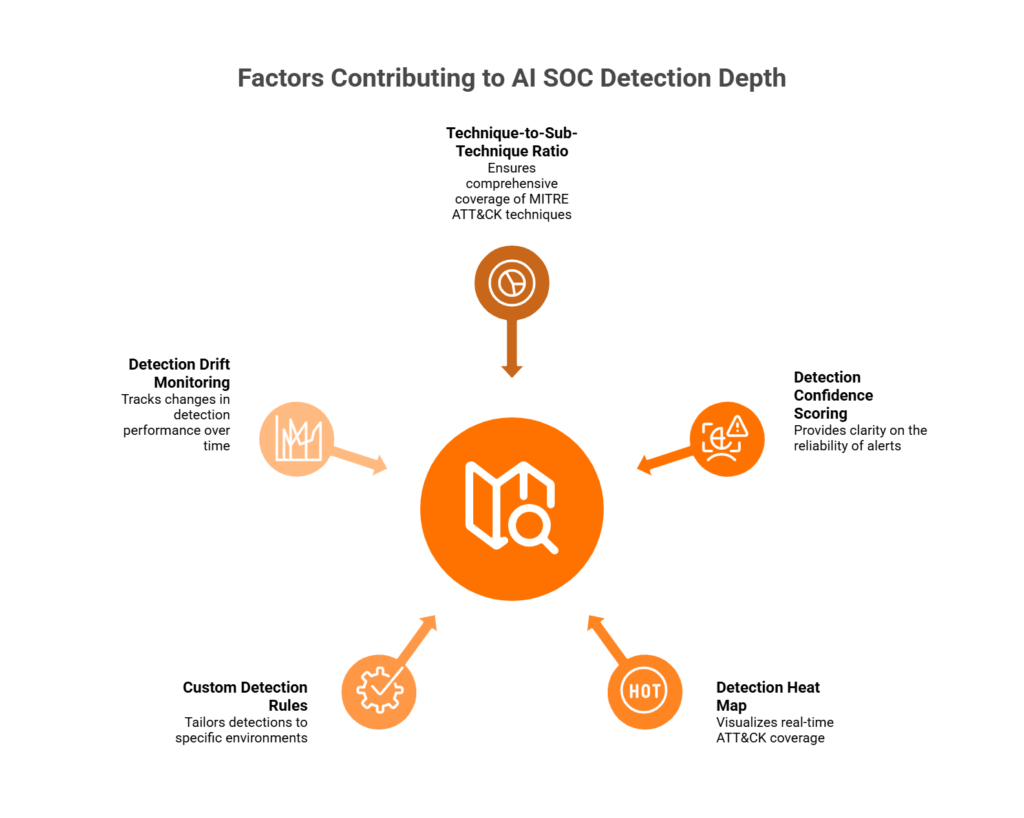
Use these five checks when you evaluate any AI SOC provider’s MITRE claims:
- Demand at least 85% technique and 60% sub-technique coverage for your top five risk tactics, typically Initial Access, Execution, Credential Access, Lateral Movement, and Stealth, which ATT&CK v19 split out of Defense Evasion. A vendor that can’t break coverage down by tactic is a red flag.
- Every alert should carry a high, medium, or low confidence label, because a detection without one is noise.
- Require a visual ATT&CK heat map that shows where detections exist and where gaps remain, so someone is accountable for what is covered.
- Ask how many custom rules the vendor has built for environments like yours, since out-of-box detections are a starting point and your applications, users, and risk patterns are your own.
- Demand drift monitoring, because coverage degrades as your environment changes, new tools arrive, and threat actors adapt, and a snapshot from onboarding day shows none of that.
Good vs. Inadequate Detection Depth
The table shows what to accept as standard and what usually signals a shallower service.
| Criteria | Demand as standard | Often charged extra |
|---|---|---|
| Sub-technique mapping | Mapped per tactic with confidence scores | “Available in premium tier” |
| Detection heat map | Real-time, accessible in the dashboard | Static PDF in a quarterly review |
| Custom detection rules | Tuned during onboarding, continuously updated | Requires a professional services engagement |
| Confidence scoring | High, medium, or low per alert, with evidence | Binary alert or no-alert output |
| Drift monitoring | Automated regression tracking | Manual annual review, if any |
A vendor that lands in the right-hand column on any row loses points on the matching checklist requirement.
How UnderDefense Simplifies This
If you can’t see which ATT&CK tactics a vendor actually covers, every coverage claim is a guess. UnderDefense reports 96% MITRE ATT&CK coverage and writes its detection logic as detection as code, so you can ask for the tactic-level breakdown in the first demo and check it against your own top five risk tactics. Expect detection tuning to your environment to take from a few weeks to a few months, as reviewers report.
What Automation Tiers Should an AI SOC Offer, and Where Must Humans Stay in the Loop?
This section is the detail behind requirements 7 to 10 of the checklist.
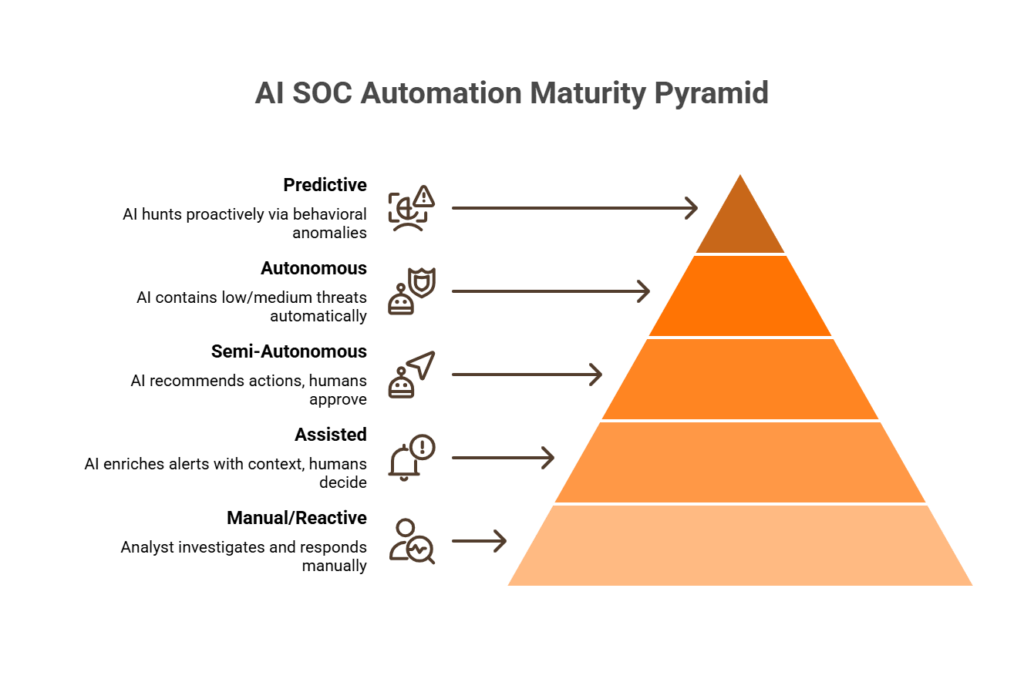
The 5-Level AI SOC Automation Maturity Model
The word “automated” in a vendor pitch means very different things depending on context. This maturity model maps the full range:
- At Level 0, manual and reactive, an analyst sees the alert, investigates it, and responds by hand, which is where many under-resourced teams work today.
- At Level 1, assisted, AI enriches alerts with threat intel, asset information, and user history, and humans still make every decision with better information.
- At Level 2, semi-autonomous, AI recommends specific actions, such as isolating an endpoint or revoking a credential, and humans approve or reject each one.
- At Level 3, autonomous, AI contains low- and medium-severity threats automatically, and humans handle high-severity incidents and edge cases that need business context.
- At Level 4, predictive, AI hunts continuously on behavioral anomalies and ATT&CK patterns, and humans govern policy and strategic exceptions.
Task-to-Tier Mapping: What to Demand in 2026
Map each SOC task to the level it should reach in 2026.
| SOC task | Target level | Notes |
|---|---|---|
| Alert triage and enrichment | Level 3 | Fully automated, with human review of exceptions |
| Phishing investigation | Level 3 | AI checks headers, links, and attachments; quarantines confirmed phish |
| Endpoint isolation | Level 2 to 3 | Policy guardrails required for production systems |
| Credential revocation | Level 2 | AI recommends, a human approves: too much business context |
| Threat hunting hypothesis | Level 2 to 3 | AI generates hypotheses; analysts validate findings |
| Compliance evidence | Level 3 to 4 | Fully automated and audit-ready |
| Incident reporting | Level 3 | AI drafts the report; an analyst reviews and publishes |
For 2026, demand at least Level 2 to 3 across all core SOC tasks. A vendor still operating at Level 0 to 1 for triage and phishing investigation is selling you a 2020 SOC in a 2026 wrapper.
Actions That Should Never Be Fully Autonomous
This is where the “fully autonomous SOC” narrative breaks down, and where you should push back on any vendor that sells zero human intervention as a feature. Four actions require human judgment every time:
- Production system shutdown needs human authorization first, because a false positive takes the business offline.
- Legal and regulatory notification involves legal, PR, and executive stakeholders, and AI cannot make that call.
- Cross-environment containment, such as isolating a network segment, affects several departments and needs an explicit human impact assessment.
- VIP account actions, such as disabling access for the C-suite or critical service accounts, need explicit sign-off with organizational context.
Define these guardrails in the contract, where they can’t stay implicit assumptions buried in terms of service. Ask each vendor which actions its system takes without human approval, and what the escalation policy is for high-impact responses. A written answer, attached to the contract, is one you can audit.
How UnderDefense Handles This
Your team needs triage off its plate without giving up the final say on actions that can take the business down. The UnderDefense Agentic AI SOC detects, investigates, and responds to threats in under 5 minutes, automating Tier 1 and Tier 2 SOC work, and UnderDefense analysts make the decisions on high-impact actions.
Before escalating, analysts confirm suspicious activity with the affected user over Slack, Microsoft Teams, email, or SMS, because asking the person involved is often the fastest way to close an alert.
How Should AI SOC Threat Hunting Work, and When Do You Still Need Human Analysts?
This section is the detail behind requirements 11 to 14 of the checklist.
Three Hunting Models, and Why Vendors Rarely Say Which One They Use
Threat hunting in 2026 splits into three distinct models, and the differences matter more than vendors admit:
- Human-led hunting starts from an analyst’s hypothesis based on threat intelligence, followed by manual investigation and documented findings, and it is deep but slow and hard to scale for a lean team.
- AI-assisted hunting generates hypotheses from behavioral anomalies and ATT&CK patterns, and human analysts investigate and validate them, which scales better and keeps contextual judgment.
- Fully autonomous hunting lets AI hunt, correlate, and escalate without human involvement, which is fast but misses context-dependent threats like insider activity and supply chain anomalies.
Many vendors claim AI hunting without naming the model, because the honest answer is often scheduled queries labeled as hunting. That is monitoring with better marketing.
Where Autonomous Hunting Falls Short
Autonomous hunting catches known patterns well, such as anomalous login times, suspicious process trees, and known C2 communication. It misses threats that require organizational context:
- An employee opens sensitive files at 2 a.m. to meet a project deadline, which looks the same as exfiltration without business context.
- A third-party vendor uses a legitimate admin tool in a way that is abnormal for your environment and normal for its role.
- A supply chain compromise behaves exactly like an authorized software update.
Automation scales the routine work, and humans handle the edge cases that need judgment and organizational knowledge. A resilient hunting program needs both.
The 2026 Standard: Hybrid Hunting
Demand three specifics from any AI SOC provider:
- Hunting runs 24/7, with continuous hypothesis generation and investigation, and a quarterly schedule fails this test.
- Every hunt follows a documented methodology with ATT&CK-mapped findings.
- Hunts target your industry, your stack, and your attack surface.
Ask for one documented hunt from last month: it shows the cadence, the method, and the ATT&CK mapping on a single page.
How UnderDefense Approaches Hunting
A hunting finding helps only when someone who knows your business decides what it means. UnderDefense lists threat hunting in its published plans, and its 24/7 analysts make the decisions on what the AI flags: when a finding needs context, an analyst asks the affected user directly over Slack or Microsoft Teams before escalating. Every investigative step stays visible and auditable, so a finding arrives with the evidence behind it.
“What we love most about UnderDefense is their proactive approach. Their experienced SOC engineers work closely with our team, providing continuous monitoring and threat detection.”
Oleksii M., G2 verified review
Whichever provider you choose, ask who validates a hunt finding before it reaches your team, and how long that takes.
What Analyst Support Model Should Your AI SOC Include: Copilot, Virtual Analyst, or Concierge?
This section is the detail behind requirements 15 to 19 of the checklist. Many security leaders pick an analyst support model by its label, when the operational reality behind it is what matters.
“AI analyst” can mean a chatbot that summarizes alerts, a virtual triage bot that auto-closes low-severity tickets, or a dedicated team that acts on your behalf 24/7. Choose wrong, and you either overpay for a glorified search bar or discover during a real incident that your “AI analyst” needs you to tell it what to do.
The Wrong Way to Choose
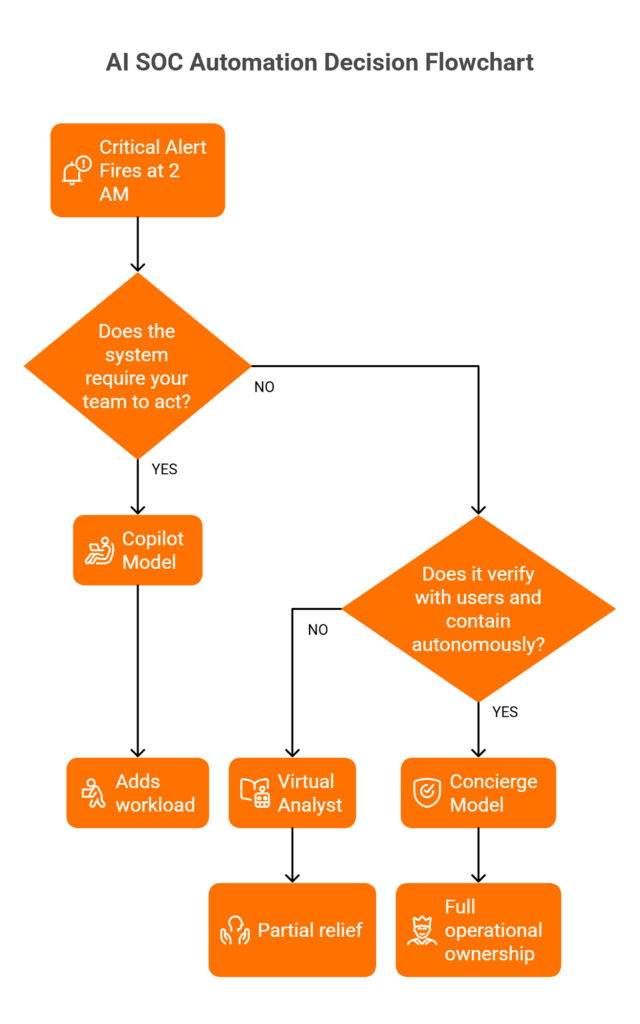
The common mistake is choosing by marketing language, such as “virtual SOC analyst” or “intelligent copilot,” without asking one critical question: when the alert fires at 2 a.m., does this model need your team to do something, or does it handle it?
A copilot that needs prompting, interpreting, and manual action adds to your workload. A concierge team that acts around the clock takes work off it.
The Right Framework: 5 Evaluation Criteria
Score each model against five criteria that separate real analyst support from repackaged dashboards:
- Autonomy asks whether the model works independently or needs your team to prompt, interpret, and act on its outputs.
- Organizational context asks whether it knows your users, VIPs, assets, and business rhythms, or treats every alert the same.
- Communication asks whether it can reach affected users directly over Slack, Teams, or email, or only opens tickets.
- Response authority asks whether it can contain threats, such as isolating endpoints or revoking credentials, or only recommends actions.
- Availability asks whether it runs 24/7/365 with humans behind it, or covers business hours with automation after hours.
Model Comparison Scorecard
The table scores the four common models against those five criteria.
| Criterion | Copilot | Virtual analyst | Hybrid staffing | Concierge |
|---|---|---|---|---|
| Autonomy | Needs prompting | Partial, follows rigid playbooks | Depends on staffing coverage | Acts independently 24/7 |
| Organizational context | Generic | No organizational awareness | Limited to onboarded knowledge | Learns VIPs, assets, and business context |
| Communication | Dashboard only | Ticket-based | Email escalation | ChatOps to users: Slack, Teams, SMS |
| Response authority | Recommends only | Basic containment | Varies by contract | Full containment and remediation |
| Availability | Business hours, typically | 24/7, automated | Gaps between shifts | 24/7/365, human plus AI |
For organizations without a 24/7 internal SOC, the concierge model scores highest, because it is the one model where the system that detects a threat can also verify it with the affected user and contain it without waking your team.
How UnderDefense Delivers the Concierge Model
When a critical alert fires at 2 a.m., you need a decision, and your team needs its sleep. An analyst from the 24/7 analyst team behind the Agentic AI SOC responds within the 20-minute SLA for critical alerts, and your team wakes up to the investigation, with senior-analyst access and an incident response team behind it if the alert turns into an incident.
“UnderDefense act as an extension of our team, so we don’t need additional resources, ensuring 24/7 protection. It also solved our problem of having separate security tools that didn’t work well together.”
Inga M., CEO, G2 verified review
The gap between “analyst support” and “concierge response” is the gap between getting an alert and getting an answer, and your AI SOC should deliver the answer.
Can You Trust the AI’s Decisions? Explainability, Case Management, and Evidence Timelines
This section is the detail behind requirements 20 to 23 of the checklist. An AI SOC that can’t explain its reasoning is a liability: an opaque system can auto-close thousands of alerts and suppress genuine threats, and nobody finds out until a post-incident review, because nobody could audit its logic. Explainability, auditability, and native case management are the governance triad that separates trustworthy AI SOC platforms from black-box alert engines.
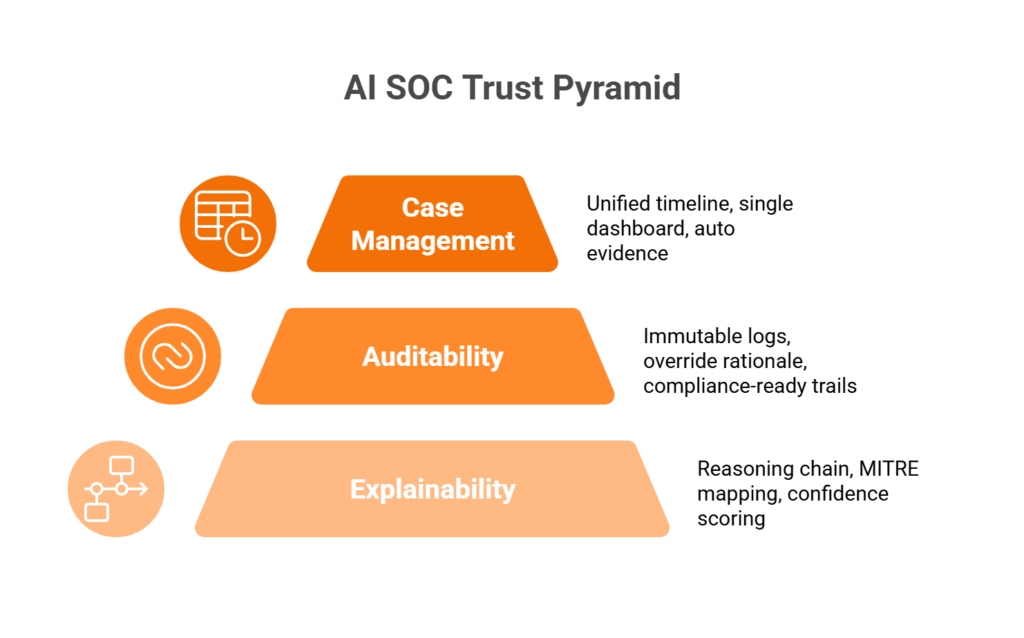
How It Works: Three Pillars of Trust
1. Explainability. The AI must show its reasoning chain for every alert. Which telemetry signals triggered the detection? Which MITRE ATT&CK technique was mapped? What is the confidence level? What action is recommended, and why? If the AI says “this is malicious” and can’t show its work, you are trusting a system you can’t verify, and neither your compliance team nor your auditors will accept that.
2. Auditability. Every decision, whether made by the AI or by a human analyst, needs an immutable log. Investigation records, analyst override decisions with their rationale, and AI reasoning trails must be available for compliance audits under SOC 2, HIPAA, and ISO 27001. When a regulator asks “why did you contain this user’s account at 3:14 a.m.?”, the answer can’t be “the AI said so.”
3. Native case management. Unified evidence timelines link every alert, enrichment step, user verification, and response action in one case view, with timestamps. When the record is scattered across your SIEM, your ticketing system, email threads, and a shared spreadsheet, incident review becomes archaeology.
What to Verify Before You Commit
Before committing to any AI SOC platform, confirm that these capabilities exist and work on your data:
- The AI gives a plain-language explanation for every escalated alert.
- The full investigation timeline sits in one dashboard, outside spreadsheets and side tools.
- Evidence packages for compliance audits are generated automatically.
- Analyst override decisions are logged with their rationale.
- Case history is searchable for patterns across incidents.
- ATT&CK technique mapping is visible on every detection.
- Confidence scoring is transparent and adjustable.
Ask the vendor to show each item on a closed incident in the demo environment, because a slide can’t prove any of them.
Why This Matters Now
When an auditor or regulator asks why an automated containment action was taken, your legal and compliance teams need the reasoning on record to defend it. Without native case management, incident review becomes a forensic dig through five different tools to reconstruct what happened. Explainability comes down to evidence trails you can hand to someone outside the SOC.
Think of it as the difference between a doctor who says “take this pill” and one who explains the diagnosis, shows the test results, and documents the treatment plan. Your AI SOC should do the latter, every time.
How UnderDefense Delivers This
If you can’t show an auditor why an account was contained at 3 a.m., the automation becomes your risk. In the UnderDefense Agentic AI SOC, every investigative step is visible and auditable, so the reasoning behind each verdict is on record when someone asks for it. A G2 reviewer describes the flow:
“When something fires, the Agentic SOC classifies it, pulls the relevant logs, maps to MITRE ATT&CK, and routes a structured verdict with reasoning before it reaches a human.”
Maksym G., Chief Technology Officer, company of 51 to 1,000 employees, G2 review, August 2026
The same reviewer is candid about the start: “we underestimated how much calibration time we’d need upfront.” Plan the first weeks of a rollout for tuning.
“It offers clear and actionable insights, allowing us to react promptly to any security issue. The platform’s interface is intuitive, making it easy even for non-techies to navigate. It’s clear they’ve focused on making a tool that gets straight to the point without unnecessary fluff.”
Darina I., Customer Success Manager, G2 verified review
Ask every vendor on your shortlist to walk you through one closed case from first signal to final action.
How Broad Should AI SOC Integration Be, and What’s the Real Cost of Vendor Lock-In?
This section is the detail behind requirements 24 to 26 of the checklist. Picture this: you signed with an AI SOC provider 18 months ago, and it promised full-stack visibility. You were forced to migrate your SIEM, your CrowdStrike EDR feeds flow, your Okta identity data “is on the roadmap,” and your AWS GuardDuty integration needs a professional services project. You pay for full coverage and see part of your environment.
Gaps like these push many organizations to switch security providers.
Root Cause: Vendor Lock-In Creates Visibility Gaps
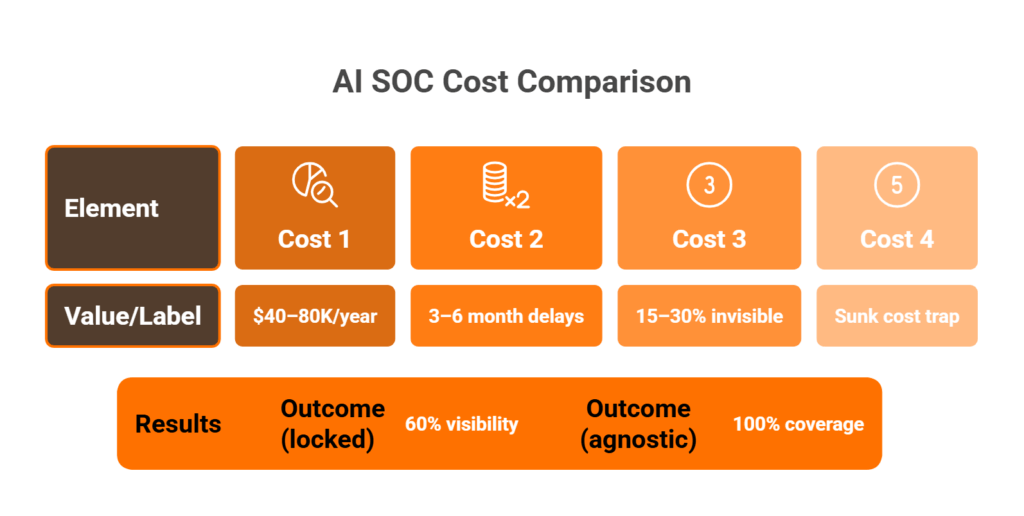
Lock-in usually comes from a provider’s choices: it integrates readily with its own ecosystem and slowly with everything else. When an AI SOC vendor requires you to replace your SIEM or mandates its own agent stack, every tool outside that ecosystem becomes a blind spot, and the hidden costs compound fast:
- Professional services fees for “custom” integrations that should be standard.
- Months of waiting for support for a new tool to reach the vendor’s roadmap.
- Parts of your environment that stay invisible because integrations lag behind your actual stack.
- A sunk-cost trap, where every year adds detection rules and business logic you lose if you leave.
The Ideal State: Vendor-Agnostic by Design
Integration breadth in a modern AI SOC should cover at least these categories and tools.
| Category | Tools that must be supported |
|---|---|
| SIEM | Splunk, Elastic, Microsoft Sentinel, QRadar |
| EDR | CrowdStrike, SentinelOne, Microsoft Defender, Carbon Black |
| IAM | Okta, Microsoft Entra ID, Duo, JumpCloud |
| Cloud | AWS (GuardDuty, CloudTrail), GCP, Azure |
| ITSM | ServiceNow, Jira |
| Collaboration | Slack, Microsoft Teams (for ChatOps response) |
Treat out-of-the-box integrations for every tool in the table, no per-connector fees, and integration included in the base price as non-negotiable requirements.
How UnderDefense Solves This
Your team keeps the Splunk, CrowdStrike, and Okta it already runs, and nobody migrates a SIEM to get coverage. The Agentic AI SOC works on top of your existing stack through 250+ integrations, in SaaS, hybrid, on-premises, or air-gapped deployments, and your security data stays in the SIEM you already own.
“The platform itself is straightforward – it pulls in data from all our existing security tools, so we didn’t have to rip and replace anything.”
Verified user in marketing and advertising, G2 verified review
Before any demo, send each vendor the list of tools you run, so the demo shows your connectors working.
The Standard vs. Premium Trap: Which AI SOC Features Belong in the Base Price?
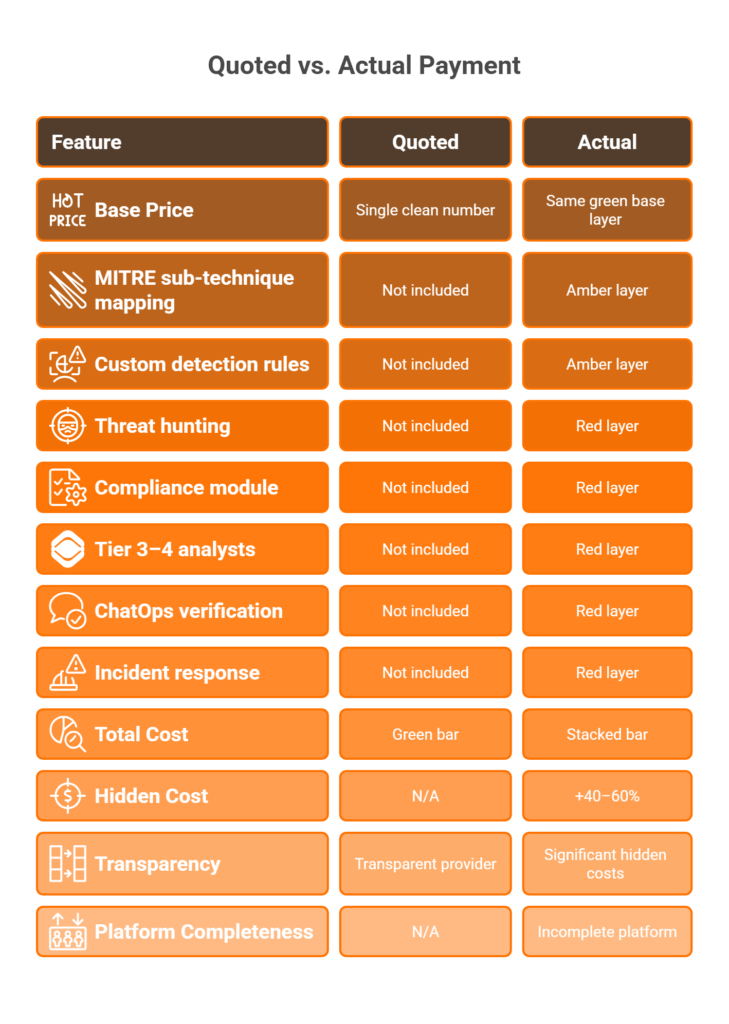
The “Red flag” column of the checklist marks the requirements that vendors often move into premium tiers, add-on modules, and professional services invoices. The difference between a transparent provider and an upsell machine often shows up after you have signed the contract, so count the add-ons before you sign.
Pricing UnderDefense Against the Checklist
A quote that grows after signature breaks the budget you defended to finance. UnderDefense publishes a starting price of $11 per device per month for 24/7 monitoring and quotes its paid tiers, so ask for that quote, like every other vendor’s, with each of the 30 requirements marked as included or extra.
“UnderDefense is surprisingly affordable considering the level of protection we get. Their proactive threat hunting and rapid response have saved us from incidents that could have been incredibly costly.”
Verified user in program development, G2 verified review
“It’s reassuring to know they’re always watching for threats, and it doesn’t cost a fortune. They catch and stop problems quickly, which is a huge relief.”
Serhii B., CISO, G2 verified review
If a vendor charges extra for six or more requirements on the checklist, you are buying a monitoring dashboard with an expensive upgrade path. The right AI SOC puts what your team needs into a price you can predict, because a surprise invoice during an active incident is the last thing anyone needs.
What KPIs, SLAs, and Contractual Language Should You Demand From Your AI SOC Provider?
This section is the detail behind requirements 27 to 30 of the checklist. If you can’t measure it, you can’t hold anyone accountable for it, and security teams often sign AI SOC contracts, then find six months later that they can’t tell whether detection got faster, false positives fell, or coverage improved.
7 Essential AI SOC KPIs and the Targets to Set in 2026
Anchor every AI SOC contract to measurable KPIs. The targets below are the ones this checklist recommends writing into the agreement.
| KPI | Target to write into the contract | Why it matters |
|---|---|---|
| Mean time to detect (MTTD) | 10 minutes or less for critical threats | Longer means noisy or undertrained detection |
| Mean time to respond (MTTR) | 30 minutes or less for critical incidents | Counts containment, beyond acknowledgment |
| False positive rate | 5% or less of escalated alerts | Each false escalation costs your team time |
| Alert-to-incident ratio | At least 50:1 compression | Thousands of signals become a handful of incidents |
| MITRE ATT&CK coverage | At least 85% techniques, 60% sub-techniques | Anything lower leaves blind spots |
| Analyst alert reduction | At least 95% | Your team’s time goes to strategy |
| Hunting cadence | Continuous | A hunt every 90 days is theater |
One more metric is worth tracking: analyst hours saved per month. It ties directly to ROI and gives your CFO a number to compare against the cost of full-time hires.
SLA Clause Recommendations for Your MSA
KPIs matter only if your contract enforces them. Put these clauses in your Master Service Agreement:
- MTTR commitments with financial penalties for misses, written into the agreement itself.
- Coverage uptime of at least 99.9% for 24/7 monitoring, because downtime in a SOC is exposure.
- Defined escalation paths that say who gets notified, within what time, and through which channel.
- Quarterly ATT&CK reporting that shows which techniques are covered and which are missing.
- Right-to-audit clauses that let your team verify detection logic, alert workflows, and analyst actions.
- Monthly reporting of analyst hours saved, with trended data.
- Exit protections that guarantee data portability, commit to a transition timeline, and remove lock-in penalties.
Each clause turns a vendor promise into something your team can measure and enforce at renewal.
How UnderDefense Publishes Its SLAs
Every SLA you can’t see before signing becomes a renewal argument you lose later. UnderDefense publishes its triage figure, about 2 minutes from alert to triage, alongside the escalation SLA for critical alerts described above. Ask for both in the draft agreement, together with the reporting and exit clauses from the list above, and hold UnderDefense to the same clauses you ask of every other vendor.
Which SOC Providers Actually Deliver These Features? See the Full Comparison
Providers differ in architecture, pricing model, and automation maturity, so a vendor’s checklist score tells you more than its place on any list. Four dimensions separate operational reality from AI SOC marketing:
- Vendor-agnostic platforms preserve your SIEM and data ownership, while proprietary stacks force a rip-and-replace.
- Level 3 to 4 automation covers agentic triage, containment, and user verification, while Level 2 stops at enrichment.
- Concierge analysts own outcomes and talk directly with affected users, while an AI copilot assists your team.
- Published pricing lets you compare quotes line by line, while “contact sales” pricing hides the add-ons.
Finding the Right Fit
Each provider fits different scenarios, and the right choice depends on your current stack, your team’s maturity, and your operational priorities. A ranking of SOC as a service providers compares pricing, response times, integration capabilities, and compliance support for 12 of them.
UnderDefense Score: The Checklist Applied to UnderDefense
UnderDefense publishes this article, so the scorecard below is UnderDefense’s own account of how it meets each category of the checklist. Each row shows what UnderDefense reports and the evidence to ask for, so you can score UnderDefense on the same 0-to-3 scale you use for every other vendor.
| Category | What UnderDefense reports | What to verify in a demo |
|---|---|---|
| Detection depth | 96% MITRE ATT&CK coverage; detection logic as code | Coverage by tactic for your top five |
| Automation tiers | Tier 1 and Tier 2 SOC work automated | Triage of a replay of your alerts |
| Threat hunting model | AI flags findings; analysts decide with context | A sample report from a recent hunt |
| Analyst support model | 24/7 analysts; ChatOps checks with the affected user | A live Slack or Teams verification |
| Explainability and auditability | Every investigative step visible and auditable | One closed case, first signal to action |
| Integration breadth | 250+ integrations on top of your existing stack | Connectors for your SIEM, EDR, and identity |
| KPIs and SLAs | 20-minute SLA response time for critical alerts | The SLA clause in the draft agreement |
The scores are yours to give. In one published case, “First response was in 5 minutes, with escalated cases handled in 14 minutes,” and “Threats were fully contained in 43 minutes,” before the attack became a full-blown ransomware incident.
UnderDefense is rated 4.9 out of 5 from 57 reviews on G2, as of October 2026, and several of those reviewers note that detection tuning took from a few weeks to a few months. Run the evaluation with the same scoring template you use for the rest of your shortlist.
Bring your shortlist and score UnderDefense live. Book a checklist demo
Frequently Asked Questions
What are the must-have features for an AI SOC platform in 2026?
The must-haves are the 30 requirements in the AI SOC requirements checklist above, grouped into detection depth, automation tiers, threat hunting, analyst support, explainability and auditability, integration breadth, and KPIs and SLAs. Score each from 0 to 3, weight the categories, and count every requirement the vendor sells as an add-on.
How do you measure MITRE ATT&CK coverage beyond a vendor's percentage claim?
Ask for coverage by tactic and by sub-technique, because a single percentage hides gaps. ATT&CK v20 lists 227 Enterprise techniques and 479 sub-techniques. Requirements 1 to 6 set the bar: at least 85% technique and 60% sub-technique coverage for your top five tactics, plus confidence scores, a live heat map, and drift monitoring.
What automation levels should an AI SOC operate at, and where do humans stay in the loop?
Demand Level 3 for alert triage and phishing investigation, and Level 2 to 3 for endpoint isolation, as requirements 7 to 10 describe. Production shutdowns, legal or regulatory notifications, cross-environment containment, and VIP account actions should always wait for a human, and the contract should list them.
Should AI SOC threat hunting be continuous or scheduled, and when do you still need human analysts?
Hunting should be continuous, with human analysts validating what the AI finds. Analysts supply the business context that autonomous hunting misses, such as insider activity or a supply chain compromise that mimics an authorized update. Requirements 11 to 14 cover cadence, validation, threat intel mapping, and documented reports.
What is the difference between a copilot, virtual analyst, and concierge analyst support model?
A copilot waits for your team to prompt it and only recommends actions. A virtual analyst follows fixed playbooks with partial autonomy. A concierge model works 24/7, knows your VIPs and assets, verifies alerts with the affected user over ChatOps, and contains the threat. Requirements 15 to 19 score the difference.
How do you avoid vendor lock-in when choosing an AI SOC provider?
Keep your SIEM, EDR, and identity tools, and require the vendor to connect to them without a migration or per-connector fees. Requirements 24 to 26 cover integration and data ownership, and requirement 30 puts exit terms and data portability into the contract.
What KPIs and SLA clauses should be in an AI SOC contract?
Requirements 27 to 30 list them: a published escalation SLA for critical alerts, contractual targets for MTTD, MTTR, and false positives, monthly KPI and quarterly ATT&CK reporting, and penalties, audit rights, and exit terms. Each target needs a penalty for misses, and AI SOC SLA clause tables show how to word them.
Which AI SOC features should be included as standard in the base price?
Every requirement in the checklist belongs in the base price. The ones most often sold separately are sub-technique mapping, custom detection rules, containment, compliance evidence, ChatOps verification, full remediation, continuous hunting, hunting reports, custom integrations, and senior-analyst access. Six or more add-ons means the base price buys an incomplete platform.