A free VPN extension with tens of thousands of users looked exactly like what it claimed to be: harmless. It was one piece of a coordinated operation that also included a second extension, Penumbra, running the identical code under different branding, and a command server hidden inside a blockchain smart contract that updated itself every few days. The money behind it moved through a no-KYC cryptocurrency exchange, where the trail goes cold. This is how we found it.
The extension was VeiloVPN. What activated it was a signal from its own server, telling it to open a ClickFix popup on the victim’s macOS device, a social engineering page that talks a user into pasting a command into their own terminal. From there, the attacker’s command server was never a domain anyone could block. It lived inside a Polygon smart contract, a technique called EtherHiding, updated sixteen times over the next two months without the malware itself ever changing.
Here is what this article covers and who it is written for:
What: How a dormant, server-gated browser extension delivered ClickFix on macOS and resolved its command server through a blockchain smart contract instead of a domain, and the detection pattern that catches this regardless of which extension or domain shows up next
Who: CISOs, VP Security, and the analysts who end up triaging alerts like this one
Why it matters: ClickFix and command servers hidden inside smart contracts are each already documented techniques on their own. What is rarer is a full technical anatomy of how they were combined in one live campaign, traced end to end, along with the exact detection patterns that catch it no matter which extension or domain shows up next.
See how the UnderDefense Agentic AI SOC investigates and resolves real alerts
What is EtherHiding?
EtherHiding is a method of hiding a command and control address inside a public blockchain instead of a domain or IP address. The malware makes a read only call to a smart contract and gets back the current server address as data, no different mechanically from reading a public record. This pattern is formally known as a dead drop resolver, a fixed public location anyone can check for instructions, without the instructions themselves ever staying fixed.
The advantage for an attacker is durability. A domain can be seized, sinkholed, or blocklisted. A smart contract on a public chain has no owner to serve a takedown notice to and no host to pull offline. As long as the chain itself is running, the dead drop is live. In this case, the operator did not just set the address once. They updated it directly on chain sixteen times over about 67 days, and every infected host picked up the change automatically on its next check in. Blocking yesterday’s server domain did nothing, because the malware was never told to look for that domain in the first place. It just asks the contract what today’s answer is.
The attack chain
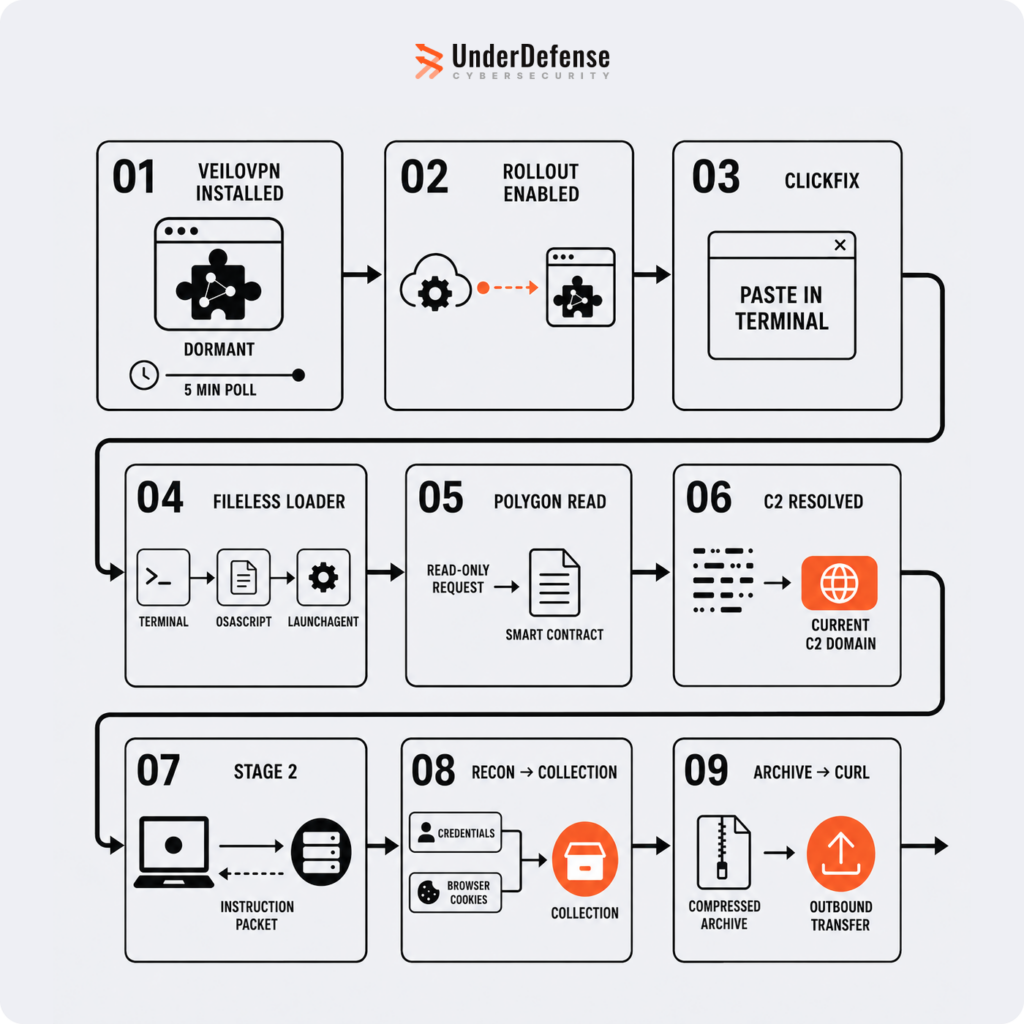
Stage 1: VeiloVPN
The extension had been installed for at least two weeks before the attack activated, quietly polling its own server every five minutes to ask whether a remote flag was on or off. For most installs, most of the time, the answer was no, which is also why an extension like this can sit in a web store for months with a large user base and no red flags. It genuinely does nothing malicious until the operator decides otherwise for a specific install.
The mechanism itself is narrow and deliberately unremarkable. A background service worker sends a small POST request to the extension’s own endpoint on a five minute timer, using Chrome’s standard alarms API, the same mechanism any ordinary extension would use to check something periodically. The request body is thin on purpose: a random identifier generated locally at install time, the extension’s own version number, a local sequence counter, and a label describing which event triggered the call. Nothing about the user, the device, or the network is deliberately packaged into that request.
What comes back is a JSON response containing a field called rollout. The check against that field is obfuscated, comparing string length and a single character code rather than comparing the word directly, an attempt to make static analysis harder. As long as the response says the flag is off, nothing happens. When it flips to on, the extension opens a popup pointed at its own domain, the ClickFix page.
Which installs get told yes and which get told no is decided entirely on the attacker’s server, and it is not visible in the extension’s own code. It is likely based on something inherent to the request itself, such as the source IP or timing, rather than anything the extension explicitly sends, but this could not be confirmed from the evidence available.
Separately, the extension requests permission to control the browser’s proxy settings and uses it to force outbound traffic to bypass any configured interception proxy entirely. This is not evasion in the sense of detecting and reacting to a proxy. The extension simply never routes through one in the first place, which is why standard interception tooling shows nothing at all during analysis.
Stage 2: The ClickFix popup
Once the activation flag switches on, the popup walks the user through a short verification style prompt that ends with a command pasted into Terminal. The specific wording and the literal command are not reproduced here. Describing the mechanism is useful to defenders, a working script is not.
Stage 3: Fileless persistence on macOS
The pasted command runs through osascript to write and load a macOS LaunchAgent, with a randomized label generated per build so no two infections share the same persistence filename. This stage is a clean example of macOS malware persistence built entirely from trusted system tools. No separate malicious binary is ever dropped to disk. Every step downstream runs through Apple signed system tools, which means there is no file to hash and no sample to submit to a scanning engine. The endpoint rule that caught this was running in detect only mode, so nothing was blocked automatically. A person had to see the alert and act on it.
Stage 4: Resolving the command server through a smart contract
This is the EtherHiding step. The loader makes a read only call to a specific function on a Polygon smart contract, decodes the response locally into a domain name, and connects to whatever comes out. Over the life of this campaign that domain changed multiple times, moving from one throwaway domain to another as the contract was updated, and the contract itself never had to be touched by defenders because it cannot be taken down, only the domains it currently points to can be.
Tracing who funded this told its own story. The wallet that deployed and controls the contract was itself funded from a separate wallet, which in turn traced back to a no-KYC cryptocurrency exchange, where the trail ends.
As one of our analysts put it: “The part that made me stop was realizing the C2 address wasn’t in the script at all, it sat inside a Polygon smart contract, and the loader just did an eth_call to read it. The next day the same contract handed back a different C2. You can’t take that down.”
Stage 5: Credential theft and exfiltration
Once connected to its command server, the malware ran basic host reconnaissance, then went after saved browser credentials and cookies across multiple browsers, packaged the results, and uploaded them out in a single request.
As our analyst described the moment they realized why standard interception tooling showed nothing: “Nothing showed up in Burp and I assumed my setup was broken. It wasn’t, the extension owns the browser’s proxy setting and quietly forces everything DIRECT, so a normal proxy never sees it.”
A second front: Penumbra
While tracing this incident, we found a second Chrome extension, Penumbra, marketed as a dark mode and display tool under a completely different name, running the identical delivery framework with only its internal variable names changed. Both extensions share a Google site verification token, which is a much stronger link than similar code alone, since it ties both listings back to the same underlying operator rather than a coincidentally reused toolkit. Both listings also show a cluster of unusually positive reviews posted on the same date, consistent with coordinated review manipulation to build apparent legitimacy rather than organic user feedback.
How we investigated it
The pattern, not just the sample. VeiloVPN, Penumbra, and a third, entirely independent ClickFix delivery page found live on July 8 all trace back to the same three signals: an extension quietly polling its own endpoint and waiting for a remote flag before doing anything, a proxy override that defeats standard interception, and a command server resolved through a smart contract rather than a domain. Building a malicious browser extension like this no longer requires specialized skill. It can be assembled quickly with the help of an AI coding assistant and the malicious logic dropped in afterward. That means the instances named here are almost certainly not the only ones. The detection approach below is built to catch this pattern, not these two extension IDs specifically.
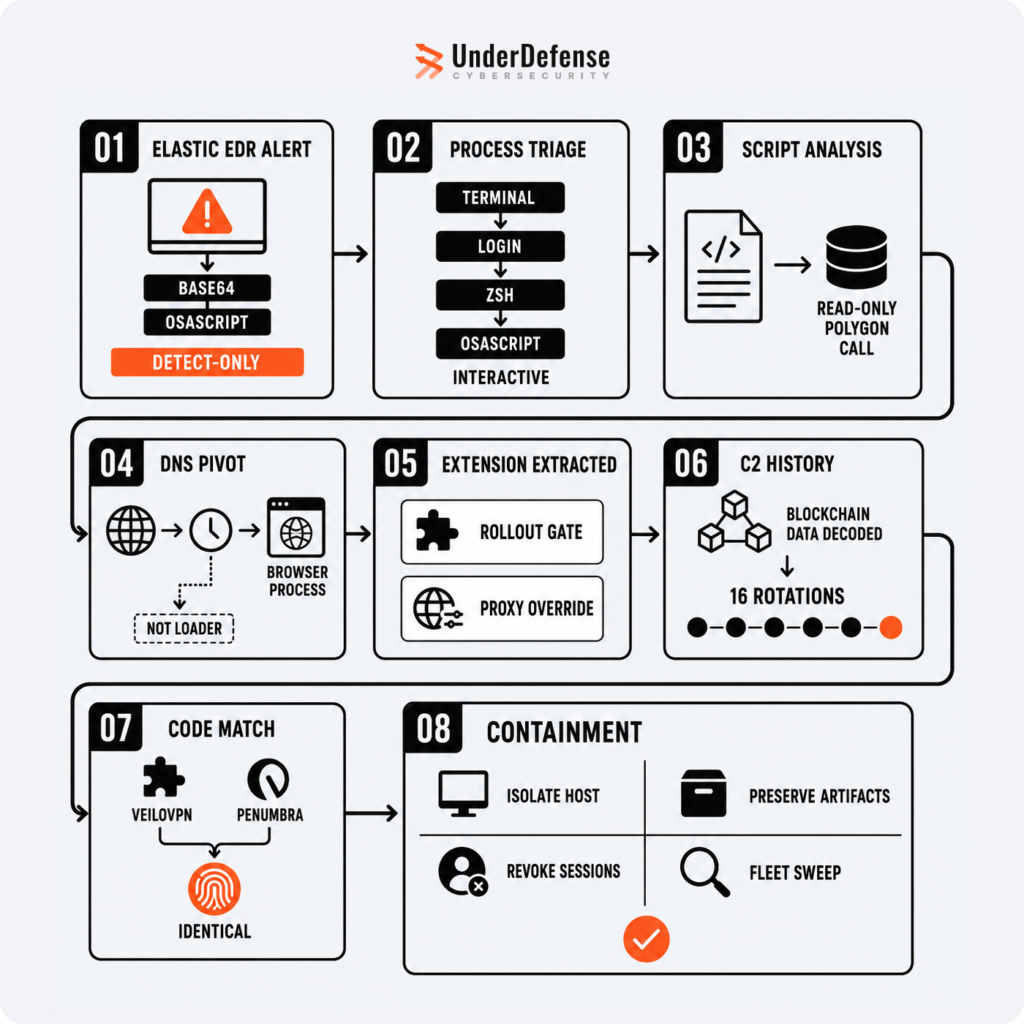
Detection. Two layers caught this independently. An endpoint behavioral rule watching for base64 encoded strings executed through osascript, and a separate SIEM level rule watching for a script making an outbound call to blockchain RPC infrastructure immediately followed by a connection to a newly seen domain. Neither rule needed to know about this specific campaign in advance, both describe behavior, not a list of known bad indicators, which is what let them catch it in the first place.
Confirming human driven versus automated activity. Process ancestry mattered here. The initial execution showed a clear interactive chain, terminal, shell, script, with a controlling terminal session attached, consistent with a person pasting a command. The persistence mechanism that ran afterward showed a completely different ancestry, launched by the system’s own service manager with no terminal attached at all. Distinguishing a one time human action from an ongoing automated loop is a useful triage signal on its own.
From a strange domain to an extension. The periodic beaconing traced back to the browser process itself, not to any script or downloaded file, which pointed toward an installed extension rather than a compromised website or a malicious ad. Confirming that meant reading the extension’s own code rather than taking any outside report at face value.
Reading the extension directly. We pulled the extension’s own unpacked source and read it rather than relying on the store listing. The permissions it requested were the first tell, broader proxy and network access than a VPN extension strictly needs. The code confirmed the gated rollout mechanism and a popup that opens to the extension’s own domain rather than a third party’s.
Tracking the on chain command server. The contract emits no events, so there is no simple log to pull. Recovering the full history of command server changes meant reading the raw input data of every transaction that had called the contract’s update function, each one effectively a timestamped record of what the server address was at that moment. All of this is done through read only calls, nothing about this side of the investigation touches the malicious infrastructure directly.
What made this harder than it needed to be. Two things tripped us up. First, the activation flag can simply return off for a given install, meaning you can hold the exact malicious extension in your hand and still be unable to trigger its behavior on demand, because the operator controls who sees stage two. Second, standard interception tooling showed nothing at all, because the extension quietly forces the browser’s proxy settings to bypass the interceptor entirely rather than detecting and evading it. Checking the browser’s own proxy configuration directly would have surfaced this faster than any amount of time spent troubleshooting the interception setup.
As our analyst summarized it: “The tell was in the browser, not the malware: a VPN extension that had been sitting quietly for over two weeks, beaconing to its own server every five minutes, waiting for a flag to flip before it ever showed a popup.”
Containment. Isolate the host at the network layer without powering it down, and preserve everything before removing it, the persistence artifact, staging directories, the unpacked extension, browser profile, and a memory image, since fileless malware means these artifacts are the only samples that will ever exist. Treat the OS account password as compromised and reset it along with the local keychain. Revoke server side sessions and tokens as well, not just the local password, since stolen cookies survive a password reset. Check beyond the browser too, crypto wallets, SSH keys, and any cloud CLI tokens on the same machine. At the fleet level, sweep for the extension ID, the known command domains, and the blockchain RPC egress pattern, and move endpoint protection from detect only to actively blocking mode.
See how the UnderDefense Agentic AI SOC turns a raw alert into full attack attribution.
Indicators of compromise
| Type | Value | Role |
| Chrome extension | VeiloVPN, ID kkaneedgomgliclbnamedjoknagffnfe | Delivery vector |
| Chrome extension | Penumbra, ID ooklbphnohkomhgecdmjapldgddcjeha | Same operator, separate front |
| Polygon smart contract | 0xA3a603F8a454a9c905b4c579Bb72628F7C15C2A0 | EtherHiding dead drop, getter selector 0x2686ecea, setter selector 0xd75d1ba6 |
| RPC infrastructure | polygon.drpc.org, polygon.publicnode.com, polygon-mainnet.gateway.tatum.io, tenderly.rpc.polygon.community | Four node failover used to read the contract |
| Persistence | ~/Library/LaunchAgents/com.[16 random lowercase characters].plist, RunAtLoad and KeepAlive set | Persistence mechanism, label randomized per build |
| Behavioral | Extension requests browser proxy override permission and forces traffic direct | Anti interception indicator |
| Behavioral | security find-generic-password calls against multiple browsers’ credential stores in rapid succession | Credential theft indicator |
| Behavioral | Outbound blockchain RPC call immediately followed by a connection to a newly seen domain | EtherHiding resolution pattern |
| Behavioral | Recon commands against system profile and platform identifiers, followed by an archive utility packaging files for upload | Collection and staging pattern |
| [OPEN ITEM, confirm before publish: brief also lists operator dev emails and a shared Google site verification token under Operator OSINT. Not explicitly named in the section 10 publishable list. Add here if approved.] |
MITRE ATT&CK mapping
| Tactic | Technique |
| Persistence and delivery | T1176.001, Browser Extensions |
| Execution, user | T1204.004, Malicious Copy and Paste, a technique specific enough that MITRE gave it its own sub-technique in March 2025 |
| Persistence | T1543.001, Launch Agent |
| Command and control | T1102.001, Web Service, Dead Drop Resolver |
| Command and control | T1105, Ingress Tool Transfer |
| Execution | T1059.002, AppleScript |
| Defense evasion | T1027.010, Command Obfuscation, and T1140, Deobfuscate or Decode |
| Credential access | T1555.001, Credentials from Password Stores, Keychain |
| Credential access | T1539, Steal Web Session Cookie |
| Input capture | T1056.002, GUI Input Capture |
| Discovery | T1082, T1033, T1016.001 |
| Collection and exfiltration | T1005, T1560.001, T1041 |
Key takeaways for defenders
- Chrome extension malware does not need to look suspicious to work. A clean looking extension with a large user base is not proof of safety, this one behaved normally for weeks because it was designed to, the malicious behavior switched on remotely, per target, not baked into every install.
- Blockchain based command and control defeats domain and IP blocking by design. If you cannot explain why a process is making blockchain RPC calls, that is worth investigating on its own merits.
- Fileless does not mean invisible, it means detection has to be behavioral. There was no malicious binary anywhere in this chain to hash.
- Check the browser’s own proxy settings before trusting your interception tooling. An extension with proxy permissions can quietly defeat traffic inspection without doing anything that looks like active evasion.
- One malicious extension is rarely the whole campaign. The barrier to building something like this has dropped low enough that assembling one no longer takes specialized skill. Assume there are variants that have not been found yet, and build detection around the pattern, self polling plus proxy override plus non domain command resolution, rather than a fixed list of known indicators.
Is this still active?
Malware names in this space turn over constantly. VeiloVPN and Penumbra are both gone from the Chrome Web Store as of this writing, removed independently of this investigation, no report from us was needed. A third lookalike, called Veil, surfaced separately with 124 users and an immediate untrusted source warning on install, small enough that it may just be a test build rather than a live vector, but a clean illustration of how fast new names appear under the same pattern. The names will keep changing. The detection approach described above does not depend on any of them.
How UnderDefense can help
If you are staring at an alert that looks like routine persistence and cannot yet explain where the outbound traffic is going, that gap between something fired and knowing what happened is exactly where our analysts spend their time, not to take the investigation off your team’s plate, but to close it faster than one person can alone. If you are working through something that looks like this, reach out.
See how the UnderDefense Agentic AI SOC investigates, triages, and resolves real alerts on your stack.
1. How do you detect EtherHiding on an endpoint?
EtherHiding hides command-and-control data inside a public blockchain, so signatures on the C2 domain miss it. Detection is behavioral. Watch for a process making read-only blockchain RPC calls, paired with macOS Launch Agent persistence and base64-encoded execution. The UnderDefense Agentic AI SOC flags this pattern straight from endpoint telemetry.
2. Why doesn't blocking domains stop EtherHiding C2?
With EtherHiding, the operator stores the live C2 address inside a smart contract on a public chain like Polygon. The malware reads it at runtime, and the operator rotates infrastructure by updating the contract. Any domain you block is only the current exit, so blocklists go stale within a single contract update.
3. How is ClickFix being delivered through browser extensions?
A malicious extension can sit dormant after install, polling a server-side control on a schedule. When the operator flips a rollout flag to enabled for a targeted user, the extension shows a ClickFix popup with a command to paste into the terminal. Users outside the target set see a normal extension, which delays discovery.
4. What does ClickFix persistence look like on macOS?
On macOS the loader is often fileless, running through the terminal and osascript, then writing a base64-encoded Launch Agent that survives reboot. In our investigation the Elastic EDR alert was detect-only, so the write was logged while nothing was auto-blocked. That gap between detection and response is why triage speed matters.
5. How do you investigate a malicious browser extension?
Pull the extension code through its service worker and read the background logic for gated behavior, such as a rollout key that controls when the payload fires. If the extension blocks proxy inspection of its own traffic, rewrite the sample to log its own requests and responses so you can recover the C2 exchange.
6. How do you know if a VPN extension is malicious?
Warning signs include a long dormant period after install, a server-controlled rollout switch that changes behavior remotely, calls to unexpected endpoints, and code shared with other flagged extensions. Any popup telling a user to paste a command into the terminal is a strong signal. Review the code and network behavior before trusting a free VPN extension.