






Ransomware doesn’t need to touch a programmable logic controller (PLC) to stop your plant: the ERP and MES servers that schedule production sit on hypervisors an attacker can encrypt overnight. When your cyber insurance renewal asks who sees the first alert at night and how fast production restarts, a vague answer can raise the premium or narrow the cover.
Here is how attackers reach the plant, what to watch at night, and how to restart production in the right order.
TL;DR
- Cybersecurity for manufacturing starts with the IT systems production depends on: vendor access, identity, hypervisors, and networks.
- NIST SP 800-82 Rev. 3 recommends separating IT from operational technology (OT), monitoring the boundary, and planning recovery with operations.
- A small plant IT team can decide in advance which night alerts need a person and who acts on them; the hard part is having someone read them at 2 a.m.
- Restart in a set order: a clean recovery base, then identity, virtualization, ERP and MES, and the production lines.
Table of contents
- Why Plant Downtime Starts in Office IT Systems
- Five Paths Attackers Use to Reach the Plant Floor
- What NIST SP 800-82 Asks You to Separate, Monitor, and Recover
- A 24/7 Detection Plan a Small Plant IT Team Can Run
- Restart Order: Recovering Production After Ransomware
- How UnderDefense Agentic AI SOC Watches the Systems Production Depends On
- Seven Questions to Ask a Monitoring Partner Before a Plant Signs
- Frequently Asked Questions
This guide is for IT Directors and CISOs at manufacturers with one or more plants and a small IT team. You run endpoint detection and response (EDR) on office endpoints, virtualization hosts under your ERP and MES servers, and a firewall between the office and the plant. Machine vendors connect in remotely to support their equipment.
See who catches the first plant network alert at 2 a.m.
Why Plant Downtime Starts in Office IT Systems
Plants are exposed because the ERP, MES, and historian servers that production depends on sit on IT networks an attacker can reach from the office. The plant can’t schedule a shift without them.
The ERP holds orders and bills of materials, the MES turns those orders into work on the line, and historians record what every machine did. All three usually run on servers in the office data center.
This is the convergence of IT and OT (operational technology): the controllers, human-machine interfaces (HMIs), and engineering workstations on the floor now exchange data with business systems every few minutes. It saves planners hours of rekeying. It also means a problem in the server room becomes a problem on the line.
The exposure on the OT side is growing as well. The Cybersecurity and Infrastructure Security Agency (CISA) published 480 industrial control system (ICS) advisories in 2025, counted on CISA’s ICS advisory listing on November 13, 2026, each one describing vulnerabilities in industrial control or OT products.
That’s about nine a week, so subscribe to CISA advisories for the vendors on your floor and log which fixes wait for the next shutdown.
Many of those devices can’t be patched until a planned shutdown, so a fix can wait months. Your practical lever is the IT path an attacker takes to reach them, which you can monitor and close today.
💡 Start by listing the IT systems production depends on. Walk the line with the plant manager and ask what stops if each system goes dark for a shift: the ERP, the MES, the historian, the print server for labels, the file share holding recipes, and the domain controllers every login needs.
That list becomes the scope for everything else in this guide. It tells you which logs to collect first, which servers to back up offline, and which systems come back first after an attack.
Manufacturing cybersecurity also has a cost profile other sectors don’t share. A bank that loses its email still trades, while a plant that loses its MES stops shipping. That is why the plant manager and the CFO measure an attack in lost production days.
A security information and event management (SIEM) system that collects logs but has nobody reading them at night won’t change that outcome, as UnderDefense’s analysis of a Fortune 500 ransomware breach shows. The rest of this guide treats detection and recovery as one plan.
Five Paths Attackers Use to Reach the Plant Floor
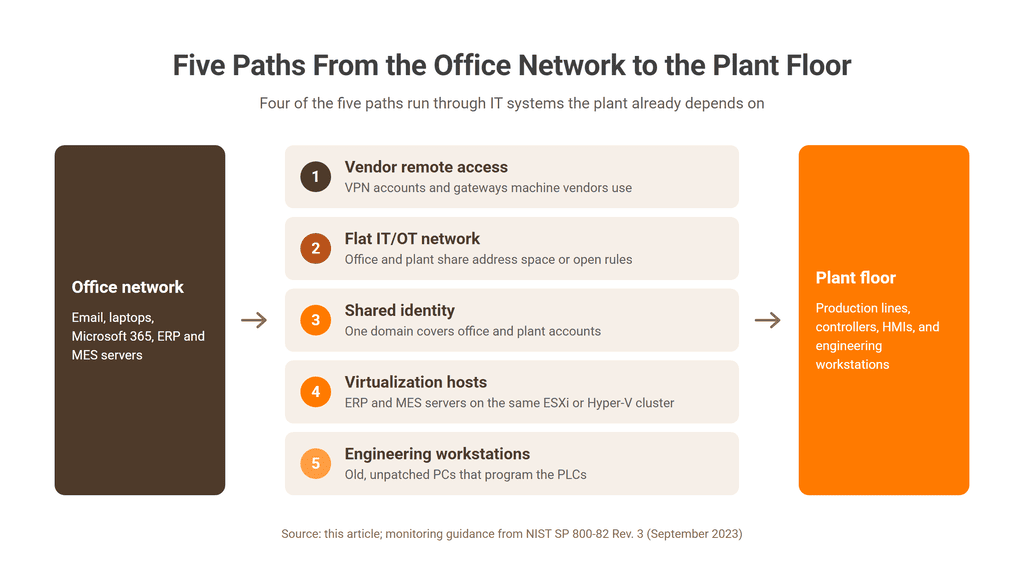
Attackers reach the plant through the same routes your own staff and vendors use every day, and each route ends somewhere that production depends on.
Ransomware crews have turned these steps into a routine, and how Medusa operators work is a clear example of that discipline. The five paths below cover most of what a plant IT team needs to watch.
Remote Access for Machine Vendors
Equipment makers often need to connect to their machines for support, so plants keep VPN accounts, remote desktop tools, or vendor-installed gateways open. Those accounts tend to have shared passwords, no multi-factor authentication (MFA), and nobody checking when they are used.
An attacker who buys or guesses one of those credentials lands inside the plant network with a vendor’s trust. Time-limited access, MFA, and a log of every session close most of that gap.
Flat Networks Between IT and OT
Many plants grew one network at a time, and the office and the floor still share address space or wide-open firewall rules. Once an attacker is on an office laptop, they can scan straight into the plant.
A flat network also lets ransomware spread at machine speed. Segmentation turns that into a few controlled crossings you can watch.
Shared Identity Across Office and Plant
When one Active Directory or Entra ID domain covers both the office and the plant, a stolen admin account opens both. Attackers know this, and domain admin rights are usually their first goal after landing.
Check whether any account can log on to both office servers and plant engineering workstations. Those accounts are the keys an attacker wants most.
Virtualization Hosts Running Production Servers
ERP, MES, historian, and file servers often share the same VMware ESXi or Hyper-V cluster. Encrypting the hypervisor stops every virtual machine on it at once, which is why ransomware groups target hosts directly.
The plant’s controllers can keep running, but without the MES and ERP nobody knows what to build or where to ship it. That is how a plant goes down without a single OT device being touched.
Unpatched Engineering Workstations
Engineering workstations hold the software that programs PLCs, and they often run old operating systems that the equipment vendor certified years ago. They sit on the plant network and are frequently reachable from IT.
An attacker on one of these machines can change logic or simply encrypt it, and rebuilding it takes vendor support. Keep them off email and the web, and watch who logs on.
The table sums up each path, what the attacker does there, and what to monitor. The monitoring column is this guide’s judgment, built on the boundary monitoring guidance in NIST SP 800-82 Rev. 3.
| Path | What the attacker does | What to monitor |
|---|---|---|
| Vendor remote access | Logs in with a vendor account | VPN and gateway logons, session times |
| Flat IT/OT network | Scans and moves from office to plant | IT/OT firewall traffic, new connections |
| Shared identity | Takes over an admin account | Domain controller logons, group changes |
| Virtualization hosts | Encrypts ESXi or Hyper-V hosts | Hypervisor logons, SSH, mass VM shutdowns |
| Engineering workstations | Changes PLC logic or encrypts the host | Logons, new software, project file changes |
Four of the five paths run through systems your IT team already owns. That makes them the cheapest place to protect uptime, because the logs already exist and only need someone reading them.
Detection on these paths is the gap the UnderDefense Agentic AI SOC is built to close, watching the IT systems production depends on 24/7, on top of the tools you already run. The plan in the next sections works with or without an outside partner.
What NIST SP 800-82 Asks You to Separate, Monitor, and Recover
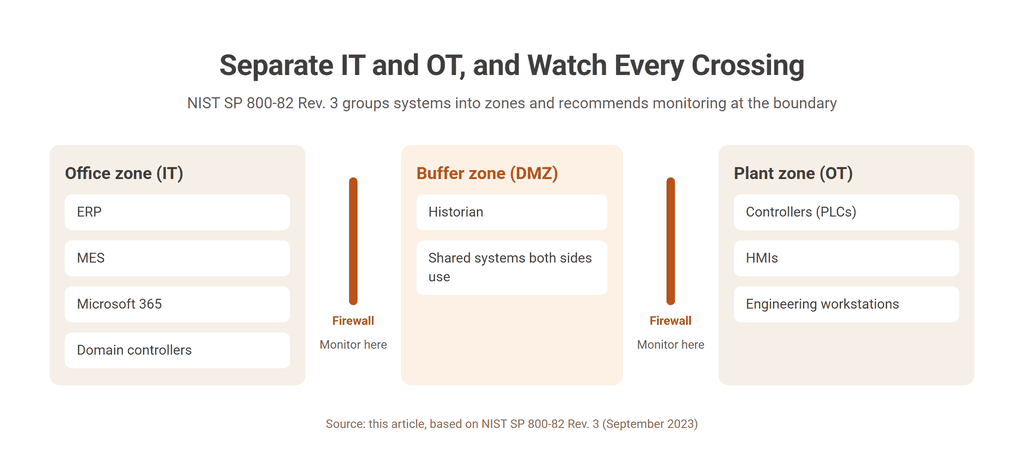
NIST SP 800-82 Rev. 3 asks you to separate IT and OT into zones, monitor the boundary between them, and plan recovery with the people who run the process. The Guide to OT Security, published in September 2023, is the main federal reference for securing plants.
The guide is voluntary for private manufacturers, although customers, insurers, and sector rules sometimes point to it. NIST has published a draft Rev. 4; until it is final, Rev. 3 is the version to plan against, so the advice below follows Rev. 3.
Separate IT and OT Into Zones
SP 800-82 Rev. 3 recommends grouping systems with similar security needs into zones and controlling every path between them. In a typical plant, that means an office zone, a plant zone, and a buffer zone (a DMZ) where shared systems such as historians sit.
The aim is that nothing in the office talks directly to a controller. Every crossing goes through a firewall rule someone can name and defend.
For a plant that runs one flat network today, the first step is smaller. Put a rule set between office and plant, allow only the connections the MES and historian need, and log everything that crosses, then tighten zones line by line during planned shutdowns.
Monitor the Boundary
The guide recommends monitoring at the boundary between zones, so unusual traffic between IT and OT is seen while it happens. For a small team, the IT/OT firewall, the remote access gateway, and the domain controllers give the most signal for the effort.
Start with the logs you already collect. Most plants have firewall and domain controller logs today and simply don’t review them after hours.
Boundary monitoring also teaches you what normal looks like. Once you know which servers talk to the plant and when, a new connection at 3 a.m. stands out.
Recover With Operations in the Room
SP 800-82 Rev. 3 treats incident response in OT as a joint job with the people who run the process. Engineers and the plant manager decide when a line can stop safely and when it can restart.
That changes how you write the plan. Your response plan needs the plant manager’s phone number, a safe shutdown procedure for each line, and agreement on who can order a stop.
Note which lines can run for a shift without the MES and which need it from the first minute. That tells the plant manager what to protect first.
Many plants won’t reach full zoning in one budget year. The next section shows how to get detection running on the IT side first, where four of the five paths begin.
A 24/7 Detection Plan a Small Plant IT Team Can Run
Attackers often work at night and on weekends, when nobody is watching. In UnderDefense’s own incident investigations, the first request came around 10 p.m., keys were taken by 2 a.m., and a backdoor was in place by 3 a.m.
A small plant IT team can’t staff a night shift, so the plan has to decide in advance which alerts wake a person and who that person calls.
Start with logging. These are the sources to collect first, in order of how much they tell you about an attack on production:
- Domain controllers: logons, new admin accounts, and group membership changes
- Hypervisor hosts: VMware ESXi or Hyper-V logons, SSH sessions, and VM shutdowns
- Remote access gateways and VPN: every vendor and staff session
- The IT/OT firewall: new connections and denied traffic between zones
- EDR on office servers and endpoints: CrowdStrike or SentinelOne detections
- Backup servers: deleted jobs, changed retention, and failed backups
Collect those six and you can see most of the five paths described earlier. They also feed the SIEM most plants already run, and a gap in that feed is the IT/OT blind spot a managed SIEM for manufacturing setup is built to close.
Decide Which Alerts Reach a Human at Night
Only the signs of an attack heading for production need a phone call at 2 a.m.: a new domain admin, a logon to a hypervisor host outside a change window, a vendor session at an odd hour, backup jobs being deleted, and EDR detections on ERP or MES servers.
Everything else can wait for the morning queue. Keeping the night list short is what makes it work, because people stop answering a phone that rings for every alert.
Write those rules down and test them. If any of them fires and nobody answers within the time you agreed, treat it as a failed test and fix the escalation path.
Write the Escalation Path With the Plant Manager
The escalation path runs from the alert to triage, to a human decision, to a call to the plant manager, and then to containment. Each step needs a named person and a backup, plus the authority to act.
The plant manager’s role is to decide what happens to production while IT contains the attack. Agree in advance who can isolate a server, who can stop a line, and who calls the insurer.
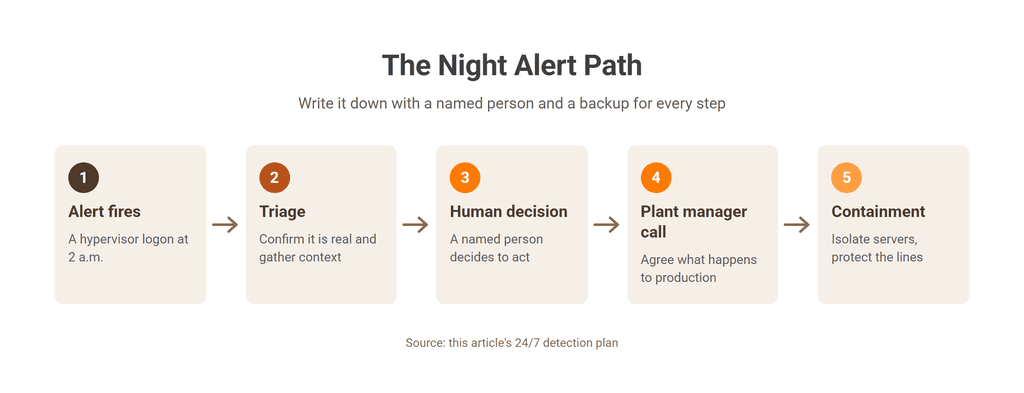
Covering nights without hiring is where most small teams get stuck. An on-call rota spreads nights across two or three people, but those are the same people who work all day, and someone has to read hypervisor and domain controller logs in the middle of the night.
If a test alert at night goes unanswered within the time you agreed, or the people on the rota also carry the day shift, the rota is the gap.
So the decision is whether to keep the rota and accept its gaps, or to bring in 24/7 SOC coverage that works on top of the tools you already own. Either way, the alert rules and escalation path above stay yours.
Cover plant nights and weekends without hiring a SOC team
Restart Order: Recovering Production After Ransomware
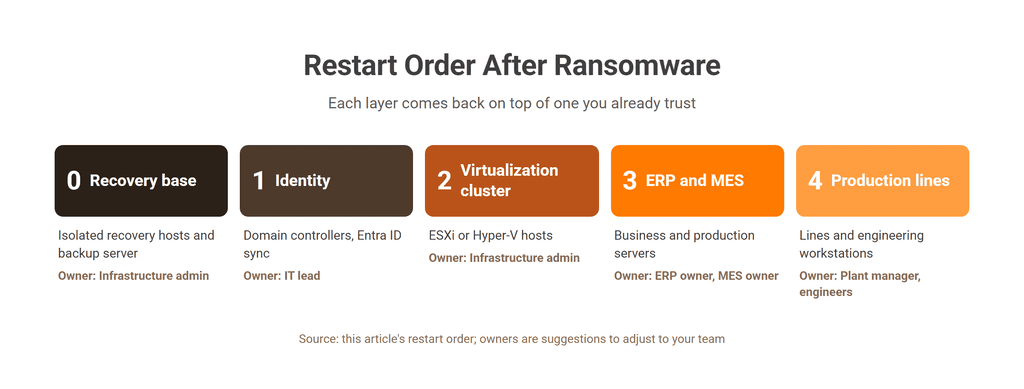
Bringing systems back in the wrong order can undo a recovery. Start with clean, isolated recovery hosts and the offline backup server, then identity, then the production virtualization cluster, then ERP and MES, then the lines. ERP needs identity, and most MES scheduling needs ERP data; note which lines can run on printed orders while both come back.
Begin with offline backups. Keep copies of hypervisor configurations, domain controllers, and ERP and MES servers that an attacker with domain admin rights can’t reach or delete, and test a restore at least once.
The table below sets out the restart order. The owners and readiness evidence are this guide’s suggestions, so adjust them to your own team.
| Step | System | Owner | Evidence it is ready |
|---|---|---|---|
| 0. Recovery base | Isolated recovery hosts, backup server | Infrastructure admin | Backups verified clean, restore tested |
| 1. Identity | Domain controllers, Entra ID sync | IT lead | Clean admin accounts, passwords reset |
| 2. Virtualization | ESXi or Hyper-V hosts | Infrastructure admin | Hosts rebuilt or verified clean |
| 3. ERP and MES | Business and production servers | ERP owner, MES owner | Restored from clean backup, data checked |
| 4. Production lines | Lines and engineering workstations | Plant manager, engineers | Line checks passed, MES orders flowing |
Restoring in this order means each layer comes back on top of one you already trust. Skipping ahead risks reinfecting a clean ERP server from an identity system the attacker still controls.
✅ Run a tabletop exercise with operations at least once a year. Walk through the order with the plant manager and engineers in the room, and time how long each step takes in your own environment.
Write the order into a ransomware response plan, with the backup locations and the contacts beside it. ⚠️ Keep a printed copy too, because the file server may be one of the encrypted systems.
If you need outside hands during a live attack, ransomware recovery support can help you restore. The order you agreed in advance still decides what comes back first.
A restart order you’ve tested shortens the worst day. Detection that catches the attack before the hypervisors are encrypted can keep that day from happening at all.
How UnderDefense Agentic AI SOC Watches the Systems Production Depends On
The UnderDefense Agentic AI SOC gives a small plant IT team 24/7 detection and investigation on the systems production depends on: domain controllers, hypervisors, and vendor sessions. AI agents and analysts watch them every night, so a real attack reaches a person while there is still time to protect the lines.
UnderDefense is rated 5.0 out of 5 from 83 reviews on G2 as of November 2026, and the company is ISO 27001 certified.
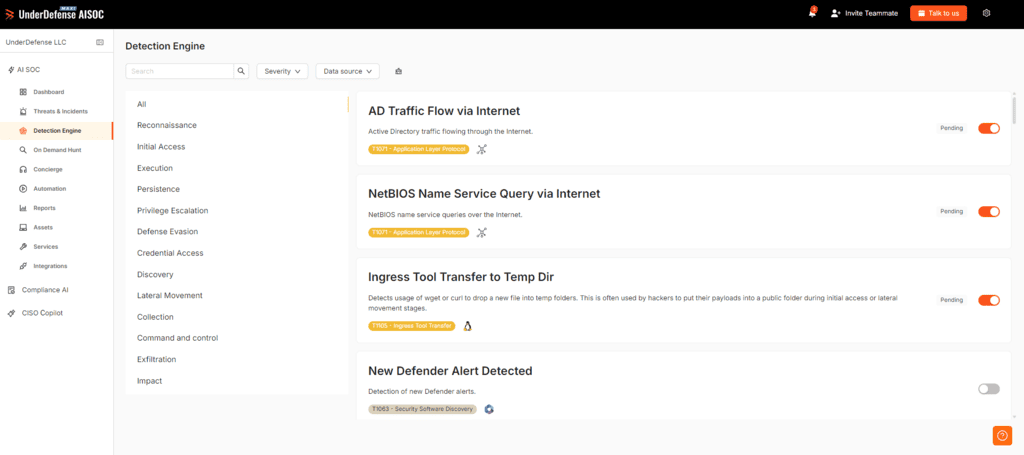
UnderDefense reports about 2 minutes from alert to triage, so a hypervisor logon in the middle of the night is already being investigated when your on-call phone rings.
Here is how it answers the seven questions in the next section:
- Night alerts: analysts work 24/7, and critical incidents are escalated to your team within 15 minutes.
- OT-adjacent systems: coverage spans cloud, SaaS, network, identity, endpoint, and OT.
- Action: AI agents investigate every alert, and analysts decide on escalation and containment, so your on-call person gets the facts already gathered.
- Tuning: detection rules are customized for your environment during onboarding.
- Your plant manager: from the Standard tier, a concierge team gives direct chat with analysts, and alerts can go to Teams or Slack.
- Your stack: the EDR, firewall, and SIEM your plant already runs stay in place, with no SIEM replacement required, through 250+ integrations, including CrowdStrike, SentinelOne, Splunk, and Fortinet.
- The restart: a team of 40 incident response professionals, with a 40-hour incident response retainer included from the Standard tier on the published pricing page.
The platform runs as SaaS on Azure with tenant isolation, as a hybrid, or fully on-premises and air-gapped with no outbound connections, and client data is never used for training.
UnderDefense’s incident response team was called in after ransomware reached 22 hypervisors at a global poultry producer, which the case study describes as “One of the world’s top 10 poultry producers.”
After the recovery, it rebuilt detection: “100+ personalized detection rules replaced over 900 ineffective and noisy rules,” leaving “30 critical alerts per day instead of 100 false positives” for analysts to investigate, so the plant team hears only about what needs a decision.
One G2 reviewer describes the night coverage this way:
“Their 2-minute alert-to-triage speed isn’t just on paper, as we’ve personally seen them act on a weekend night” Bohdan P., Founder & CEO, Small-Business (50 or fewer emp.), G2
UnderDefense goes live within 10 days; full onboarding with customized detections takes 30 days, so start before your next shutdown window.
Check your plant’s night alert coverage with UnderDefense
Seven Questions to Ask a Monitoring Partner Before a Plant Signs
Whichever partner you choose, the answers to these questions show whether they can protect uptime. Ask them during the demo and ask for proof:
- Who answers an alert at 2 a.m., and how fast do they respond to a critical one? A strong answer names analysts on shift and an escalation time in minutes.
- What can they see in OT-adjacent systems such as hypervisors, historians, and the IT/OT firewall? A strong answer lists the log sources by name.
- Do they act on an attack, or do they only send a notification? A strong answer says who can contain and with what approval.
- How do they tune noisy detection rules for your environment, and how long does it take? A strong answer gives a timeline in days or weeks.
- How will they work with your plant manager when a line may need to stop? A strong answer names a direct channel to a person.
- What happens to the EDR, firewall, and SIEM you already own? A strong answer: they stay.
- How do they support the restart if ransomware gets through? A strong answer names an incident response team and the hours included.
Compare the answers side by side, and weigh the first and third most heavily. The first tells you whether a person is on shift at night or only on call, and the third tells you whether containment waits for your team to wake up.
Score every vendor on the same seven questions, because AI SOC options for manufacturing differ in how much of the OT side they cover.
Bring your plant’s stack to the conversation, including the hypervisors, the vendor access tools, and the firewall between office and floor. The useful demo is the one that shows which of tonight’s alerts would reach a human.
See which of your plant’s alerts would reach a human at night
- Check which domain controller, hypervisor, and vendor-access logs your current tools already send
- Watch AI agents investigate a night alert while an analyst decides on escalation
- Get a rollout plan for your stack: SaaS, hybrid, or on-premises
Frequently Asked Questions
Why do attackers target manufacturers?
Manufacturers can’t afford to stop production, so attackers expect them to pay quickly to restart. Plants also run older systems that are hard to patch, and many connect vendors and office networks to the floor. That combination gives attackers both an easy way in and strong pressure on the victim.
What is the difference between IT security and OT security?
IT security protects business systems and data such as email, ERP, and file servers. OT security protects the controllers, HMIs, and engineering workstations that run physical processes, where safety and uptime come first. In a plant, the two meet at servers like the MES and historian, which is why cybersecurity in manufacturing has to cover both.
Do you need separate monitoring for OT systems?
Many plants start by monitoring the IT systems production depends on, plus the boundary into OT, with the tools they already own. Dedicated OT security platforms add passive visibility into controllers and industrial protocols.
If vendor remote access or a plant internet link lands on the plant network without crossing IT, add OT monitoring for that path; if every path crosses IT first, start with IT and boundary monitoring.
Is NIST SP 800-82 mandatory for manufacturers?
No. NIST SP 800-82 Rev. 3 (September 2023) is voluntary guidance for private manufacturers, although customers, insurers, or sector rules may ask you to follow it. NIST has published a draft Rev. 4; until it is final, Rev. 3 is the version to plan against. It remains a solid reference for plant security plans either way.
How can a plant keep producing during a ransomware attack?
Isolate the affected IT systems quickly and keep the plant network separate, so controllers can keep running if it is safe. Some plants then run lines on manual schedules or printed orders while ERP and MES are restored. Plan this with the plant manager before an incident, and practice it in a tabletop.