The names of the company, its employees, internal systems, and some technical indicators have been changed or withheld at the client’s request.
An insurance company received a routine WhatsApp message from someone who said they had just bought a car and wanted to arrange third-party liability coverage. Nothing about the request stood out. What followed was a multi-day, step-by-step social engineering attempt that ended with a malicious file compiling itself directly on an employee’s workstation.
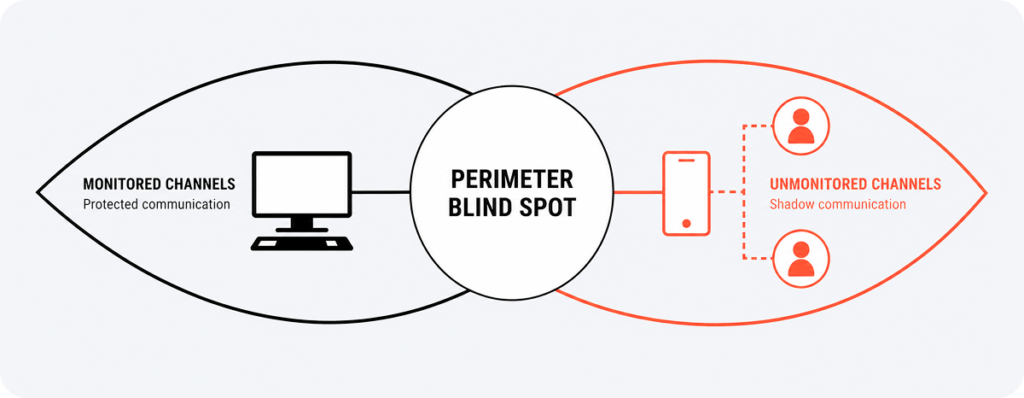
This write-up is for security teams and IT leaders who think of phishing as an email problem. The attack described here used no email and no link. It used a messaging app that most companies never think to monitor, and it worked because the attacker kept adapting, patiently, to every technical obstacle in the way. UnderDefense’s SOC was monitoring the client’s environment in real time and caught the incident as it unfolded. The full attack chain is worth walking through in detail. The most instructive part of this case is the conversation that delivered the malware.
See what a full environment review would surface in your own setup.
The Incident
The message arrived on the company’s corporate WhatsApp number, the same channel customers use for routine insurance inquiries:
“Hi. I bought a new car from a dealership. Can we arrange motor third-party liability insurance?”
The request matched the exact purpose of that communication channel. A local phone number, a photo of the vehicle, a natural tone, and a clear business context gave the employee no reason for concern.
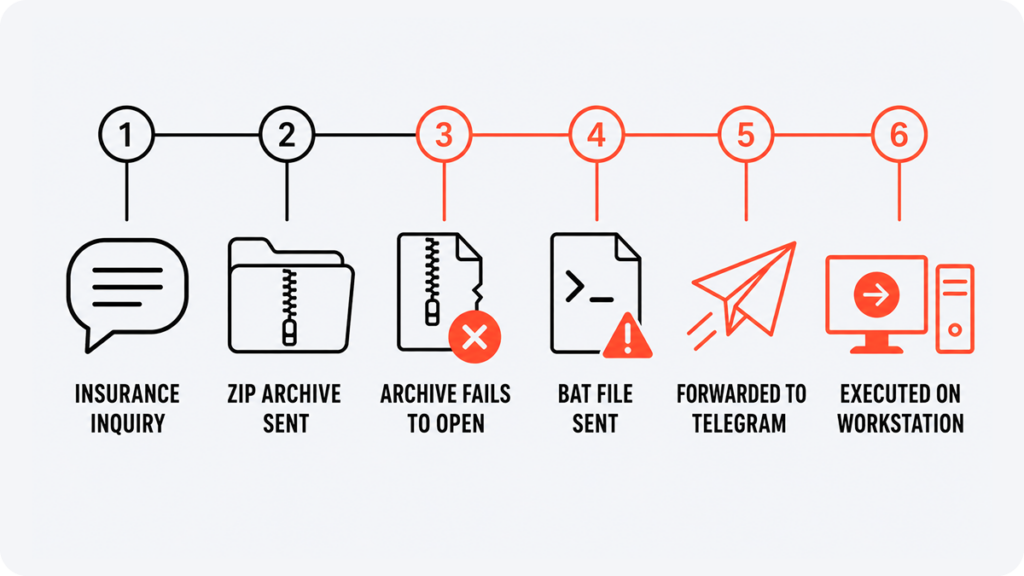
The employee asked for the vehicle registration certificate or another document needed to calculate the premium. The sender replied that the registration certificate was not yet available, but a pro forma invoice from the dealership was. A few minutes later, a ZIP archive with an invoice-style filename appeared in the chat.
At that point, the attack could have ended. The archive would not open.
The attacker did not disappear. He explained that the dealership had sent exactly this type of file, suggested it might only open on a computer, and kept the conversation going. Telemetry also showed attempts to unpack the archive through a third-party online service.
When that failed too, the sender provided a second file, a BAT script named after the vehicle model, with a new instruction attached:
“Try clicking ‘Save as’ and then open the file.”
After another failed attempt, he adjusted again:
“Try moving the file to the desktop and opening it.”
That last instruction is the center of this case. The attacker did not just deliver a payload. He walked the employee through launching it, one obstacle at a time, adjusting the ask each time something did not work.
The file reached the workstation through WhatsApp, then the employee forwarded it to themselves via Telegram to move it onto the machine, where it was saved and executed. WhatsApp was the delivery channel; Telegram was the employee’s own workaround for getting the file onto the host.
Find out whether anyone on your team would catch a script like this before it reaches a desktop
Inside the Dropper
The BAT file sent inside the archive and the one sent separately shared the same hash. The filename and delivery method changed; the payload inside did not.
The file was roughly 3.37 MB, unusually large for a command script, because almost all of that size was encoded data. UnderDefense’s threat research team reconstructed the execution chain by correlating the client’s CrowdStrike Falcon telemetry step by step:
BAT file
→ copies itself to the temp directory
→ creates a short VBS script
→ launches wscript.exe
→ hidden cmd.exe
→ decodes C# code through certutil.exe
→ compiles through csc.exe
→ creates UpdateCheck16.exe
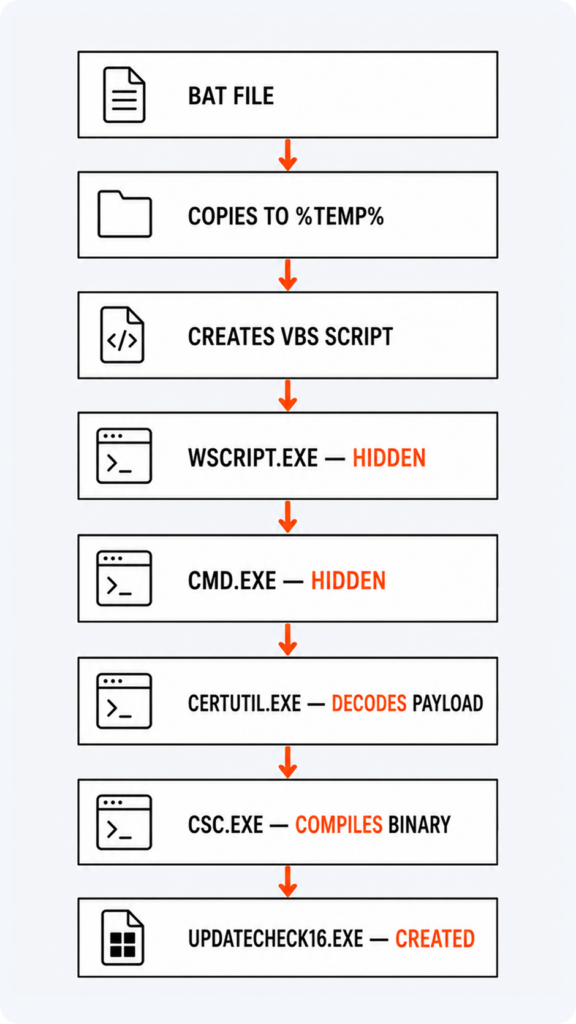
The dropper first copied itself to %TEMP% as _r64866.bat, then created a file named _q.vbs containing a single instruction: run the copied BAT file through a hidden command window. This let the script continue executing without a visible console, and the VBS file deleted itself immediately afterward. To the employee, nothing appeared to happen on screen, even as a hidden process ran in the background.
A finished executable is easy to check against reputation, hash, or a known signature. This attacker avoided that entirely by building the final executable on the victim’s machine. The BAT file created a large intermediate file of encoded data, then called certutil.exe to decode it into C# source, then called csc.exe, the standard .NET Framework compiler, to build a Windows executable with no visible console window.
Both certutil.exe and csc.exe are legitimate Windows components. Neither is malicious on its own. Attackers use tools like these as so-called living-off-the-land techniques: the components already exist on the system, so nothing extra needs to be delivered or flagged as unfamiliar software. This gave the attacker several advantages at once:
- No ready-made executable appeared in the initial files.
- Most of the payload sat inside encoded blocks.
- The system’s own trusted tools did the building.
- The final file existed only once the attack was already underway.
- The command windows stayed hidden throughout.
The final file also carried metadata naming it UpdateCheck16 with a company field referencing Microsoft Corporation. That did not make it a genuine Microsoft file. It could still make a quick, superficial review look less alarming.
Whether the chain was built specifically to bypass CrowdStrike is not something the evidence confirms. The large encoded payload, hidden execution, use of certutil.exe and csc.exe, and disguised metadata are common defense evasion techniques seen across many antivirus and EDR products. What can be said with confidence is that it did not work here.
Same Chain, Different Hash
The employee ran the dropper twice, roughly ten minutes apart, once from the Telegram Desktop folder and once from the desktop itself, matching the attacker’s second set of instructions. Each time, the BAT file built a fresh copy of UpdateCheck16.exe, and each time the hash was different.
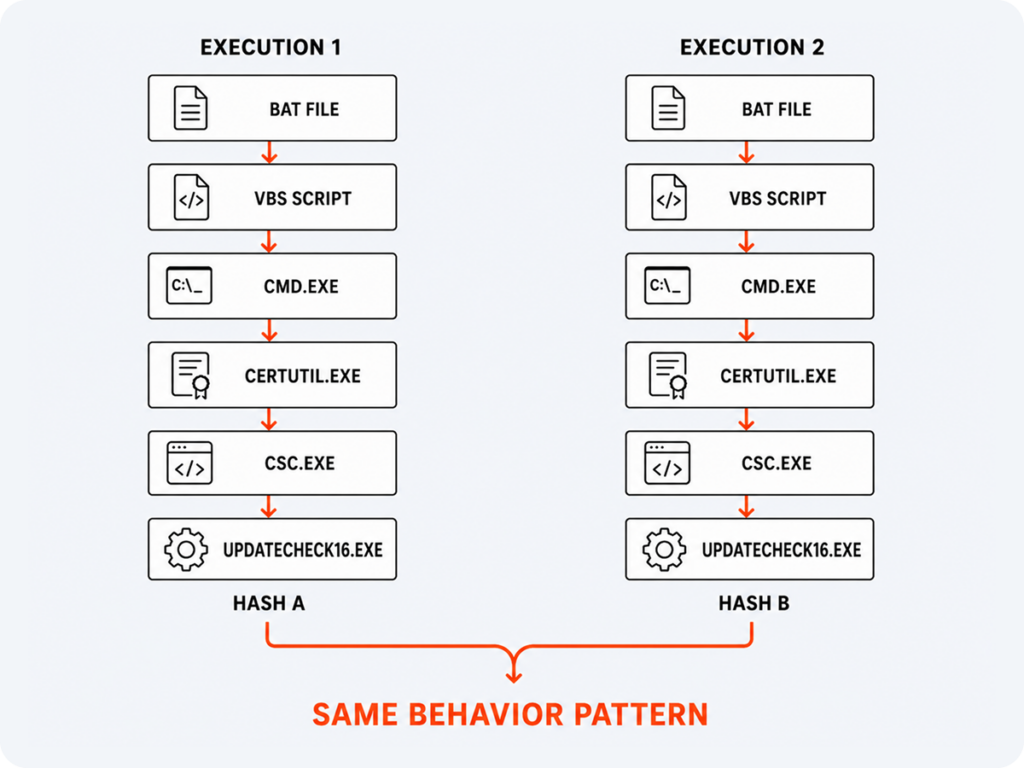
That detail matters more than it looks. Blocking a specific SHA-256 hash after the first attempt would not have stopped the second one; local compilation on the host produced a new binary each run. Whether that variation was a deliberate evasion technique or simply a byproduct of how csc.exe embeds variable fields, such as timestamps and build metadata, into each compiled .NET binary is not something the available evidence confirms. What stayed constant across both executions was the behavior: the same sequence of a hidden VBS wrapper, a hidden command shell, decoding through certutil.exe, and compilation through csc.exe. Recognizing that sequence in real time is what let UnderDefense’s SOC treat the two executions as one incident. A single artifact alone would not have connected them.
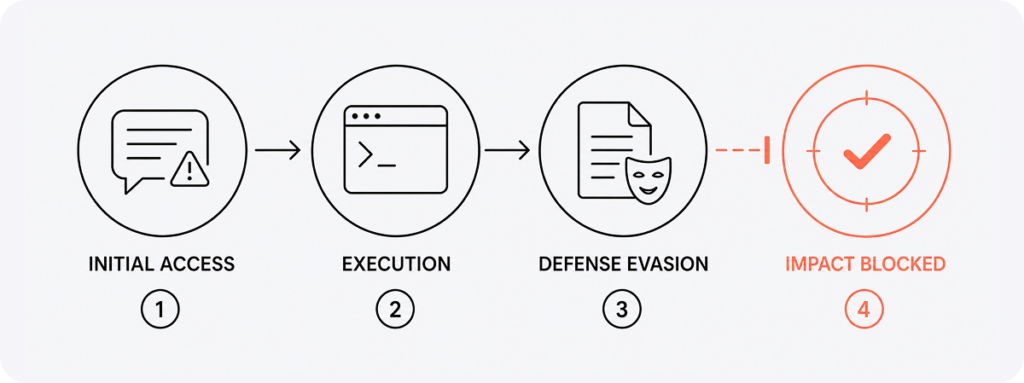
Falcon’s sensor-based machine learning model classified the compiled binary as malicious at the moment of execution in both cases, blocking the process and quarantining the file before it could proceed. Script execution monitoring on the workstation was active throughout, but the auxiliary VBS file lived for only a fraction of a second before deleting itself, so that stage produced telemetry without triggering a block. The compiled binary was where the chain was ultimately stopped.
UpdateCheck16.exe never created a child process, never established persistence, and never reached out to a command-and-control server, according to the available telemetry. Based on its characteristics, the final component may have belonged to the Quasar RAT family or a similar remote access tool, the kind typically used to control an infected host and reach its files, processes, and system functions. The compilation and preparation stages worked exactly as the attacker intended. The payload never got the chance to run.
Likely Actor
UnderDefense’s threat research team assessed this incident as consistent with a coordinated, targeted social engineering campaign, based on the combination of factors involved. No single indicator carried that conclusion on its own.
The target was the company’s corporate WhatsApp number. Communication used the target’s local language, from a local phone number, using a pretext specific to the business itself: a new vehicle, a dealership document, a request for third-party liability coverage. That level of business-specific framing points to a targeted approach. Indiscriminate malware distribution rarely carries this much operational context.
The attacker’s persistence after the first failed attempt reinforces that assessment. He stayed engaged, supplied the BAT file through an alternate route, and guided the employee through saving, moving, and launching it. Combined with the technical chain, encoded payload data, hidden execution through VBS, reliance on legitimate Windows utilities, and local construction of a remote-access payload, the pattern is consistent with tradecraft observed in other targeted social engineering campaigns. Taken together, the targeting, language, pretext, and execution chain point to a deliberate, targeted campaign.
Why This Case Matters
The technical chain here is genuinely interesting. The stronger part of this case is what made the technical chain possible in the first place: he chose a channel where the request looked completely normal, built a plausible story around a new vehicle, used invoice-style filenames, answered questions without rushing, and refused to give up after the first failure. He offered an alternate file format, explained how to save it, and talked the employee through moving it to the desktop. Every technical obstacle along the way got a new instruction.
Security awareness training that stops at “do not click suspicious links” would not have prepared this employee for what actually happened, because there was no link at all. The incident closed without impact. For a regulated insurer, that distinction matters beyond the technical outcome. It is the difference between a quiet Tuesday and a breach-notification clock that a board, a regulator, and a client all start watching at once. What mattered most was that the process chain behind the file stayed visible from end to end. A hash changes with every compilation. A behavior pattern, hidden VBS execution feeding a hidden shell feeding a local compiler, does not. Watching for that pattern is what turned two separate executions into one recognized incident. Waiting for a known-bad signature would have caught neither.
What Security Teams Can Do
Treat messengers as part of the external perimeter
WhatsApp, Telegram, Viber, and similar apps can carry the same threats email does. Files arriving through them, especially archives, scripts, and executables, deserve the same scrutiny as an email attachment.
Block scripts from client-facing communication channels
BAT, CMD, VBS, JS, and SCR files are not normal business documents. Receiving one from an external contact through a customer channel should trigger automatic escalation to IT or security.
Watch the full process chain
The signal in this incident was the sequence itself: messenger, BAT, wscript.exe, cmd.exe, certutil.exe, csc.exe, new executable. Behavioral monitoring is what made it possible to recognize both attempts as the same threat.
Restrict system tools that standard users rarely need
Regular use of wscript.exe, cscript.exe, certutil.exe, or csc.exe by office employees is unusual enough to warrant its own alerting. Compiling C# code from a temp directory is not a normal part of anyone’s workday outside engineering.
Give employees one simple rule
If a received file will not open, employees should stop and hand it to the security team, without trying another format, unpacking it through a third-party site, or moving it to the desktop on a stranger’s instructions.
See what a full environment review would surface in your own setup.
1. Can malware bypass antivirus without using an already-known malicious file?
Yes. In this case, the attacker delivered a script that built the final executable directly on the victim’s machine, using legitimate Windows tools like certutil.exe and csc.exe. Because the file did not exist in finished form until the moment of execution, there was nothing to check against a known signature or hash beforehand.
2. What is a living-off-the-land attack?
A living-off-the-land attack uses tools and processes already present on a system, such as certutil.exe, wscript.exe, or a script compiler, to carry out malicious actions instead of introducing new, easily flagged software. Because these tools are legitimate and commonly used by IT teams, their presence alone does not indicate compromise, which makes the technique harder to catch through file-based scanning alone.
3. Why should security teams monitor messaging apps like WhatsApp and Telegram?
Messaging apps are often left out of traditional security monitoring, even though they can deliver the same file types, archives, scripts, and executables, that email security controls exist to catch. In this case, the entire attack was delivered without a single email or link.
4. How can the same malware produce a different file hash every time it runs?
When a script compiles its payload locally rather than delivering a pre-built file, small variations in build metadata, such as timestamps, can produce a different hash on every execution. This means hash-based blocking alone will not catch a second attempt that uses the same technique.
5. What is the difference between signature-based and behavioral detection?
Signature-based detection identifies threats by matching a known hash, file, or pattern, and fails once that pattern changes. Behavioral detection instead looks at the sequence of actions a process takes, such as a script launching a hidden shell that compiles code, which stays consistent even when the resulting file does not.