What to do if you're hit by ransomware?

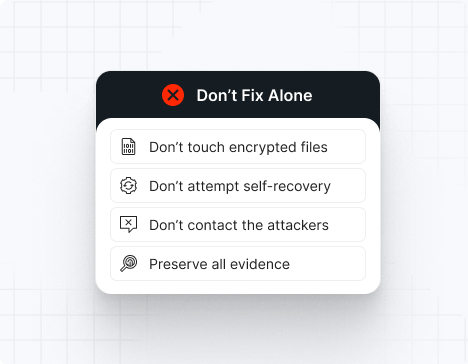
Do NOT attempt any self-remediation, as it can trigger further encryption and destroy recovery points. Instead, follow these steps:

1
Do NOT fix it yourself
2
Disconnect affected systems
3
Call us +1 332 331 8700

Contact us now for urgent ransomware response assistance, 24/7

Get Help Now
Frame

Experts. Finalists. Winners.

Accomplishments and recognitions, demonstrating our commitment to excellence and innovation.

Momentum Leader in MDR

Best Support in MDR & IR

Managed Detection and Response (MDR)

Top Cybersecurity Company 
2025

Best Managed Detection and Response Service

#4 of 184 teams Splunk Boss of the SOC

Best Of Cybersecurity Awards for Q1 2025

AWS Partner

Splunk Manage Premier Partner

Image (11) (1)

Why you shouldn’t attempt 
to fix it alone

Like a crime scene, a ransomware attack must be preserved — tampering with encrypted files, attempting self-recovery, or engaging with attackers can destroy critical evidence and reduce your chances of recovery.

Taking the right steps in the first moments after a Sarcoma attack can make a huge difference and help you make a full recovery. Request 24/7 Sarcoma ransomware recovery services to decrypt your data and maximize your chances of restoring operations.

Contact us now for urgent ransomware recovery assistance

Under attack?

Get Help Now

Sarcoma ransomware statistics & facts

Sarcoma decryptor
Sarcoma IOCs
Sarcoma attack vectors
Case outcomes
How to remove Sarcoma ransomware?
How to recover from Sarcoma ransomware?
Ransom amounts
Sarcoma decryptor

No public decryptor exists for Sarcoma. The hybrid encryption scheme with private keys held by operators makes decryption impossible without paying the ransom or law enforcement recovery of the key.

Sarcoma IOCs

Indicators of compromise are tracked through ransom note filenames, file extension patterns, RMM tool abuse, and dark web leak site monitoring.

 File extensions
.sarcoma (primary), or occasionally .Sarcoma or .SARCOMA (case variations)

Ransom note filenames
SYSTEM.README.TXT, README_SARCOMA.txt, or RESTORE.TXT placed in user desktop and document folders

Sarcoma hashes
SHA256 hashes vary across samples; Sarcoma binaries are often unsigned and compiled with standard C/C++ toolchains. Specific samples have been analyzed by Halcyon, SocRadar, and Recorded Future threat intelligence teams. No single hash represents all Sarcoma variants.

Sarcoma tools
– Initial access: Phishing, credential compromise via data breaches, vulnerability exploitation
– RMM tool abuse: AnyDesk, Connectwise Control (ScreenConnect), Splashtop, TeamViewer
– Persistence: Scheduled tasks, registry modification, WMI event subscriptions, backdoor installation
– Credential dumping: Mimikatz, LSADump, Invoke-Mimikatz
– Lateral movement: PsExec, pass-the-hash, Kerberoasting, LDAP enumeration
– Data exfiltration: FileZilla, 7-Zip + FTP, WinRAR, Rclone to cloud storage
– Encryption: Custom Sarcoma ransomware binary deploying AES-256 + RSA-4096

Most common red flag
Presence of RMM tools (AnyDesk, Connectwise) running outside normal business hours, combined with unusual Windows Defender disablement commands via PowerShell (Set-MpPreference -DisableRealtimeMonitoring $true).

Sarcoma attack vectors

Attack vector

% of Sarcoma incidents

Notes

Compromised credentials (phishing + data breaches)

42%

Email phishing or credential reuse from previous breaches

Unpatched external-facing applications

30%

Exchange, Fortinet, Cisco, other remote access portals

Zero-day exploitation

15%

Confirmed October 2024; likely others unreported

Insider threat or supply chain compromise

13%

IT contractor with RMM access; managed services provider compromise

Powered By WP Table Builder
Case outcomes

Sarcoma victims typically experience 3–7 day campaigns from initial access to encryption and ransom demand. Organizations without proper segmentation report encryption spreading to critical business systems within 24 hours. Negotiation phase typically lasts 1–3 weeks, with some victims paying ransoms of $100,000–$800,000. One documented Sarcoma victim in the retail sector paid $350,000 to recover data. Organizations with air-gapped backups and strong segmentation reported ransoms of $0 but recovery costs of $200,000–$500,000.

How to remove Sarcoma ransomware?

1. Disconnect all infected systems from the network immediately to prevent lateral movement and further encryption.
2. Identify and terminate all RMM tool processes (AnyDesk.exe, ccagent.exe, SplashtopService) and uninstall RMM software.
3. Boot systems into safe mode and scan with updated antivirus/EDR tools to locate and remove the Sarcoma binary.
4. Restore system hives from backup (System, SAM, Security registry files) if registry modification occurred.
5. Reset all user and administrative account passwords using a secure, air-gapped machine.
6. Remove any created backdoor accounts (check Local Users and Groups for suspicious accounts created during the attack window).
7. Rebuild domain controllers and certificate authorities if attackers obtained administrative access.

How to recover from Sarcoma ransomware?

1. Restore encrypted files from clean backups created before the attack (test in isolated environment first).
2. If no backups exist, decrypt files using the Sarcoma decryption key (if obtained via ransom payment or law enforcement recovery).
3. Validate all restored files through integrity checks (MD5/SHA256 verification, application-layer testing).
4. Implement enhanced network segmentation to prevent future lateral movement (separate critical systems onto isolated network segments).
5. Deploy endpoint detection and response (EDR) solutions on all systems to monitor for future intrusion attempts.
6. Enable continuous incremental backups with immutable storage to prevent future data loss.
7. Implement multi-factor authentication on all critical systems and RDP/remote access endpoints.

Ransom amounts

Sarcoma operators typically demand $100,000–$1,000,000 depending on organization size and data sensitivity. Mid-market companies report average demands of $250,000–$500,000. Negotiation typically reduces initial demands by 30–50%. Payment is demanded in cryptocurrency (Bitcoin or Monero).

Our customers say it best

Contact us now for urgent ransomware recovery assistance

Under attack?

Get Help Now

Frequently asked questions

What is Sarcoma ransomware?

Sarcoma is a relatively new ransomware group that emerged in October 2024 and rapidly became one of the top three most prevalent ransomware operations globally. Operating through a selective RaaS model, Sarcoma recruits experienced affiliates and targets mid-market companies (USD 1M–USD 10M revenue) across manufacturing, healthcare, retail, and technology sectors. The group employs innovative “Living Off the Land Remotely” tactics, weaponizing legitimate remote management tools to avoid detection and establish persistence before deploying encryption and data exfiltration.

Where is Sarcoma gang located?

Operational patterns suggest Sarcoma operators are based in Eastern Europe or nearby CIS regions. The group’s language in communications and forum activity implies Russian or Ukrainian origin. No definitive geolocation has been published by threat intelligence firms.

How does Sarcoma ransomware work?

Sarcoma attacks begin with credential compromise via phishing emails or exploiting unpatched external-facing applications. Attackers gain initial access and then install a legitimate RMM tool (AnyDesk, Connectwise Control, or Splashtop) to establish persistent remote access that blends with normal IT operations. Over days or weeks, attackers conduct reconnaissance, move laterally through the network, identify critical systems and data, and exfiltrate sensitive files using tools like Rclone or FileZilla. Finally, the Sarcoma ransomware binary is deployed across the network simultaneously, encrypting files and rendering systems unusable. Ransom notes and dark web leak site postings follow.

How long do Sarcoma attacks last?

From initial access to ransom demand, Sarcoma attacks typically span 3–7 days. Initial access to first signs of reconnaissance may take hours; lateral movement and data exfiltration occupy 1–4 days; encryption and ransom note delivery occur in the final 12–24 hours, giving organizations minimal time to detect and respond.

Can Sarcoma ransomware be deleted or decrypted?

Sarcoma files cannot be decrypted without the private RSA key held by operators. Deletion of the malware from infected systems stops further encryption but does not recover already-encrypted files. Recovery requires either paying the ransom for the decryption key (no guarantee of actual key delivery) or restoring from clean backups.

What happens when infected?

When Sarcoma infects your systems, your files are encrypted with .sarcoma extensions and become inaccessible. All files on network shares and connected devices are simultaneously encrypted. A ransom note (SYSTEM.README.TXT) appears on all compromised systems, directing you to contact operators via a Tor website for payment and decryption. Additionally, a ransom note appears on the dark web leak site, threatening to publish exfiltrated data if you do not pay within 3–5 days.

How can it be prevented?

Prevent Sarcoma attacks by: (1) implementing robust email security with anti-phishing training to reduce credential compromise; (2) applying security patches to all external-facing applications immediately; (3) enforcing strong, unique passwords and multi-factor authentication on all accounts; (4) monitoring for and blocking suspicious RMM tool installation and execution; (5) implementing network segmentation to isolate critical systems; (6) maintaining immutable, off-site backups; (7) deploying EDR solutions with behavioral detection for ransomware patterns; and (8) conducting regular threat-hunting exercises to identify persistence mechanisms.

What is a ransomware prevention checklist?

– Enforce multi-factor authentication on all remote access and VPN endpoints
– Deploy anti-phishing email filters and user security awareness training
– Apply all security patches to external-facing applications and systems within 24–48 hours of release
– Implement network segmentation isolating critical systems (finance, healthcare, databases) from general corporate networks
– Monitor for unauthorized RMM tool installation and alert on any off-hours RMM activity
– Deploy EDR/XDR solutions with behavioral detection for encryption and lateral movement activity
– Create daily incremental backups with immutable (write-once, read-many) storage offline
– Implement detailed logging and monitoring of administrative account activity
– Conduct quarterly threat-hunting exercises to identify persistence mechanisms and backdoors
– Restrict local administrator access using privilege access management (PAM) solutions
– Implement application whitelisting on critical systems
– Disable RMM software when not in active use; remove unnecessary RMM installations

Why does Sarcoma use legitimate RMM tools instead of custom malware?

Sarcoma’s use of legitimate, trusted RMM tools is a deliberate evasion strategy. Organizations typically allow IT teams to use these tools, so their presence does not trigger alarms. This “Living Off the Land Remotely” approach reduces detection likelihood, allows attackers to steal data before encryption (many antivirus solutions only detect at encryption time), and distributes the attack across trusted tools rather than a single detectable malware binary.

What is unique about Sarcoma's October 2024 zero-day exploitation?

In October 2024, Sarcoma affiliates were observed exploiting a previously unknown zero-day vulnerability in an external-facing application as part of their initial access strategy. This demonstrates advanced reconnaissance capabilities and access to zero-day research teams, setting Sarcoma apart from less sophisticated ransomware groups and indicating potential state-sponsored support or ties to professional security researchers.