Security & Compliance Automation Platform
UnderDefense MAXI is the solution to day-to-day cybersecurity problems of IT leaders and teams. It builds your 24/7 business protection together with you on the driver’s seat.
UnderDefense MAXI Platform
UnderDefense Secures Top Honor at the 2025 Global Infosec Awards
We’re proud of being a winner at the 2025 Global Infosec Awards…
10-Point AWS Security Checklist for Executives
Quickly assess your cloud security posture with this executive-ready checklist covering IAM, monitoring, and compliance essentials.
Anti-Phishing Playbook
Your free PDF guide to spotting and stopping phishing attacks before they reach your team or data.
24/7 Threat Detection & MAXImum Responsiveness
Our human-led MDR service combines expert insight and automation and AI for fast, precise threat response. Get full context in 2 minutes and cut MTTC to 15, staying ahead of ransomware and other attacks.
Calculate your MDR price
Pay only for the services you actually need, with no hidden costs.
10-Point AWS Security Checklist for Executives
Quickly assess your cloud security posture with this executive-ready checklist covering IAM, monitoring, and compliance essentials.
Anti-Phishing Playbook
Your free PDF guide to spotting and stopping phishing attacks before they reach your team or data.
Spot threats faster and respond smarter than tools alone
24/7 MDR and SOC services led by award-winning security experts. We act as an extension to your team or as a fully remote team, providing detailed threat insights and actionable responses to secure your environment immediately.
UnderDefense is an AWS Partner
We’re excited to announce that UnderDefense is now an AWS partner and available on AWS Marketplace…
Managed SOC at Your Service
Augment your SOC with 24/7 monitoring, threat detection, and expert response—without the overhead. Integrated with your existing tools, our SOCaaS stops attacks before they cause harm.
Managed SIEM Pricing Guide
Download a clear, practical overview of Managed SIEM pricing, featuring detailed breakdowns by service type, pricing model, real-world pros and cons, and key cost factors.
Managed SOC at Your Service
Augment your SOC with 24/7 monitoring, threat detection, and expert response—without the overhead. Integrated with your existing tools, our SOCaaS stops attacks before they cause harm.
Managed SIEM Pricing Guide
Download a clear, practical overview of Managed SIEM pricing, featuring detailed breakdowns by service type, pricing model, real-world pros and cons, and key cost factors.
SafePay ransomware recovery team on standby
Do NOT attempt to negotiate with ransomware attackers or restore systems without expert guidance—this can worsen the situation and risk permanent data loss. Instead, engage UnderDefense’s Incident Response team to swiftly contain the threat and recover your operations.
Average Mttc
Ransom-Free recovery rate
Avoided in ransom
Global availability
Systems restored
IR experts
Ransomware cases resolved
IR experience
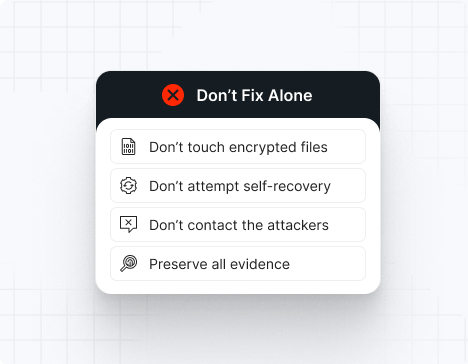
Do NOT attempt any self-remediation, as it can trigger further encryption and destroy recovery points. Instead, follow these steps:
Contact us now for urgent ransomware response assistance, 24/7
Get Help Now
Accomplishments and recognitions, demonstrating our commitment to excellence and innovation.
Momentum Leader in MDR
Best Support in MDR & IR
Managed Detection and Response (MDR)
Top Cybersecurity Company 2025
Best Managed Detection and Response Service
#4 of 184 teams Splunk Boss of the SOC
Best Of Cybersecurity Awards for Q1 2025
AWS Partner
Splunk Manage Premier Partner
Like a crime scene, a ransomware attack must be preserved — tampering with encrypted files, attempting self-recovery, or engaging with attackers can destroy critical evidence and reduce your chances of recovery.
Taking the right steps in the first moments after a SafePay attack can make a huge difference and help you make a full recovery. Request 24/7 SafePay ransomware recovery services to decrypt your data and maximize your chances of restoring operations.
Watch out for the key SafePay ransomware IOCs: .safepay file extension, ransom note readme_safepay.txt, disabled security services, shadow copy deletion, suspicious batch files in ProgramData, and tools like ShareFinder.ps1, PsExec, WinRAR, or FileZilla running in your environment.
Operates with aggressive speed, compressing initial access through full network encryption in roughly 24 hours, limiting detection and response windows.
Independent ransomware group maintaining complete operational control without affiliate infrastructure, retaining 100% of ransom payments.
Exfiltrates sensitive data before encryption and threatens publication via Tor and TON network leak sites.
Leverages both traditional Tor hidden services and innovative TON network communications for redundant command and control.
The readme_safepay.txt note will direct you to download the TOR browser and open a link to communicate with the attackers.
Unfortunately, there is no publicly available decryptor for SafePay ransomware. The group operates as a centralized, closed organization with strict control over its infrastructure, making decryption keys inaccessible without payment. The good news — UnderDefense’s incident response team is on standby to contain the attack, eliminate the malware, prevent reinfection, and restore your systems using verified, uncompromised backups so you can safely resume operations.
Important note: IOCs often change because SafePay continuously updates its tools and tactics. This list includes recurring, widely confirmed indicators based on ThreatLocker, Check Point, Picus Security, NCC Group, Acronis, Bitdefender, and IR case data.
File extensions
The original .safepay extension is the most common. Some variants may use .SafePay with different capitalization.
Ransom note filenames
The primary ransom note filename is:
readme_SafePay.txt
*The exact filename may vary slightly across different campaigns.
SafePay hashes
These are SHA256 hashes used for encrypting payloads in known attacks:
A0dc80a37eb7e2716c02a94adc8df9baedec192a77bde31669faed228d9ff526
fd509df74a8d6a9e96762337efd46280ebf8d154c6c5dfbac7b3e8f7bb61f191
625abbf876f256662f33a88c122bf787edf74b882c35adbd61562b5bd1b2ac27
921df888aaabcd828a3723f4c9f5fe8b8379c6b7067d16b2ea10152300417eae
22df7d07369d206f8d5d02cf6d365e39dd9f3b5c454a8833d0017f4cf9c35177
327b8b61eb446cc4f710771e44484f62b804ae3d262b57a56575053e2df67917
12139246b8c5232d6d074df37acddc20f0bc233e42ed8eb00dfe2af5d3de3275
241c3b02a8e7d5a2b9c99574c28200df2a0f8c8bd7ba4d262e6aa8ed1211ba1f
654c11935448b3229434ec7d9d165a5f135ae4735d35700cffcb3b84f6a0fbc3
961346470d15d7795c5e35bc90c17d293fba7a8b811f8f5c26a3dc7c971cdc4e
Mutexes
SafePay creates unique Mutexes to prevent multiple instances from running on already-encrypted devices:
Global\DB1D-19B4-5094-D570-9841-E4BC-8ABD-29AA-03BB-84AD-C61B-1355-4FF2-194B-96BD-7E49
Global\347F-7B6B-6AFB-3C55-2602-369D-65B9-58A0-16F1-0F42-35DA-0B37-52C3-293C-8975-CAB4
Global\622D-BA6A-4BE9-5D15-5C84-898C-1760-4BAF-2BB1-D7D1-389D-6C01-AAFC-1645-BB6E-DC88
Global\A8D1-50A2-679B-3D55-D639-9810-8679-7409-02EC-EF50-EA87-5641-0086-74B7-A14E-EE4C
*Typically, a different Mutex is used for each victim.
SafePay tools
For defense evasion:
regsvr32.exe (to execute DLL payloads)
rundll32.exe (alternative DLL execution)
CMSTPLUA COM interface (UAC bypass)
For credential dumping and discovery:
ShareFinder.ps1 (PowerTools collection)
Invoke-ShareFinder (network share enumeration)
For data exfiltration:
WinRAR (with complex exclusion parameters)
7-Zip
Rclone
FileZilla
RDP clipboard
For lateral movement:
PsExec
WinRM
RDP
RMM software (e.g., ScreenConnect)
Backdoors and persistence:
QDoor (BlackSuit-associated backdoor)
ScreenConnect (legitimate remote access tool)
Most common red flags
SafePay almost always runs these commands before encryption:
vssadmin delete shadows /all /quiet
wmic shadowcopy delete
bcdedit /set {default} bootstatuspolicy ignoreallfailures
bcdedit /set {default} recoveryenabled no
*If you detect these commands, data encryption is moments away.
Attack vector | % of SafePay incidents | Notes |
Compromised credentials | 45–50% | Purchased from IABs or brute-forced |
VPN/RDP exploitation | 30–35% | Misconfigured FortiGate, no MFA |
Edge device vulnerabilities | 15–20% | VPN gateways, firewalls, RD Gateway |
Phishing + initial access | 5–10% | Less common than credential-based entry |
SafePay is a highly aggressive, centralized ransomware group that operates with exceptional speed and precision.
Unlike RaaS models, SafePay maintains strict control over negotiations and infrastructure, making them unpredictable. Attacks typically move from breach to full encryption within 24 hours, leaving minimal time for detection and response. The group employs double extortion, exfiltrating sensitive data before encryption and threatening to publish it on their Tor leak site if ransom demands are not met.
Because SafePay is a closed group, there is limited intelligence on decryptor reliability. Paying the ransom does not guarantee data recovery or prevent future attacks. Organizations that pay may still face data leaks, incomplete decryption, or repeated extortion attempts.
SafePay is known to publish stolen data rapidly if negotiations stall or if victims refuse to pay.
Note: Attempting to remove SafePay ransomware without expert guidance may lead to greater data loss and incomplete eradication.
To remove SafePay ransomware, immediately engage SafePay ransomware removal experts to guide your response and ensure no critical steps are missed. Then, begin by isolating all affected systems: disconnect compromised machines from the network (disable Wi-Fi, unplug Ethernet cables, and block their IPs at the firewall).
Next, perform a comprehensive forensic analysis to uncover the depth of the breach. Use endpoint detection and response (EDR) tools to trace the attacker’s path. Collect and review file-hash indicators of compromise (IOCs), registry changes, deleted Volume Shadow Copies, and any tampering with event logs or boot configurations. After mapping the intrusion, reimage all infected devices using clean, verified system images.
Finally, rely on SafePay ransomware removal and recovery experts to validate the cleanup, conducting rootkit scans, reviewing system configurations, rotating compromised credentials, and reinforcing your security posture. Their specialized knowledge ensures thorough removal and helps prevent future incidents through strategic hardening and lessons learned.
To recover from SafePay ransomware, follow these essential steps:
Immediately isolate affected machines to stop any further malicious activity, then only reintroduce them into production once you’ve verified clean restorations and confirmed there’s no lingering malware or backdoors.
Recover your data exclusively from offline, write-protected backups, and validate their integrity by checking checksums and performing test restores in a controlled environment before full deployment.
Perform a thorough post-incident review to map the attack chain and identify root causes, then harden or rotate all credentials (especially admin/service accounts, VPN, and RDP access) to eliminate any leftover access points.
Bring in external IR specialists to audit your environment, ensure complete ransomware eradication, validate that no persistence mechanisms remain, and help update your incident-response and business-continuity plans.
SafePay ransom demands vary significantly depending on the size of the victim organization, the amount of data stolen, and the perceived ability to pay. Ransoms are almost always demanded in Bitcoin or other cryptocurrencies.
Because SafePay conducts double-extortion attacks, victims face two simultaneous financial threats:
The ransom itself (for decryption keys)
The cost of leaked, stolen, or destroyed data (reputational damage, regulatory fines, legal liability)
Organizations should never attempt ransom negotiation alone — SafePay is known to escalate threats quickly, publish data when provoked, or disappear after receiving payment if communication is mishandled. The group operates with exceptional speed, often completing attacks within 24 hours, leaving minimal time for negotiation.
Estimated ransom demands:
Small business: $100,000 – $250,000
Medium business: $400,000 – $1,200,000
Large enterprise: $1,500,000 – $5,000,000+
*Actual demands vary based on victim profile, data sensitivity, and negotiation dynamics.
10 reasons why you should choose the UnderDefense ransomware recovery consulting services:
Get Help NowSafePay is a highly active and sophisticated ransomware operation that emerged in September 2024 and rapidly became one of the top 10 most active ransomware groups by Q1 2025. The group employs double extortion tactics, encrypting victims’ data with ChaCha20 encryption while simultaneously exfiltrating sensitive information to pressure organizations into paying ransoms. SafePay’s code shares similarities with LockBit 2022 variants and incorporates elements from ALPHV and INC Ransom, demonstrating advanced technical capabilities and strategic targeting across multiple industries.
SafePay operates as a decentralized cybercrime collective with minimal public presence on dark web forums. The ransomware includes a built-in language check that prevents execution on systems configured in Russian, Ukrainian, Belarusian, Azerbaijani, Armenian, Georgian, or Kazakh, strongly suggesting the operators are based in Russian-speaking regions. The group maintains a Tor-based leak site and uses The Open Network (TON) for victim communications, obscuring their physical location and infrastructure.
SafePay typically gains initial access through compromised VPN credentials purchased on dark web marketplaces or by exploiting VPN vulnerabilities and weak passwords. Once inside, attackers use Remote Desktop Protocol for lateral movement, deploy tools like ScreenConnect for persistence, and utilize the QDoor backdoor for command and control. They disable Windows Defender using Living Off the Land Binaries (LOLBins), delete shadow copies and recovery options, then deploy ransomware that encrypts files using ChaCha20 with x25519 key exchange. Files are encrypted in blocks with the .safepay extension appended, and ransom notes titled readme_safepay.txt are dropped across compromised systems.
SafePay is known for exceptionally fast attack execution—typically moving from initial breach to full ransomware deployment in under 24 hours. In documented incidents, threat actors gained initial access through misconfigured firewalls, conducted network reconnaissance and credential harvesting within approximately 7 hours, escalated privileges and accessed file shares by day one, and deployed ransomware across the entire environment by day two. This rapid timeline leaves security teams with minimal detection and response windows.
SafePay maintains a dark web leak site accessible via Tor at their .onion address where they publish stolen data from victims who refuse to pay. The group publicly claimed 77 victims in Q1 2025 alone, making them the 9th most prevalent ransomware variant globally. Security researchers and threat intelligence platforms track SafePay disclosures, with notable concentration in the United States, United Kingdom, and Germany—where SafePay accounted for 24% of all reported ransomware victims in Q1 2025, the highest percentage for any single group in a single country.
While you can remove the SafePay malware binary itself from infected systems, this does not decrypt your files or eliminate backdoors the attackers may have installed. SafePay uses strong ChaCha20 encryption with x25519 key exchange, and no public decryptor exists. The threat actors retain the private keys necessary for decryption. Proper recovery requires professional incident response services to fully remediate the environment, remove persistence mechanisms like ScreenConnect and QDoor backdoors, reset all compromised credentials, and restore data from clean, isolated backups.
When SafePay strikes, the attack unfolds rapidly: threat actors access your network through compromised VPN credentials or firewall misconfigurations, escalate to domain administrator accounts with weak passwords, deploy persistence tools like ScreenConnect, and use the QDoor backdoor for command and control. They disable security defenses including Windows Defender, delete Volume Shadow Copies and recovery options, exfiltrate sensitive data using tools like WinRAR and FileZilla, then deploy ransomware that encrypts files in blocks with the .safepay extension. Ransom notes appear across your systems, admin passwords are changed to lock you out, and stolen data is threatened for publication on their dark web leak site.

SafePay ransomware prevention requires layered defenses: enforce strict VPN configurations with multi-factor authentication for all accounts including local and LDAP groups, implement strong password policies across all user and administrator accounts, deploy endpoint detection and response (EDR) with 24/7 monitoring, apply the principle of least privilege to limit lateral movement, segment networks to contain breaches, monitor for UAC bypass attempts and unauthorized changes to Windows Defender settings, detect unusual WinRAR command-line activity indicating data exfiltration, maintain immutable offline backups, patch VPN and firewall vulnerabilities immediately, and restrict Remote Desktop Protocol access with additional authentication layers.
Here’s a SafePay ransomware prevention checklist to protect your organization from this fast-moving threat:
Configure VPN to require MFA for all account types (local, LDAP, domain)
Enforce strong password policies and eliminate weak credentials
Deploy EDR with behavioral detection for LOLBins and UAC bypass attempts
Monitor for unauthorized Windows Defender configuration changes
Implement network segmentation to limit lateral movement
Restrict and monitor Remote Desktop Protocol access
Apply least privilege access controls for all accounts
Maintain immutable, offline backups tested regularly
Patch VPN and firewall vulnerabilities within 48 hours
Monitor for suspicious remote access tools like ScreenConnect
Detect unusual archiving and exfiltration activity (WinRAR, FileZilla)
Enable Volume Shadow Copy protection and recovery options
Conduct incident response tabletop exercises for sub-24-hour attack scenarios