Security & Compliance Automation Platform
UnderDefense MAXI is the solution to day-to-day cybersecurity problems of IT leaders and teams. It builds your 24/7 business protection together with you on the driver’s seat.
UnderDefense MAXI Platform
UnderDefense Secures Top Honor at the 2025 Global Infosec Awards
We’re proud of being a winner at the 2025 Global Infosec Awards…
10-Point AWS Security Checklist for Executives
Quickly assess your cloud security posture with this executive-ready checklist covering IAM, monitoring, and compliance essentials.
Anti-Phishing Playbook
Your free PDF guide to spotting and stopping phishing attacks before they reach your team or data.
24/7 Threat Detection & MAXImum Responsiveness
Our human-led MDR service combines expert insight and automation and AI for fast, precise threat response. Get full context in 2 minutes and cut MTTC to 15, staying ahead of ransomware and other attacks.
Calculate your MDR price
Pay only for the services you actually need, with no hidden costs.
10-Point AWS Security Checklist for Executives
Quickly assess your cloud security posture with this executive-ready checklist covering IAM, monitoring, and compliance essentials.
Anti-Phishing Playbook
Your free PDF guide to spotting and stopping phishing attacks before they reach your team or data.
Spot threats faster and respond smarter than tools alone
24/7 MDR and SOC services led by award-winning security experts. We act as an extension to your team or as a fully remote team, providing detailed threat insights and actionable responses to secure your environment immediately.
UnderDefense is an AWS Partner
We’re excited to announce that UnderDefense is now an AWS partner and available on AWS Marketplace…
Managed SOC at Your Service
Augment your SOC with 24/7 monitoring, threat detection, and expert response—without the overhead. Integrated with your existing tools, our SOCaaS stops attacks before they cause harm.
Managed SIEM Pricing Guide
Download a clear, practical overview of Managed SIEM pricing, featuring detailed breakdowns by service type, pricing model, real-world pros and cons, and key cost factors.
Managed SOC at Your Service
Augment your SOC with 24/7 monitoring, threat detection, and expert response—without the overhead. Integrated with your existing tools, our SOCaaS stops attacks before they cause harm.
Managed SIEM Pricing Guide
Download a clear, practical overview of Managed SIEM pricing, featuring detailed breakdowns by service type, pricing model, real-world pros and cons, and key cost factors.

RansomHub ransomware recovery team on standby
Do NOT negotiate with RansomHub or attempt to decrypt files on your own—this can worsen the attack and risk permanent data loss. Instead, engage UnderDefense’s incident response experts now to contain the breach, recover operations, and protect your organization’s future.
Average Mttc
Ransom-Free recovery rate
Avoided in ransom
Global availability
Systems restored
IR experts
Ransomware cases resolved
IR experience
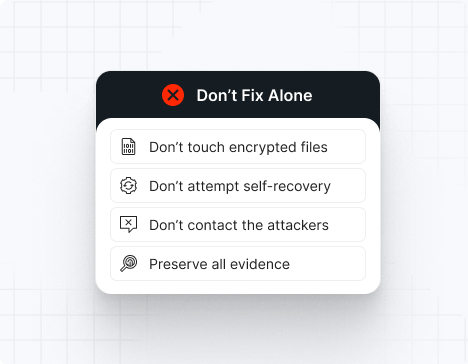
Do NOT attempt any self-remediation, as it can trigger further encryption and destroy recovery points. Instead, follow these steps:
Contact us now for urgent ransomware response assistance, 24/7
Get Help Now
Accomplishments and recognitions, demonstrating our commitment to excellence and innovation.
Momentum Leader in MDR
Best Support in MDR & IR
Managed Detection and Response (MDR)
Top Cybersecurity Company 2025
Best Managed Detection and Response Service
#4 of 184 teams Splunk Boss of the SOC
Best Of Cybersecurity Awards for Q1 2025
AWS Partner
Splunk Manage Premier Partner
Like a crime scene, a ransomware attack must be preserved — tampering with encrypted files, attempting self-recovery, or engaging with attackers can destroy critical evidence and reduce your chances of recovery.
Taking the right steps in the first moments after a RansomHub attack can make a huge difference and help you make a full recovery. Request 24/7 RansomHub ransomware recovery services to decrypt your data and maximize your chances of restoring operations.
Watch out for the key RansomHub ransomware IOCs: encrypted files with random extensions, ransom notes titled “How To Restore Your Files.txt,” disabled EDR and antivirus solutions, deleted shadow copies, suspicious admin account creation, and tools like RClone, PsExec, Mimikatz, or AnyDesk running in your environment.
Uses ECDH and AES encryption algorithms with intermittent encryption patterns, appending a 32-byte master public key to encrypted files and requiring a passphrase to execute.
Affiliate-driven attacks with 90% ransom split to affiliates, using shared tools and infrastructure, with initial access gained through phishing, VPN compromise, or exploiting known vulnerabilities like CVE-2023-3519 and CVE-2023-27997.
Steals data before encryption using tools like RClone and MEGAsync, threatens to publish stolen information on their Tor-based leak site within 3 to 90 days if ransom isn't paid.
Targets Windows, Linux, and VMware ESXi environments across entire networks, terminates critical processes and services, and disables system recovery by deleting shadow copies and backups.
The note titled "How To Restore Your Files.txt" provides a unique client ID and directs victims to contact the group via a .onion URL accessible through the Tor browser to negotiate payment.
Unfortunately, there is no publicly available decryptor for RansomHub ransomware. The encryption uses Curve 25519 (ECDH) combined with AES, making decryption without the private key virtually impossible. The good news — UnderDefense’s incident response team is on standby to contain the attack, eliminate the malware, prevent reinfection, and restore your systems using verified, uncompromised backups so you can safely resume operations.
Important note: IOCs often change because RansomHub constantly updates its tools and affiliates operate with varying techniques. This list includes recurring, widely confirmed indicators based on FBI, CISA, Trend Micro, GuidePoint Security, Group-IB, and IR case data.
File extensions
RansomHub appends the first six characters of the master public key as the file extension to encrypted files. Examples include random alphanumeric strings such as .a3f8e2, .7b9c1d, or similar variations unique to each victim.
Ransom note filenames
The ransom note is typically named:
README_{first six characters of master public key}.txt
How To Restore Your Files.txt
*The exact filenames vary by affiliate and campaign.
RansomHub hashes
These are SHA256 hashes used for encrypting payloads in known attacks:
(Note: Specific hashes were not provided in available sources; organizations should consult CISA AA24-242A advisory and Trend Micro Intelligence Reports for updated hash lists)
RansomHub tools
For EDR disabling:
EDR Kill Shifter (BYOVD technique)
TDSSKiller
TOGGLEDEFENDER
STONESTOP (uses signed POORTRY driver)
IOBit Unlocker
Modified Secure Common Uninstall Tool (SCUT)
AMSI Bypass Patcher
GMER
For credential dumping:
Mimikatz
LaZagne
SecretServerSecretStealer
Veeamp (Veeam credential dumper)
Nanodump
For reconnaissance:
NetScan
Advanced Port Scanner
AngryIPScanner
nbtscan
For data exfiltration:
RClone
WinSCP
MEGAsync
PuTTY
Amazon AWS S3 buckets
For lateral movement:
PsExec
SMB Spreader (uses Impacket)
AnyDesk
Atera
Splashtop
Ngrok
ConnectWise Screen Connect
Remmina
Malware:
NODESTEALER (Python-based)
XWORM
COBEACON
SocGholish (initial access framework)
Betruger
Python SOCKS5 Proxy Client
Most common red flags
RansomHub almost always runs these commands:
powershell.exe -Command “Get-CimInstance Win32_ShadowCopy | Remove-CimInstance”
cmd.exe /c iisreset.exe /stop
powershell.exe -Command “Get-VM | Stop-VM -Force”
vssadmin Delete Shadows /All /Quiet
bcdedit /set {default} recoveryenabled No
*If you detect these, data encryption is moments away.
Attack vector | % of RansomHub incidents | Notes |
Phishing + social engineering | 35–40% | Spear-phishing voice scams, malicious attachments, SocGholish framework |
Exploited vulnerabilities | 30–35% | CVE-2023-3519, CVE-2023-27997, CVE-2023-46604, CVE-2023-22515, CVE-2023-46747, CVE-2023-48788, CVE-2017-0144, CVE-2020-1472 |
Compromised VPN/RDP | 15–20% | Password spraying, brute force, stolen credentials |
Insider/Supply chain access | 5–10% | Compromised MSP tools, RMM abuse |
Malvertising/Fake updates | 3–5% | SocGholish-style redirects |
RansomHub is unpredictable and extremely dangerous.
Some affiliates provide decryptors after payment, but many are slow, unstable, or incomplete — especially on ESXi environments. Victims often face repeated extortion attempts even after paying. Partial data recovery failures are common when backups are destroyed or encrypted. RansomHub is known to publish stolen data within 3 to 90 days if negotiations stall or fail, depending on the affiliate.
The group’s double-extortion model means victims face two simultaneous threats: encrypted systems and leaked sensitive data.
Note: Attempting to remove RansomHub ransomware without expert guidance may lead to greater data loss and incomplete eradication.
To remove RansomHub ransomware, immediately engage RansomHub ransomware removal experts to guide your response and ensure no critical steps are missed. Then, begin by isolating all affected systems: disconnect compromised machines from the network (disable Wi-Fi, unplug Ethernet cables, and block their IPs at the firewall).
Next, perform a comprehensive forensic analysis to uncover the depth of the breach. Use endpoint detection and response (EDR) tools to trace the attacker’s path. Collect and review file-hash indicators of compromise (IOCs), registry changes, deleted Volume Shadow Copies, cleared event logs, and any tampering with security software. After mapping the intrusion, reimage all infected devices using clean, verified system images.
Finally, rely on RansomHub ransomware removal and recovery experts to validate the cleanup, conducting rootkit scans, reviewing system configurations, rotating compromised credentials (especially admin/service accounts), and reinforcing your security posture. Their specialized knowledge ensures thorough removal and helps prevent future incidents through strategic hardening and lessons learned.
To recover from RansomHub ransomware, follow these essential steps:
Immediately isolate affected machines to stop any further malicious activity, then only reintroduce them into production once you’ve verified clean restorations and confirmed there’s no lingering malware.
Recover your data exclusively from offline, write-protected backups, and validate their integrity by checking checksums and performing test restores in a controlled environment.
Perform a thorough post-incident review to map the attack chain and identify root causes, then harden or rotate all credentials (especially admin/service accounts and VPN access) to eliminate any leftover access points.
Bring in external IR specialists to audit your environment, ensure complete ransomware eradication, patch exploited vulnerabilities (prioritize CVEs listed above), and help update your incident-response and business-continuity plans.
RansomHub ransom demands vary widely depending on the size of the victim organization and the amount of data stolen. Ransoms are almost always demanded in Bitcoin or Monero.
Because RansomHub conducts double-extortion attacks, victims face two simultaneous financial threats:
The ransom itself
The cost of leaked, stolen, or destroyed data
Organizations should never attempt ransom negotiation alone — RansomHub affiliates are known to escalate threats quickly, publish data when provoked, or disappear after receiving payment if communication is mishandled.
Average ransom estimates:
Small business: $100,000 – $500,000
Medium business: $500,000 – $2,000,000
Large enterprise: $2,000,000 – $5,000,000+
Note: Affiliates keep 90% of the ransom, with 10% going to the RansomHub operators — one of the highest affiliate payouts in the RaaS ecosystem, which has attracted high-profile affiliates from LockBit and ALPHV.
10 reasons why you should choose the UnderDefense ransomware recovery consulting services:
Get Help NowRansomHub is a highly aggressive Ransomware-as-a-Service (RaaS) operation that emerged in February 2024 and quickly gained notoriety for targeting large enterprises through “big game hunting” tactics. The group breaches networks, exfiltrates sensitive data, disables security defenses, and rapidly encrypts systems using ECDH and AES encryption algorithms before demanding substantial ransoms. Stolen data is then published on RansomHub’s dark-web leak site to pressure victims into paying. The group has claimed over 800 victims worldwide across 75+ countries in just over a year of operation.
RansomHub operates as a decentralized RaaS collective, recruiting affiliates through the Russian cybercriminal dark web forum RAMP and using Tor-based infrastructure to obscure its origins. While the group is believed to be run by Russian-speaking actors with possible links to former BlackCat (ALPHV) and Knight ransomware operators, there is no officially confirmed physical location. The group adheres to strict rules: they avoid targeting the Commonwealth of Independent States (CIS), Cuba, North Korea, and China.
RansomHub typically infiltrates through spear-phishing attacks, compromised VPN credentials, or exploited vulnerabilities like CVE-2023-27532 in Veeam Backup & Replication. Once inside, attackers use tools like MIMIKATZ and LaZagne to steal credentials, deploy NetScan and Advanced Port Scanner to map the network, and move laterally via PsExec and SMB spreaders.
They exfiltrate data using RClone or MEGAsync, disable security defenses with TDSSKiller, EDR Kill Shifter, and modified uninstall tools, then rapidly encrypt files using ECDH and AES encryption. The ransomware requires a 32-byte passphrase to execute and appends the first six characters of the master public key as a file extension.
Finally, they drop ransom notes in every directory, delete shadow copies, and may establish remote access via AnyDesk, Splashtop, or ScreenConnect.
RansomHub’s encryption phase is devastatingly fast — small networks can be locked down in minutes, while larger enterprises may be encrypted within hours. However, the attack typically begins weeks earlier: attackers spend days or even weeks inside the network undetected, quietly stealing credentials, mapping systems, exfiltrating data, destroying backups, and disabling security tools before launching the simultaneous encryption across all systems.

There is no official public list of RansomHub victims, but confirmed cases are published on RansomHub’s own dark-web leak site and later reported by cybersecurity researchers, threat intelligence platforms, and media outlets that track ransomware disclosures. As of March 2025, the group had listed at least 748 victims on their leak site before operations were taken over by DragonForce in April 2025. Security teams often monitor these leak portals, CTI feeds, and DFIR reports to stay updated on newly named victims.
You can remove the RansomHub malware itself, but that does nothing to decrypt your files or stop the attack. Because there is no public decryptor for RansomHub and the threat actors often leave backdoors like XWORM, COBEACON, or Python SOCKS5 proxies behind, proper recovery requires professional incident response, full environment cleanup, credential rotation, and restoration from uncompromised backups. The ransomware requires a specific 32-byte passphrase to decrypt files, which only the attackers possess.
RansomHub attackers typically infiltrate your network days or weeks before encryption, quietly stealing credentials using tools like MIMIKATZ and LaZagne, disabling EDR and backup solutions with TDSSKiller and EDR Kill Shifter, and exfiltrating sensitive data via RClone or MEGAsync. When the ransomware detonates, files across Windows, Linux, and ESXi systems are rapidly encrypted with ECDH and AES algorithms, shadow copies are wiped using PowerShell commands, and ransom notes appear in every directory. Soon after, stolen data is threatened or published on the gang’s dark-web leak site to pressure victims into paying.
Ransomware is best prevented through layered security: patching critical vulnerabilities like CVE-2023-27532 within 48 hours, enforcing phishing-resistant MFA on all accounts including VPN access, deploying EDR with behavioral detection and 24/7 monitoring, segmenting networks to limit lateral movement, hardening identity and admin access, securing email gateways against spear-phishing, and protecting backups with immutability and offline storage so attackers cannot tamper with them. Employee security awareness training, regular vulnerability assessments, and continuous threat-hunting further reduce risk.
Here’s a ransomware prevention checklist that will help your organization block, detect, and contain attacks:
Patch critical vulnerabilities within 48 hours, especially CVE-2023-27532
Enforce MFA on all accounts, VPN, and remote access tools
Deploy EDR with behavioral detection on all endpoints and servers
Centralize logs into SIEM with 24/7 monitoring
Monitor for lateral movement tools like PsExec and credential dumping
Disable unused RDP and enforce VPN access controls with MFA
Apply network segmentation and restrict admin privileges
Harden backup servers with immutability and offline storage
Implement email security to block spear-phishing and malicious attachments
Run phishing simulations and security awareness training
Perform regular vulnerability assessments and penetration testing
Monitor for suspicious tools like MIMIKATZ, LaZagne, and RClone
Establish incident response plans and conduct tabletop exercises