









Play Ransomware: Remove and Recover Fast
Removing Play ransomware from a compromised system is a tough nut to crack, especially when financial and reputational stakes are high. Learn how Play hackers operate and how to respond to ransomware threats in our expert overview.
What is Play ransomware?
Play (aka PlayCrypt) is a highly aggressive ransomware group with about 900 confirmed attacks between mid-2022 and May 2025. It targets organizations across North and South America and Europe, encrypting data and demanding ransoms in the thousands to millions of dollars. The group steals sensitive information and publishes it on its leak site to pressure victims.
How does Play ransomware work?
Play ransomware works by exploiting known vulnerabilities, often in Remote Desktop Protocol (RDP) servers or Fortinet FortiOS, to gain access to systems. The Play ransomware group also uses ProxyNotShell exploits to breach networks. Once inside, attackers avoid detection using such tools as AnyDesk or NetScan. They spread the ransomware and conduct lateral movement. Play uses intermittent encryption, encrypting only some parts of the files, to bypass traditional malware defenses.
What does Play ransomware target?
The Play ransomware gang targets government agencies, healthcare providers, financial and legal institutions, and municipalities. The group frequently attacks organizations with exposed remote access services, weak perimeter defenses, and large data storage units to maximize the pressure and potential payout.
Who is behind the Play ransomware group?
The individuals behind the Play ransomware group are unknown, and their origin has not been identified. However, in 2023, one of the Play attacks was linked to Jumpy Pisces, a threat group previously sponsored by the North Korean government. This might mean that some Play attackers collaborate with state-affiliated hackers, even though most incidents follow the profit-driven RaaS model.
How to detect Play ransomware?
Detecting Play ransomware actors requires searching for specific file extensions, malicious use of admin software, and lateral movement. Here’s what you need to look for in more detail:
- Stay sharp for suspicious file extensions. Hackers usually add a .play extension for encryption.
- Pay attention to shady use of admin tools. Monitor for unusual activity within remote management tools like AnyDesk or Advanced IP Scanner.
- Monitor abnormalities in system processes. If your system abruptly terminates a certain process or runs unfamiliar executables, you might be hit by Play ransomware.
- Look for lateral movement via group policy object (GPO). GPOs are connected to the management configuration, and any changes can take control of your organization.
- Identify stealth techniques. Play hackers often misuse legitimate Windows tools to avoid detection by traditional antivirus software.
How to remove Play ransomware?
To remove Play ransomware, quarantine infected parts of your network, identify the entry point using cybersecurity services, and disable malicious software.
- Disconnect infected devices and software immediately. You need to isolate compromised parts of the network to stop further encryption.
- Engage a cybersecurity team. Contact security experts to help you find an intrusion path and safely remove the ransomware.
- Terminate malicious tools. The cybersecurity team will detect unauthorized use of your tools and shut them down without risking data loss.
- Clean the system. After forensic evidence is collected, wipe compromised parts of the system and reinstall clean versions.
- Patch the vulnerabilities that caused the breach or might cause it in the future. Close exploited remote desktop protocol (RDP) ports and patch the system.
How to mitigate Play ransomware?
Play ransomware mitigation mostly includes network segmentation, enhanced permission controls, the use of an EDR system, and regular updates.
- Segment your network. Limit access across systems to prevent exposing your entire infrastructure with one compromised account.
- Apply strong access controls. Restrict user permissions to reduce possible attacks.
- Deploy endpoint protection with a reliable EDR system. Detect and stop ransomware early on with security tools working in real time.
- Keep systems updated. Integrate software updates regularly to fix known vulnerabilities.
- Create a ransomware response plan. Decide how to maintain backups and isolate infected systems in case of an attack.
- Implement offline backups. Use secure backups to restore critical data fast after the attack.
How to recover from a Play ransomware attack?
Recovering from a Play ransomware attack involves partnering up with cybersecurity specialists to ensure system safety, checking your backup for malware traces, and updating your infrastructure.
- Collaborate with a cybersecurity incident response team. Experts can evaluate the full attack scope and ensure there’s no hidden malware left in your system.
- Ensure your backup is clean. Use offline, verified backups and scan them for signs of infection to avoid a relapse.
- Rebuild compromised infrastructure. Update all compromised services, apps, and operating systems using trusted sources.
- Update your credentials. Use new strong passwords across the whole network.
- Improve your security approach. Work with your cybersecurity team to improve network segmentation and deploy advanced incident response methods.
The right actions in the first moments after a Play ransomware attack can make the difference between full recovery and permanent loss. Follow these steps to protect your data and maximize your chances of restoring operations.
What to Do If Your System Is Compromised By Play
Contact us now for urgent assistance, 24/7
How does the Play ransomware note look like
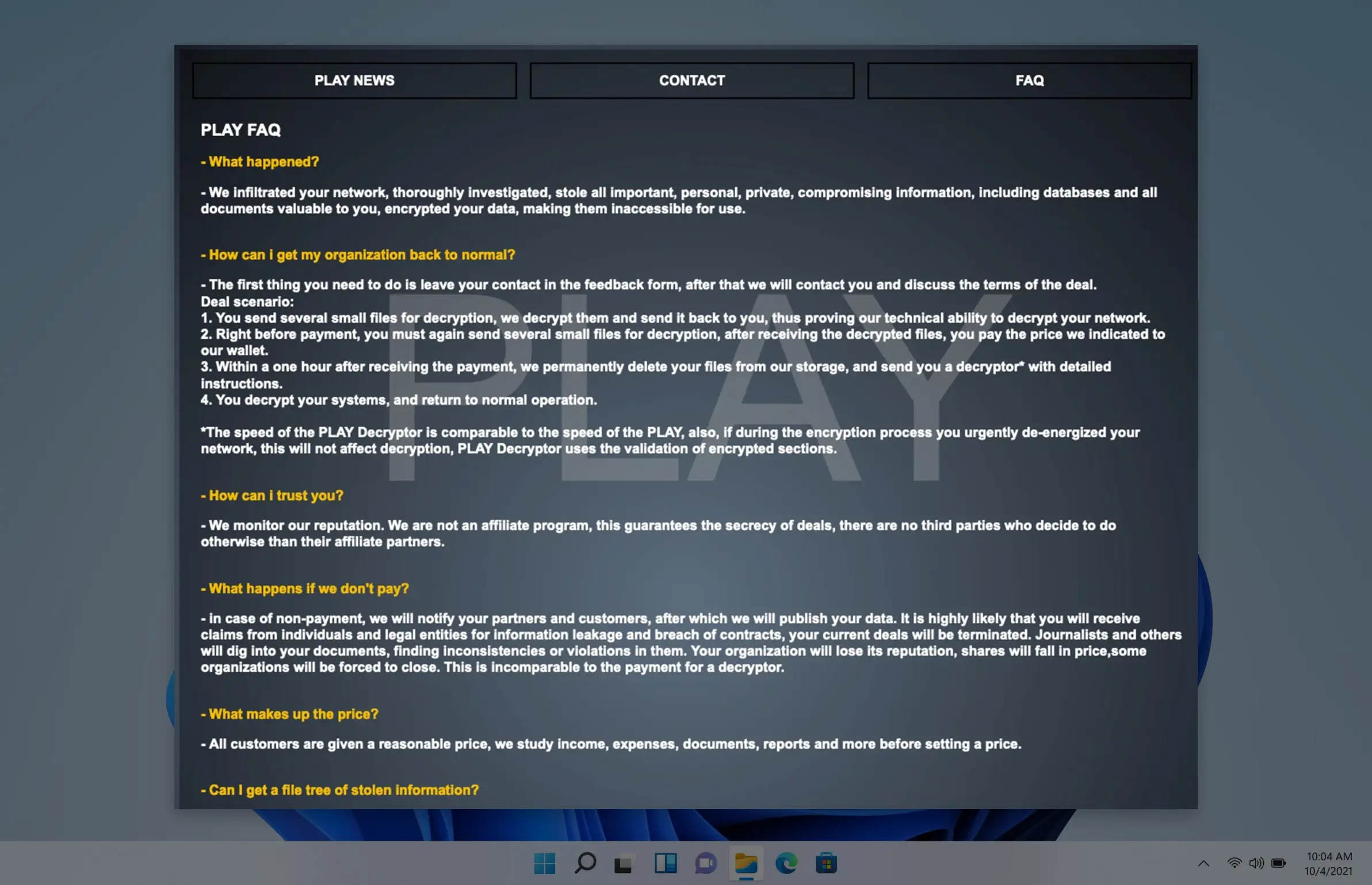
Frequently asked questions
How does Play Ransomware spread?

Play ransomware spreads by exploiting known vulnerabilities and entering through weak remote access points. Hackers rely on lateral movement when they get inside the network to avoid detection.
How to prevent Play ransomware?
What does the Play ransomware negotiation process look like?
Who are the main Play ransomware victims?
What is the Play ransomware lifecycle?
How does Play ransomware get on your computer?