Security & Compliance Automation Platform
UnderDefense MAXI is the solution to day-to-day cybersecurity problems of IT leaders and teams. It builds your 24/7 business protection together with you on the driver’s seat.
UnderDefense MAXI Platform
UnderDefense Secures Top Honor at the 2025 Global Infosec Awards
We’re proud of being a winner at the 2025 Global Infosec Awards…
10-Point AWS Security Checklist for Executives
Quickly assess your cloud security posture with this executive-ready checklist covering IAM, monitoring, and compliance essentials.
Anti-Phishing Playbook
Your free PDF guide to spotting and stopping phishing attacks before they reach your team or data.
24/7 Threat Detection & MAXImum Responsiveness
Our human-led MDR service combines expert insight and automation and AI for fast, precise threat response. Get full context in 2 minutes and cut MTTC to 15, staying ahead of ransomware and other attacks.
Calculate your MDR price
Pay only for the services you actually need, with no hidden costs.
10-Point AWS Security Checklist for Executives
Quickly assess your cloud security posture with this executive-ready checklist covering IAM, monitoring, and compliance essentials.
Anti-Phishing Playbook
Your free PDF guide to spotting and stopping phishing attacks before they reach your team or data.
Spot threats faster and respond smarter than tools alone
24/7 MDR and SOC services led by award-winning security experts. We act as an extension to your team or as a fully remote team, providing detailed threat insights and actionable responses to secure your environment immediately.
UnderDefense is an AWS Partner
We’re excited to announce that UnderDefense is now an AWS partner and available on AWS Marketplace…
Managed SOC at Your Service
Augment your SOC with 24/7 monitoring, threat detection, and expert response—without the overhead. Integrated with your existing tools, our SOCaaS stops attacks before they cause harm.
Managed SIEM Pricing Guide
Download a clear, practical overview of Managed SIEM pricing, featuring detailed breakdowns by service type, pricing model, real-world pros and cons, and key cost factors.
Managed SOC at Your Service
Augment your SOC with 24/7 monitoring, threat detection, and expert response—without the overhead. Integrated with your existing tools, our SOCaaS stops attacks before they cause harm.
Managed SIEM Pricing Guide
Download a clear, practical overview of Managed SIEM pricing, featuring detailed breakdowns by service type, pricing model, real-world pros and cons, and key cost factors.

MedusaLocker ransomware recovery team on standby
MedusaLocker has targeted healthcare, education, and government organizations since 2019, exploiting RDP vulnerabilities and leveraging AES-256 + RSA-2048 encryption to lock critical files. Do not attempt decryption or removal alone — isolate affected systems immediately and engage UnderDefense's incident response team to contain the attack.
Average Mttc
Ransom-Free recovery rate
Avoided in ransom
Global availability
Systems restored
IR experts
Ransomware cases resolved
IR experience
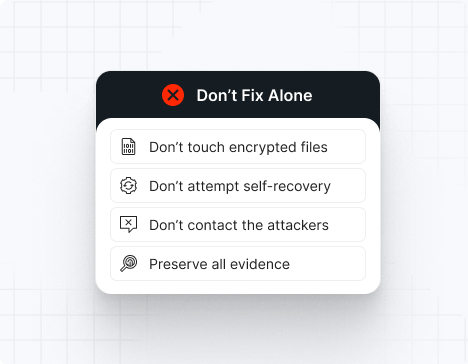
Do NOT attempt any self-remediation, as it can trigger further encryption and destroy recovery points. Instead, follow these steps:
Contact us now for urgent ransomware response assistance, 24/7
Get Help Now
Accomplishments and recognitions, demonstrating our commitment to excellence and innovation.
Momentum Leader in MDR
Best Support in MDR & IR
Managed Detection and Response (MDR)
Top Cybersecurity Company 2025
Best Managed Detection and Response Service
#4 of 184 teams Splunk Boss of the SOC
Best Of Cybersecurity Awards for Q1 2025
AWS Partner
Splunk Manage Premier Partner
Like a crime scene, a ransomware attack must be preserved — tampering with encrypted files, attempting self-recovery, or engaging with attackers can destroy critical evidence and reduce your chances of recovery.
Taking the right steps in the first moments after a MedusaLocker attack can make a huge difference and help you make a full recovery. Request 24/7 MedusaLocker ransomware recovery services to decrypt your data and maximize your chances of restoring operations.
Watch for MedusaLocker’s indicators of compromise: file extensions including .deadfiles, .readinstructions, .lockfiles (varying per incident), ransom notes named How_to_back_files.html or similar, disabled backup services, deleted shadow copies, RDP activity logs showing brute-force attempts or unusual successful logins, and evidence of credential dumping and lateral movement. The group employs double extortion with data exfiltration before encryption.
Uses AES-256 for fast symmetric encryption of large files paired with RSA-2048 public-key encryption for key protection, making brute-force decryption computationally infeasible.
Scans for exposed RDP services (TCP port 3389) and conducts password brute-force attacks against common usernames (administrator, guest) and weak password dictionaries to gain network access.
Recruits affiliates to conduct initial access and lateral movement; RaaS operators maintain infrastructure for ransom negotiation and decryption key management.
Exfiltrates sensitive data (patient records, financial documents, personal information) before encryption, using data-breach threats alongside encryption pressure to maximize ransom likelihood.
Typically provides How_to_back_files.html or How_To_Restore_FILES.html files with instructions for accessing a Tor-based ransom website and paying the bitcoin ransom demand.
A public decryptor exists for some older MedusaLocker variants (v1 and early v2), but no decryptor exists for current versions (v3+). Check Emsisoft or No More Ransom websites to verify if your variant has a public decryptor before paying any ransom.
Indicators are identified through RDP logs, Windows Event Log entries, ransom note patterns, file extension analysis, and dark web leak site monitoring.
File extensions
.deadfiles, .readinstructions, .lockfiles, .encrypted, .medusa, or sometimes random 4-8 character extensions (varies per incident)
Ransom note filenames
How_to_back_files.html, How_To_Restore_FILES.html, README.txt, RESTORE_YOUR_FILES.txt (varies per variant and affiliate)
MedusaLocker hashes
SHA256 hashes vary across samples and versions; representative MedusaLocker binaries from v1, v2, and v3 variants have been analyzed by Bleeping Computer, Kaspersky, and Emsisoft. No single hash signature represents all variants. Binaries are compiled with different parameters per affiliate deployment, making hash-based detection unreliable.
MedusaLocker tools
– Initial access: RDP brute-force attacks, phishing emails with malicious attachments (historical)
– Credential dumping: Mimikatz, procdump, hashdump, credential manager extraction
– Lateral movement: PsExec, WinRM, Kerberoasting, pass-the-hash attacks
– Persistence: Scheduled tasks, registry run keys, WMI event subscriptions, rogue local accounts
– Data exfiltration: FileZilla, WinRAR, Rclone, or custom exfiltration scripts
– Encryption: MedusaLocker ransomware binary deploying AES-256 + RSA-2048
– Defense evasion: Disabling Windows Defender, deleting shadow copies (vssadmin), clearing event logs
Most common red flag
RDP brute-force login attempts followed by successful administrative RDP session, followed within hours by powershell.exe execution with commands to disable Windows Defender and delete shadow copies: `vssadmin delete shadows /all /quiet`.
Attack vector | % of MedusaLocker incidents | Notes |
RDP brute-force with weak passwords | 65% | Exposed port 3389 with weak or default credentials |
Phishing emails with malicious attachments | 20% | Macro-enabled documents or direct executable attachments (historical, less common 2024) |
Compromised RDP credentials from data breaches | 10% | Credentials obtained from previous breaches or dark web credential dumps |
Unpatched RDP vulnerability exploitation | 5% | Legacy CVEs in Windows RDP or RDP gateway software |
MedusaLocker victims typically experience 1–3 week campaigns from initial RDP compromise to ransom demand. Organizations with poor network segmentation report encryption spreading to all accessible systems within 24–48 hours. Negotiation phases typically last 1–3 weeks, with ransom demands ranging from $30,000 (small organizations) to $1,000,000+ (large enterprises). One documented healthcare victim paid $250,000 to recover patient records within 48 hours of encryption. Education sector victims report average ransom payments of $80,000–$150,000. Law enforcement (FBI, HHS) has published warnings on MedusaLocker targeting healthcare organizations.
1. Immediately block or disable RDP access from the internet—restrict RDP to internal networks only via VPN.
2. Force logout all active RDP sessions; change all RDP account passwords using a clean, air-gapped machine.
3. Isolate all infected systems from the network and boot into safe mode.
4. Scan with updated antivirus/EDR tools to locate and remove the MedusaLocker binary.
5. Remove any secondary persistence mechanisms (scheduled tasks, registry run keys, WMI event subscriptions).
6. Restore system registry hives from backup if attackers modified them (System, SAM, Security).
7. Check Event Viewer for evidence of other administrative account creation or lateral movement attempts.
8. Rebuild systems from clean images rather than attempting file-by-file removal.
1. Restore encrypted files from clean backups created before the RDP compromise (test in isolated environment first).
2. Check No More Ransom or Emsisoft websites to confirm whether your MedusaLocker variant has a public decryptor.
3. If no backups or public decryptor exist, decrypt using the MedusaLocker decryption key (if obtained via ransom payment or law enforcement recovery).
4. Validate all restored files through integrity checks and application-level testing.
5. Implement network segmentation isolating critical systems from general networks.
6. Deploy EDR solutions on all systems to detect future intrusion attempts.
7. Implement continuous incremental backups with immutable storage.
8. Force password resets and implement multi-factor authentication on all critical accounts.
MedusaLocker operators typically demand $30,000–$1,000,000+ depending on organization size, sector, and data sensitivity. Healthcare organizations report average demands of $200,000–$500,000; education sector victims report $80,000–$250,000; smaller organizations report $30,000–$100,000. Negotiation typically reduces initial demands by 30–50%. Payment is demanded in cryptocurrency (Bitcoin or Monero).
10 reasons why you should choose the UnderDefense ransomware recovery consulting services:
Get Help NowMedusaLocker is a ransomware-as-a-service operation that emerged in September 2019 and primarily targets healthcare, education, and government organizations. The group initially relied on phishing emails with malicious attachments as the primary attack vector. However, in 2022, the group shifted strategy to exploit exposed RDP services with weak passwords, making RDP brute-force attacks the dominant initial access method. MedusaLocker encrypts files using AES-256 symmetric encryption paired with RSA-2048 public-key encryption, employs a RaaS model recruiting affiliates to conduct initial access and lateral movement, and operates double extortion by exfiltrating data before encryption.
Operational patterns suggest MedusaLocker operators are based in Eastern Europe or the CIS region. The group’s focus on English-language ransom notes and healthcare-targeting suggests possible Russian or Ukrainian origin. No definitive geolocation has been published by threat intelligence firms.
MedusaLocker attacks begin with RDP service scanning and brute-force password attacks against common usernames (administrator, guest) using weak password dictionaries. Once an RDP account is compromised, attackers connect to the network and conduct lateral movement using stolen credentials, Mimikatz for credential dumping, and tools like PsExec for command execution. Attackers identify and exfiltrate sensitive data (patient records, financial data, personal information) using tools like FileZilla or Rclone. Finally, the MedusaLocker ransomware binary is deployed across the network to encrypt all accessible files. Ransom notes (How_to_back_files.html) are dropped in user directories.
From initial RDP brute-force compromise to encryption and ransom demand, MedusaLocker attacks typically span 1–3 weeks. RDP compromise to credential dumping may take 1–5 days; lateral movement and data exfiltration occupy 5–15 days; encryption deployment occurs within final 24–48 hours.
MedusaLocker-encrypted files cannot be decrypted without the RSA-2048 private key held by operators. Older variants (v1 and early v2) have public decryptors available from Emsisoft or No More Ransom—check these websites before paying any ransom. Current variants (v3+) have no public decryptor. Deletion of the malware stops further encryption but does not recover encrypted files.
When MedusaLocker infects your network via RDP compromise, files are encrypted with various extensions (.deadfiles, .readinstructions, .lockfiles, etc.) and become inaccessible. You discover the compromise when users report inability to access files and systems become unresponsive. Ransom notes (How_to_back_files.html) appear on all infected systems, directing you to access a Tor website with a unique victim ID to negotiate. Additionally, a ransom note appears on the dark web leak site, threatening to publish exfiltrated data if you do not pay within 3–7 days.

Prevent MedusaLocker attacks by: (1) disabling or restricting RDP access from the internet—expose RDP only via VPN with MFA; (2) enforcing strong, unique passwords (minimum 16 characters) on all RDP accounts; (3) implementing multi-factor authentication on all RDP and VPN access; (4) monitoring RDP login logs for brute-force attempts and failed logins; (5) implementing network segmentation isolating critical systems from general corporate networks; (6) deploying EDR solutions with behavioral detection for credential dumping and lateral movement; (7) maintaining immutable, off-site backups; (8) disabling RDP on systems that do not require it; and (9) blocking RDP on non-standard ports if possible.
– Disable RDP access from the internet entirely; expose RDP only via VPN
– Require multi-factor authentication on all RDP and VPN endpoints
– Enforce strong, unique passwords (minimum 16 characters) on all RDP accounts
– Monitor and alert on RDP login failures (brute-force attempts) and unusual successful logins
– Implement network segmentation isolating critical systems from general corporate networks
– Deploy EDR solutions with behavioral detection for credential dumping and lateral movement activity
– Create daily incremental backups with immutable (write-once) offline storage
– Test backup restoration monthly to ensure recovery capability
– Disable RDP on systems that do not require it
– Implement firewall rules restricting RDP access by source IP if possible
– Monitor for unusual PowerShell execution (particularly vssadmin delete shadows) and alert on shadow copy deletion
– Implement local admin password management (LAPS) to randomize and secure local account passwords
– Conduct quarterly vulnerability scans of all systems for unpatched RDP vulnerabilities
MedusaLocker is one of the longest-running ransomware operations (active since 2019) and represents the traditional encryption-based RaaS model. Newer groups like Sarcoma employ “Living Off the Land Remotely” tactics using legitimate RMM tools, while Cicada3301 specifically targets virtualized infrastructure (ESXi hypervisors). MedusaLocker’s RDP-focused approach is more of an “opportunistic” targeting strategy—the group scans broadly for exposed RDP services rather than conducting targeted reconnaissance. This makes MedusaLocker both easier to defend against (disable RDP) and more likely to impact smaller organizations with exposed remote access infrastructure.
Yes, for some older variants. Emsisoft released a free decryptor for MedusaLocker v1 and v2 variants, available at the No More Ransom project (nomoreransom.org). Check the website to see if your specific variant has a public decryptor before paying any ransom. However, no public decryptors exist for current MedusaLocker v3 variants, making air-gapped backups the only reliable recovery option for recent attacks.