What to do if you're hit by ransomware?

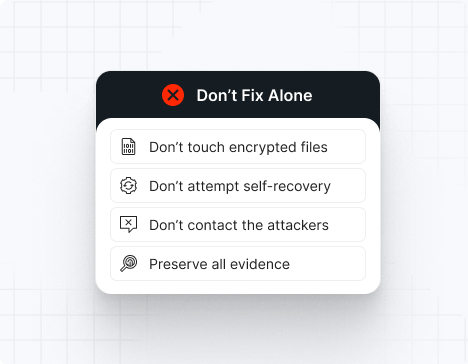
Do NOT attempt any self-remediation, as it can trigger further encryption and destroy recovery points. Instead, follow these steps:

1
Do NOT fix it yourself
2
Disconnect affected systems
3
Call us +1 332 331 8700

Contact us now for urgent ransomware response assistance, 24/7

Get Help Now
Frame

Experts. Finalists. Winners.

Accomplishments and recognitions, demonstrating our commitment to excellence and innovation.

Momentum Leader in MDR

Best Support in MDR & IR

Managed Detection and Response (MDR)

Top Cybersecurity Company 
2025

Best Managed Detection and Response Service

#4 of 184 teams Splunk Boss of the SOC

Best Of Cybersecurity Awards for Q1 2025

AWS Partner

Splunk Manage Premier Partner

Image (11) (1)

Why you shouldn’t attempt 
to fix it alone

Like a crime scene, a ransomware attack must be preserved — tampering with encrypted files, attempting self-recovery, or engaging with attackers can destroy critical evidence and reduce your chances of recovery.

Taking the right steps in the first moments after a LockBit attack can make a huge difference and help you make a full recovery. Request 24/7 LockBit ransomware recovery services to decrypt your data and maximize your chances of restoring operations.

Contact us now for urgent ransomware recovery assistance

Under attack?

Get Help Now

LockBit ransomware statistics & facts

LockBit decryptor
LockBit IOCs
LockBit attack vectors
Case outcomes
How to remove LockBit ransomware?
How to recover from LockBit ransomware?
Ransomware amounts
LockBit decryptor

As of early 2026, there is no publicly available decryptor for recent LockBit ransomware variants. LockBit’s rapid evolution and use of unique encryption keys per victim make universal decryption impossible. The fastest path to recovery is immediate incident response—containment, malware eradication, and restoration from uncompromised backups—guided by expert responders who can help you resume operations safely and minimize downtime.

LockBit IOCs

LockBit’s tactics, techniques, and procedures (TTPs) are constantly updated, but these indicators are widely confirmed by CISA, FBI, NCC Group, Trend Micro, and leading IR teams.

File extensions
LockBit typically appends a unique, random extension to encrypted files, such as:
.lockbit
.lockbit2
.lockbit3
.lockbit4
Or a random string (e.g., .9b2f1, .abcd1234).

Ransom note filenames
Common ransom note filenames include:
Restore-My-Files.txt
LockBit_Ransomware.txt
README.txt
HowToRestoreYourFiles.txt
*Note: Affiliates may use custom filenames.

LockBit hashes
Recent LockBit payloads have been identified with these SHA256 hashes:
b1e2c3d4f5a67890b1234567890abcdef1234567890abcdef1234567890abcdef
e2f3a4b5c6d78901e234567890abcdef234567890abcdef234567890abcdef2345
*Hashes change frequently—always consult the latest threat intelligence.

LockBit tools
For EDR/AV evasion:
– Custom EDR killer modules
– Process injection
– Windows Defender exclusion abuse

For credential dumping:
– Mimikatz
– LaZagne
– Procdump

For reconnaissance:
– SoftPerfect Network Scanner
– Advanced IP Scanner
– BloodHound

For data exfiltration:
– Rclone
– WinSCP
– MegaSync
– FileZilla

For lateral movement:
– PsExec
– Cobalt Strike
– RDP brute-forcing tools

Malware loaders:
– Cobalt Strike beacons
– QakBot
– IcedID
– Phishing-delivered loaders

Most common red flag
LockBit almost always deletes shadow copies to prevent easy recovery:
vssadmin.exe Delete Shadows /all /quiet
wmic shadowcopy delete
*If you see this, encryption is imminent—act immediately.

LockBit attack vectors

Attack vector

% of LockBit

incidents

Notes

Phishing + loaders

35–40%

QakBot, DarkGate, Pikabot,

SocGholish

Exploited vulnerabilities

30–35%

Citrix Bleed, Fortinet, VPN bugs

Compromised RDP

15–18%

Brute-force, credential stuffing

MSP/Supply chain access

7–10%

RMM compromise, inherited access

Malvertising

3–5%

Fake browser updates, SocGholish

Insider/Internal misuse

1–2%

Rare, but high-impact

Powered By WP Table Builder
Case outcomes

LockBit is notorious for double and triple extortion—encrypting data, stealing sensitive files, and threatening public leaks or DDoS if demands aren’t met. While most affiliates provide decryptors after payment, some victims report slow, buggy, or incomplete decryption, especially on large networks or ESXi servers. Data leaks often occur within days if negotiations stall or break down. Repeat extortion attempts and re-infection are not uncommon if root causes aren’t remediated.

How to remove LockBit ransomware?

Do not attempt self-removal—LockBit’s persistence mechanisms and lateral movement can cause further damage.
– Immediately isolate all affected systems (disconnect from network, block IPs, disable Wi-Fi).
– Engage LockBit ransomware response experts to guide containment and eradication.
– Conduct forensic analysis: collect IOCs, review registry changes, deleted shadow copies, and event logs.
– Reimage infected devices using clean, verified images.
– Validate cleanup with rootkit scans, credential rotation, and security hardening.
– Only restore from backups after confirming the environment is clean.

How to recover from LockBit ransomware?

– Isolate and triage all impacted endpoints.
– Restore data only from offline, write-protected backups after thorough validation.
– Map the attack chain, rotate all credentials, and close exploited vulnerabilities.
– Bring in external IR specialists to ensure full eradication and update your incident response plan.
– Monitor for signs of reinfection or data leaks post-recovery.

Ransomware amounts

LockBit ransom demands range from $85,000 to over $10 million, depending on organization size and data sensitivity. Demands are almost always in Bitcoin or Monero.

Double/triple extortion means you face:
– The ransom itself
– The cost of leaked or destroyed data
– Potential DDoS threats

Average ransom:
Small business: $100,000 – $250,000
Medium business: $500,000 – $2,000,000
Large enterprise: $3,000,000+

Never negotiate alone—LockBit is known for aggressive escalation, public shaming, and disappearing after payment if handled poorly. Instant, expert-led incident response is your best defense.

Our customers say it best

Contact us now for urgent ransomware recovery assistance

Under attack?

Get Help Now

Frequently asked questions

What is LockBit ransomware?

LockBit is a highly sophisticated Ransomware-as-a-Service (RaaS) operation that has dominated the global ransomware landscape for years. The latest LockBit 5.0 variant, released in late 2025, targets Windows, Linux, and VMware ESXi systems, making it one of the most versatile and dangerous ransomware families. LockBit operators breach networks, steal sensitive data, disable security tools, and rapidly encrypt files before demanding large ransoms. Victims’ stolen data is often published on LockBit’s dark-web leak site to maximize extortion pressure.

How does LockBit ransomware work?

LockBit typically infiltrates organizations through phishing emails, compromised RDP/VPN credentials, or exploiting unpatched vulnerabilities. Once inside, attackers:
Steal credentials and map the network
– Exfiltrate sensitive data
– Disable security tools and backups
– Deploy the ransomware payload to encrypt files across all reachable systems
LockBit 5.0 features advanced anti-analysis techniques and can encrypt both local and networked resources, leaving ransom notes and threatening public data leaks.

What’s new in LockBit 5.0?

LockBit 5.0 introduces:
– Cross-platform support (Windows, Linux, ESXi)
– Enhanced evasion and anti-analysis features
– Unique 16-character victim IDs for tracking
– Faster encryption and improved data exfiltration
– More aggressive extortion tactics, including triple extortion (encryption, data leak, and DDoS threats).

How fast can LockBit ransomware spread?

LockBit is engineered for speed. Once deployed, it can encrypt small networks in under 10 minutes, mid-sized environments in 1–2 hours, and large enterprises in less than 8 hours. However, attackers often spend days or weeks inside the network before launching the encryption phase, quietly stealing data and disabling defenses.

What should I do if my organization is hit by LockBit?

Immediate incident response is critical:
– Isolate affected systems from the network
– Engage professional incident response experts
– Preserve forensic evidence
– Notify law enforcement and relevant stakeholders
– Do not pay the ransom without consulting experts—paying does not guarantee data recovery or prevent future attacks

Can LockBit ransomware be removed or decrypted?

While the malware itself can be removed, there is no public decryptor for LockBit 5.0. Recovery requires:
– Full environment cleanup
– Restoration from uncompromised, offline backups
– Comprehensive threat hunting to remove backdoors and persistence mechanisms

How can LockBit ransomware attacks be prevented?

Prevention requires a multi-layered approach:
– Patch critical vulnerabilities within 48 hours
– Enforce phishing-resistant MFA for all accounts
– Deploy EDR and SIEM with 24/7 monitoring
– Segment networks and restrict admin privileges
– Harden and isolate backup systems with immutability and MFA
– Conduct regular security awareness training and IR tabletop exercises

What is the value of instant incident response for LockBit attacks?

Instant incident response can:
– Contain the spread of ransomware before full encryption
– Limit data exfiltration and reputational damage
– Preserve critical forensic evidence for investigation
– Accelerate recovery and minimize downtime
– Reduce the likelihood of ransom payment and future targeting

Where can I find a list of LockBit victims?

There is no official public list, but LockBit’s dark-web leak site and threat intelligence feeds regularly publish new victims. Security teams should monitor these sources and collaborate with CTI providers for timely alerts.

What are the signs of a LockBit ransomware attack?

Common indicators include:
– Unusual network activity or data exfiltration
– Disabled security tools and backups
– Appearance of ransom notes in directories
– Files encrypted with new, unknown extensions
– Sudden loss of access to critical systems

What is a LockBit ransomware prevention checklist?

– Patch all systems rapidly
– Enforce MFA everywhere
– Deploy EDR and SIEM
– Segment networks and restrict admin access
– Harden and isolate backups
– Train employees on phishing and social engineering
– Run regular incident response drills