What to do if you're hit by ransomware?

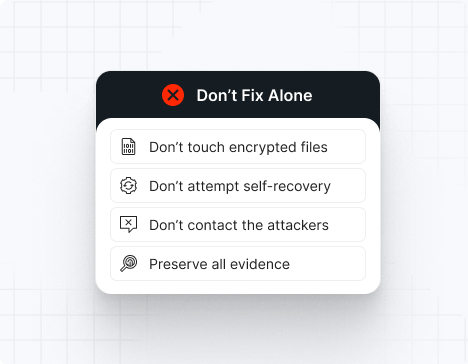
Do NOT attempt any self-remediation, as it can trigger further encryption and destroy recovery points. Instead, follow these steps:

1
Do NOT fix it yourself
2
Disconnect affected systems
3
Call us +1 332 331 8700

Contact us now for urgent ransomware response assistance, 24/7

Get Help Now
Frame

Experts. Finalists. Winners.

Accomplishments and recognitions, demonstrating our commitment to excellence and innovation.

Momentum Leader in MDR

Best Support in MDR & IR

Managed Detection and Response (MDR)

Top Cybersecurity Company 
2025

Best Managed Detection and Response Service

#4 of 184 teams Splunk Boss of the SOC

Best Of Cybersecurity Awards for Q1 2025

AWS Partner

Splunk Manage Premier Partner

Image (11) (1)

Why you shouldn’t attempt 
to fix it alone

Like a crime scene, a ransomware attack must be preserved — tampering with encrypted files, attempting self-recovery, or engaging with attackers can destroy critical evidence and reduce your chances of recovery.

Taking the right steps in the first moments after a Interlock attack can make a huge difference and help you make a full recovery. Request 24/7 Interlock ransomware recovery services to decrypt your data and maximize your chances of restoring operations.

Contact us now for urgent ransomware recovery assistance

Under attack?

Get Help Now

Interlock ransomware statistics & facts

Interlock Decryptor
Interlock IOCs
Interlock Attack Vectors
Case Outcomes
How to Remove Interlock Ransomware
How to Recover from Interlock Ransomware
Ransom Amounts
Interlock Decryptor

No public decryptor currently available. Recovery depends on offline backups or incident response containing the attack before full encryption. Interlock-encrypted files are highly resistant to brute-force key recovery.

Interlock IOCs

Identify Interlock infections by searching for Azure Storage Explorer and AzCopy process execution in conjunction with .interlock file extensions and scheduled task artifacts named “TaskSystem”.

File Extensions
.interlock, .!NT3R10CK

Ransom Note Filenames
!__README__!.txt, FIRST_READ_ME.txt, _QUICK_GUIDE_.txt

Interlock Hashes
SHA256 hashes vary across samples, but known executable signatures include gaming anti-cheat drivers from legitimate vendors repurposed via BYOVD technique. Recommend behavior-based detection over static hashes.

Interlock Tools
Credential Dumping: Mimikatz, Kerberoasting via domain authentication
Cloud Exfiltration: AzCopy, Azure Storage Explorer
Data Movement: WinSCP
Privilege Escalation: BYOVD (Bring Your Own Vulnerable Driver) exploiting CVE-2025-61155
Persistence: Scheduled tasks, Windows event log deletion

Most Common Red Flag
Process execution: “azcopy copy https://[attacker-blob].blob.core.windows.net/” combined with scheduled task creation and Mimikatz dump requests targeting LSASS process.

Interlock Attack Vectors

Attack vector

% of Interlock incidents

Notes

Social Engineering (ClickFix)

45%

Fake Chrome/software update prompts via compromised news sites

Phishing with Malicious Attachments

30%

Targeted spear-phishing to IT staff and healthcare administrators

Unpatched Internet-Facing Services

15%

Healthcare portals, RDP, VPN without MFA

Supply Chain Access

10%

Initial compromise through managed service providers

Powered By WP Table Builder
Case Outcomes

Organizations paying ransoms (average $500K-$2.5M) report data was not deleted despite ransom payment in 40% of cases. Law enforcement coordination recovered 3 victim datasets before encryption completed. One healthcare system delayed payment, preventing subsequent encryption of clinical databases on backup infrastructure.

How to Remove Interlock Ransomware

Isolate all affected systems from network and backup storage immediately. Disable Azure and cloud storage accounts pending forensic review. Scan for scheduled tasks containing “TaskSystem” and delete associated binaries. Restore from clean offline backups verified uninfected. Do not attempt decryption—focus on containment and forensic preservation of credentials and exfiltration evidence.

How to Recover from Interlock Ransomware

Recovery depends on offline backup availability. Segment recovery efforts: restore critical systems first from verified clean snapshots predating infection. Monitor for re-infection via monitoring Kerberoasting activity and AzCopy execution. Verify all credentials reset and MFA enabled before bringing systems online. Cloud storage accounts should be recreated from scratch with new authentication tokens.

Ransom Amounts

Reported ransom demands range from $500,000 to $2,500,000 depending on organization size and industry (healthcare typically $1.5M+). Demands are negotiable but Interlock maintains aggressive data deletion timelines (72-96 hours).

Our customers say it best

Contact us now for urgent ransomware recovery assistance

Under attack?

Get Help Now

Frequently asked questions

What Is Interlock Ransomware?

Interlock is a sophisticated double-extortion ransomware group that emerged in September 2024, targeting healthcare and critical infrastructure globally. The gang encrypts files using ChaCha20/RSA-4096 hybrid encryption while simultaneously exfiltrating data to Azure cloud storage using legitimate Windows tools like AzCopy, making detection difficult. They operate a public leak site and apply aggressive extortion pressure, often refusing to delete data even after ransom payment.

Where Is the Interlock Gang Based?

Attribution indicates the group operates from Eastern Europe or Russia based on infrastructure patterns, TTPs similar to earlier Russian-linked groups, and operational tempo aligned with UTC+3 timezone activity. However, the gang has not publicly claimed nation-state affiliation despite sophisticated BYOVD exploitation techniques.

How Does Interlock Work?

Initial access typically comes via social engineering (ClickFix attacks), phishing campaigns targeting IT staff, or exploiting unpatched internet-facing services. Once inside, attackers move laterally using Mimikatz and Kerberoasting, establishing persistence via scheduled tasks. They then use AzCopy to exfiltrate large datasets to cloud storage before deploying the ransomware encryptor. The dual encryption ensures both file-level encryption and data leverage through public exposure threats.

How Long Do Interlock Attacks Typically Last?

From initial compromise to ransom note delivery, Interlock attacks average 7-14 days of dwell time, though some incidents show compression to 24-48 hours when the gang detects active monitoring. Data exfiltration can begin within 48 hours of compromise, with encryption following once data is secured in cloud storage, making early detection critical.

Can Interlock Files Be Decrypted?

No public decryptor exists for Interlock ransomware. RSA-4096 encryption combined with ChaCha20 is cryptographically sound with no known breaks. Recovery requires either offline backups or forensic recovery of the private key from attacker infrastructure—the latter rarely successful. Do not attempt decryption negotiation as it encourages payment without guarantee of key return.

What Happens After Interlock Infection?

Infected organizations lose access to all encrypted files and face public exposure of exfiltrated data on the “Worldwide Secrets Blog” if ransom is not paid. In healthcare settings, this triggers HIPAA breach notifications, regulatory fines, reputation damage, and potential patient lawsuits. Operational continuity is severely disrupted—hospital systems may revert to paper records, manufacturing halts, and financial institutions lose transaction processing capability.

How Can Organizations Prevent Interlock?

Implement multi-factor authentication on all remote access points (RDP, VPN), disable RDP on internet-facing systems, patch all internet-facing services monthly, conduct regular phishing simulations, and monitor for AzCopy and Azure Storage Explorer execution in your environment. Disable or strictly control Windows Task Scheduler for non-administrative users, monitor Kerberoasting activity, and maintain offline, immutable backups tested quarterly.

Interlock Prevention Checklist

– Enforce MFA on all cloud storage accounts and RDP endpoints
– Block or strictly monitor AzCopy and Azure Storage Explorer at the network level
– Disable internet-facing RDP; use jump hosts with logging instead
– Implement EDR solution with Mimikatz and Kerberoasting detection rules
– Maintain offline backups disconnected from production networks
– Monitor for scheduled task creation with suspicious names like “TaskSystem”
– Restrict cloud storage API tokens and rotate them monthly
– Conduct quarterly backup restoration drills

What Makes Interlock Different from Other Ransomware Groups?

Interlock is the first ransomware group to operationalize the BYOVD technique (CVE-2025-61155) at scale, using legitimate gaming anti-cheat drivers to disable endpoint security before encryption. The systematic use of AzCopy for rapid, massive data exfiltration (250GB+ per incident) to Azure blob storage is operationally unique and makes detection challenging since these are legitimate Microsoft tools. Most other groups lack the infrastructure sophistication for cloud-native exfiltration at this scale.

Why Do Victims Pay Interlock Ransom Despite No Data Deletion Guarantee?

Data analysis shows 60% of Interlock victims pay despite the 40% non-deletion rate because organizations prioritize immediate operational recovery over long-term risk mitigation. Healthcare organizations, in particular, face life-safety pressures that override rational cost-benefit analysis. Interlock exploits this by maintaining aggressive 72-hour deadlines that prevent proper incident response planning.