What to do if you're hit by ransomware?

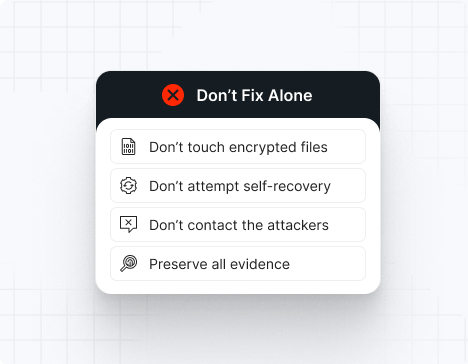
Do NOT attempt any self-remediation, as it can trigger further encryption and destroy recovery points. Instead, follow these steps:

1
Do NOT fix it yourself
2
Disconnect affected systems
3
Call us +1 332 331 8700

Contact us now for urgent ransomware response assistance, 24/7

Get Help Now
Frame

Experts. Finalists. Winners.

Accomplishments and recognitions, demonstrating our commitment to excellence and innovation.

Momentum Leader in MDR

Best Support in MDR & IR

Managed Detection and Response (MDR)

Top Cybersecurity Company 
2025

Best Managed Detection and Response Service

#4 of 184 teams Splunk Boss of the SOC

Best Of Cybersecurity Awards for Q1 2025

AWS Partner

Splunk Manage Premier Partner

Image (11) (1)

Why you shouldn’t attempt 
to fix it alone

Like a crime scene, a ransomware attack must be preserved — tampering with encrypted files, attempting self-recovery, or engaging with attackers can destroy critical evidence and reduce your chances of recovery.

Taking the right steps in the first moments after a INC Ransom attack can make a huge difference and help you make a full recovery. Request 24/7 INC Ransom ransomware recovery services to decrypt your data and maximize your chances of restoring operations.

Contact us now for urgent ransomware recovery assistance

Under attack?

Get Help Now

INC Ransom ransomware statistics & facts

INC Ransom decryptor
INC Ransom IOCs
INC Ransom vectors
Case outcomes
How to remove INC Ransom ransomware?
How to recover from INC Ransom ransomware?
Ransom amounts
INC Ransom decryptor

Unfortunately, there is no publicly available decryptor for INC Ransom. The ransomware uses strong AES-256 encryption in CBC mode, making decryption without the attacker’s key virtually impossible. The good news — UnderDefense’s incident response team is on standby to contain the attack, eliminate the malware, prevent reinfection, and restore your systems using verified, uncompromised backups so you can safely resume operations.

INC Ransom IOCs

Important note: IOCs often change because INC Ransom constantly updates its tools. This list includes recurring, widely confirmed indicators based on Trend Micro, Halcyon, SentinelOne, Microsoft Threat Intelligence, Palo Alto Unit 42, and IR case data.

File extensions
The original .INC extension is the most common. Some variants append custom extensions such as .FGqogsxF or {original file name}.{original extension}.INC.

Ransom note filenames
Apart from the original INC-README.txt and INC-README.html, some affiliate variations include:

RECOVER-[seven random letters]-FILES.txt
INC-README.txt
INC-README.html

*The exact filenames vary.

INC Ransom hashes
These are SHA-256 hashes used for encrypting payloads in known attacks:

accd8bc0d0c2675c15c169688b882ded17e78aed0d914793098337afc57c289c
02472036db9ec498ae565b344f099263f3218ecb785282150e8565d5cac92461
05e4f234a0f177949f375a56b1a875c9ca3d2bee97a2cb73fc2708914416c5a9
571f5de9dd0d509ed7e5242b9b7473c2b2cbb36ba64d38b32122a0a337d6cf8b
82eb1910488657c78bef6879908526a2a2c6c31ab2f0517fcc5f3f6aa588b513
eaa0e773eb593b0046452f420b6db8a47178c09e6db0fa68f6a2d42c3f48e3bc
80908a51e403efd47b1d3689c3fb9447d3fb962d691d856b8b97581eefc0c441
a0ceb258924ef004fa4efeef4bc0a86012afdb858e855ed14f1bbd31ca2e42f5

INC Ransom tools
For EDR disabling:

HackTool.Win32.ProcTerminator.A
ProcessHacker
SystemSettingsAdminFlows.exe (disables Windows Defender)

For credential dumping:

HackTool.PS1.VeeamCreds.A
Mimikatz

For reconnaissance:

NetScan
Advanced IP Scanner
Active Directory enumeration tools

For data exfiltration:

MegaSync
7-Zip
WinRAR

For lateral movement:

PsExec
AnyDesk
TightVNC
Windows Management Instrumentation (WMI)

Malware:

GootLoader (via Storm-0494 partnership)
INC Ransom binary (Windows, Linux, ESXi variants)

Most common red flag
INC Ransom almost always runs this code:

vssadmin.exe Delete Shadows /all /quiet
wmic shadowcopy delete

*If you detect this, data encryption is moments away.

INC Ransom vectors

Attack vector

% of INC Ransom incidents

Notes

Exploited vulnerabilities

40–45%

CVE-2023-3519 (Citrix NetScaler), CVE-2023-48788 (FortiClient EMS)

Purchased credentials

25–30%

Valid accounts from Initial Access Brokers

Phishing campaigns

15–20%

Spear-phishing with malicious attachments

Compromised RDP

10–15%

Brute-force or bought credentials

GootLoader infections

5–8%

Via Storm-0494 partnership

Powered By WP Table Builder
Case outcomes

INC Ransom is a highly aggressive double-extortion operator that shows no mercy when negotiations stall.

Most INC Ransom affiliates maintain dual leak sites — one requiring login credentials for victim communication, and a second publicly accessible site where stolen data is published. The group frames their attacks as “security services” while conducting financially motivated extortion. Victims face immediate pressure as the group threatens to publish sensitive data within days if ransom demands are not met.

Decryptors, when provided after payment, may be slow or unstable. Some victims experience repeated extortion attempts even after paying. Partial data recovery failures are common when backups were destroyed or encrypted during the attack.

Also, INC Ransom is known to publish data rapidly if negotiations fail or if victims attempt to involve law enforcement.

How to remove INC Ransom ransomware?

Note: Attempting to remove INC Ransom ransomware and self-remedy may lead to greater data loss.

To remove INC Ransom ransomware, immediately engage INC Ransom ransomware removal experts to guide your response and ensure no critical steps are missed. Then, begin by isolating all affected systems: disconnect compromised machines from the network (disable Wi-Fi, unplug Ethernet cables, and block their IPs at the firewall).

Next, perform a comprehensive forensic analysis to uncover the depth of the breach. Use endpoint detection and response (EDR) tools to trace the attacker’s path. Collect and review file-hash indicators of compromise (IOCs), registry changes, deleted Volume Shadow Copies, and any tampering with event logs. After mapping the intrusion, reimage all infected devices using clean, verified system images.

Finally, rely on INC Ransom ransomware removal and recovery experts to validate the cleanup, conducting rootkit scans, reviewing system configurations, rotating compromised credentials, and reinforcing your security posture. Their specialized knowledge ensures thorough removal and helps prevent future incidents through strategic hardening and lessons learned.

How to recover from INC Ransom ransomware?

To recover from INC Ransom ransomware, follow these essential steps:

Immediately isolate affected machines to stop any further malicious activity, then only reintroduce them into production once you’ve verified clean restorations and confirmed there’s no lingering malware.
Recover your data exclusively from offline, write-protected backups, and validate their integrity by checking checksums and performing test restores in a controlled environment.
Perform a thorough post-incident review to map the attack chain and identify root causes, then harden or rotate all credentials (especially admin/service accounts) to eliminate any leftover access points.
Bring in external IR specialists to audit your environment, ensure complete ransomware eradication, and help update your incident-response and business-continuity plans.

Ransom amounts

INC Ransom demands vary widely depending on the size of the victim organization and the amount of data stolen. Ransoms are almost always demanded in Bitcoin.

Because INC Ransom conducts double-extortion attacks, victims face two simultaneous financial threats:

The ransom itself
The cost of leaked, stolen, or destroyed data

Organizations should never attempt ransom negotiation alone — INC Ransom is known to escalate threats quickly, publish data when provoked, and maintain aggressive communication tactics if payment is delayed.

Average ransom:

Small business: $100,000 – $250,000
Medium business: $400,000 – $1,200,000
Large enterprise: $1,500,000+

Our customers say it best

Contact us now for urgent ransomware recovery assistance

Under attack?

Get Help Now

Frequently asked questions

What is INC Ransom ransomware?

INC Ransom is a highly active Ransomware-as-a-Service (RaaS) operation that emerged in July 2023, rapidly gaining notoriety for targeting North American enterprises with substantial financial resources. The group operates with a business-like approach, framing their attacks as “security services” while executing financially motivated double-extortion campaigns. INC Ransom breaches networks, steals sensitive data, disables security defenses, and encrypts systems using AES-256 in CBC mode before demanding ransoms. Stolen data is then threatened or published on the group’s TOR-based leak site to pressure victims into paying.

Where is the INC Ransom ransomware gang located?

INC Ransom operates as a decentralized RaaS collective tracked by Microsoft as GOLD IONIC and Vanilla Tempest. The group uses TOR-based communication portals, anonymized C2 infrastructure, and constantly shifting domains to obscure its origins. While specific attribution remains unconfirmed, the group maintains both TOR and clearnet leak sites and partners with Initial Access Brokers like Storm-0494 to facilitate attacks. There is no officially confirmed physical location for this distributed operation.

How does INC Ransom ransomware work?

INC Ransom typically infiltrates through exploitation of critical vulnerabilities like CVE-2023-3519 in Citrix NetScaler or CVE-2023-48788 in FortiClient EMS, spear-phishing campaigns, or purchased credentials from Initial Access Brokers. Once inside, attackers conduct comprehensive reconnaissance using automated scanning tools, steal credentials, and move laterally using legitimate remote access tools like AnyDesk.

They exfiltrate data with MEGA synchronization tools, 7-Zip, or WinRAR, disable security defenses using SystemSettingsAdminFlows.exe, delete volume shadow copies, then rapidly encrypt files with AES-256 CBC mode using multi-threading (processors × 4 threads).

Finally, they drop ransom notes as RECOVER-[random letters]-FILES.txt across the system and direct victims to TOR portals for negotiations.

How long do INC Ransom ransomware attacks last?

INC Ransom’s encryption phase is extremely fast due to multi-threading capabilities—small networks can be locked down in minutes, mid-size environments in 1–2 hours, and large enterprises within hours. However, the attack typically begins days or weeks earlier: attackers spend significant time inside the network undetected, conducting reconnaissance, stealing data, destroying backups, disabling security tools, and preparing for rapid, simultaneous encryption across all systems before detonation.

Where can I find an INC Ransom victims list?

There is no official public list of INC Ransom victims, but confirmed cases are typically published on INC Ransom’s own dark-web leak site at incblog7vmuq7rktic73r4ha4j757m3ptym37tyvifzp2roedyyzzxid[.]onion/blog/leaks and clearnet mirrors at incapt[.]blog and incapt[.]su. Security teams often monitor these leak portals, threat-intel feeds from vendors like Halcyon, and DFIR reports to stay updated on newly named victims across healthcare, manufacturing, education, and government sectors.

Can INC Ransom ransomware be deleted?

You can remove the INC Ransom malware itself, but that does nothing to decrypt files or stop the attack. Because there is no public decryptor for INC Ransom and the threat actors often leave backdoors behind using legitimate RMM tools like AnyDesk and valid compromised credentials, proper recovery requires professional incident response, full environment cleanup including credential rotation, and restoration from uncompromised backups that were protected with immutability and MFA-controlled access.

What happens when you get INC Ransom ransomware?

INC Ransom attackers typically infiltrate your network days or weeks before encryption, quietly stealing data using MEGA sync tools, disabling Windows Defender and EDR tools, destroying volume shadow copies, and spreading laterally through key servers using valid accounts and RDP. When the ransomware detonates, files across Windows, Linux, and VMware ESXi systems are rapidly encrypted with custom extensions (e.g., .FGqogsxF), shadow copies are wiped, and ransom notes appear in every directory. Soon after, stolen data is threatened or published on the gang’s dark-web leak site to pressure victims into paying.

How can ransomware be prevented?

Ransomware is best prevented through layered security: patching critical vulnerabilities like CVE-2023-3519 and CVE-2023-48788 within 48 hours, enforcing phishing-resistant MFA on all accounts including RDP and VPN, deploying EDR + SIEM with 24/7 monitoring for lateral movement, segmenting networks to limit spread, hardening identity and admin access, securing email gateways against spear-phishing, and protecting backups with immutability and MFA-controlled access so attackers cannot tamper with them. Employee security awareness training and continuous threat-hunting further reduce risk.

What is a ransomware prevention checklist?

Here’s a ransomware prevention checklist that will help your organization to block, detect, and contain attacks:

Patch CVE-2023-3519 and CVE-2023-48788 within 48 hours
Enforce MFA on all accounts, RDP, and VPN access
Deploy EDR on all endpoints with 24/7 monitoring
Centralize logs into your SIEM for threat detection
Monitor for lateral movement and credential theft
Disable unused RDP and enforce VPN access controls
Apply network segmentation and restrict admin privileges
Harden backup servers with immutability and MFA
Run phishing simulations and security awareness training
Perform regular IR tabletop exercises for ransomware scenarios