Security & Compliance Automation Platform
UnderDefense MAXI is the solution to day-to-day cybersecurity problems of IT leaders and teams. It builds your 24/7 business protection together with you on the driver’s seat.
UnderDefense MAXI Platform
UnderDefense Secures Top Honor at the 2025 Global Infosec Awards
We’re proud of being a winner at the 2025 Global Infosec Awards…
10-Point AWS Security Checklist for Executives
Quickly assess your cloud security posture with this executive-ready checklist covering IAM, monitoring, and compliance essentials.
Anti-Phishing Playbook
Your free PDF guide to spotting and stopping phishing attacks before they reach your team or data.
24/7 Threat Detection & MAXImum Responsiveness
Our human-led MDR service combines expert insight and automation and AI for fast, precise threat response. Get full context in 2 minutes and cut MTTC to 15, staying ahead of ransomware and other attacks.
Calculate your MDR price
Pay only for the services you actually need, with no hidden costs.
10-Point AWS Security Checklist for Executives
Quickly assess your cloud security posture with this executive-ready checklist covering IAM, monitoring, and compliance essentials.
Anti-Phishing Playbook
Your free PDF guide to spotting and stopping phishing attacks before they reach your team or data.
Spot threats faster and respond smarter than tools alone
24/7 MDR and SOC services led by award-winning security experts. We act as an extension to your team or as a fully remote team, providing detailed threat insights and actionable responses to secure your environment immediately.
UnderDefense is an AWS Partner
We’re excited to announce that UnderDefense is now an AWS partner and available on AWS Marketplace…
Managed SOC at Your Service
Augment your SOC with 24/7 monitoring, threat detection, and expert response—without the overhead. Integrated with your existing tools, our SOCaaS stops attacks before they cause harm.
Managed SIEM Pricing Guide
Download a clear, practical overview of Managed SIEM pricing, featuring detailed breakdowns by service type, pricing model, real-world pros and cons, and key cost factors.
Managed SOC at Your Service
Augment your SOC with 24/7 monitoring, threat detection, and expert response—without the overhead. Integrated with your existing tools, our SOCaaS stops attacks before they cause harm.
Managed SIEM Pricing Guide
Download a clear, practical overview of Managed SIEM pricing, featuring detailed breakdowns by service type, pricing model, real-world pros and cons, and key cost factors.
DragonForce ransomware recovery team on standby
Do NOT attempt to negotiate or pay the ransom—this can escalate the situation and put your organization at greater risk. Instead, immediately isolate affected systems and engage UnderDefense’s expert incident response team to contain the DragonForce ransomware attack, minimize damage, and restore your operations swiftly.
Average Mttc
Ransom-Free recovery rate
Avoided in ransom
Global availability
Systems restored
IR experts
Ransomware cases resolved
IR experience
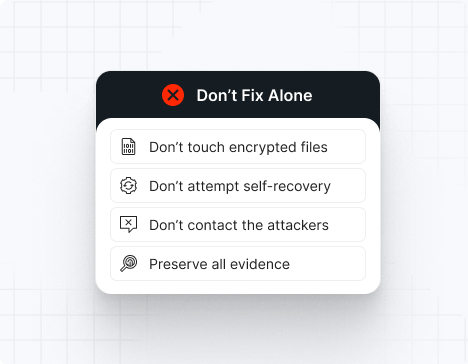
Do NOT attempt any self-remediation, as it can trigger further encryption and destroy recovery points. Instead, follow these steps:
Contact us now for urgent ransomware response assistance, 24/7
Get Help Now
Accomplishments and recognitions, demonstrating our commitment to excellence and innovation.
Momentum Leader in MDR
Best Support in MDR & IR
Managed Detection and Response (MDR)
Top Cybersecurity Company 2025
Best Managed Detection and Response Service
#4 of 184 teams Splunk Boss of the SOC
Best Of Cybersecurity Awards for Q1 2025
AWS Partner
Splunk Manage Premier Partner
Like a crime scene, a ransomware attack must be preserved — tampering with encrypted files, attempting self-recovery, or engaging with attackers can destroy critical evidence and reduce your chances of recovery.
Taking the right steps in the first moments after a DragonForce attack can make a huge difference and help you make a full recovery. Request 24/7 DragonForce ransomware recovery services to decrypt your data and maximize your chances of restoring operations.
Watch out for the key DragonForce ransomware IOCs: .dragonforce_encrypted or .df_win file extensions, readme.txt ransom notes, unusual SMB activity, suspicious registry modifications, disabled security tools, network scanning, and tools like OpenVAS, Mimikatz, or PsExec running in your environment.
Deploys multiple ransomware variants using leaked LockBit 3.0 and Conti V3 builders, making defenses harder to predict and enabling rapid payload switching across Windows, Linux, ESXi, and NAS systems.
Operates as an aggressive affiliate-driven cartel offering up to 80% ransom share, custom attack tools, and a "data analysis service" for crafting extortion materials targeting organizations with $15M+ annual revenue.
Uses Bring Your Own Vulnerable Driver (BYOVD) technique to disable endpoint security defenses by exploiting legitimate but vulnerable drivers—an uncommon tactic that allows attackers to terminate EDR processes undetected.
Steals sensitive data before encryption via SSH to malicious infrastructure, threatening public leaks on their data leak site while encrypting files across entire networks.
The readme.txt ransom note claims affiliation with DragonForce and directs victims to contact the attackers, often dropped in multiple locations including network-accessible webroot paths like inetpub and wwwroot.
Currently, there is no publicly available universal decryptor for DragonForce ransomware. However, UnderDefense’s incident response team stands ready to contain the attack, eliminate the malware, prevent reinfection, and restore your systems using verified, uncompromised backups so you can safely resume operations.
Important note: IOCs frequently change as DragonForce continuously updates its tools and infrastructure. This list includes recurring, widely confirmed indicators based on Trend Micro, S2W TALON, Group-IB, Cyble, CSIS, and incident response case data.
File extensions
The most common extension is .dragonforce_encrypted. Other variants include .RNP (Windows), .RNP_esxi (ESXi), and .locked. Some samples encode the original filename using Base32 before appending the extension.
Ransom note filenames
The primary ransom note is readme.txt. Some affiliate variations include:
Contact Us.txt
readme.txt
Instruction.txt
recovery_readme.txt
*The exact filenames vary by affiliate and campaign.
DragonForce hashes
These are SHA256 hashes used for encrypting payloads in known attacks:
451a42db9c514514ab71218033967554507b59a60ee1fc3d88cbeb39eec99f20
410db536a57c511b0ccac2639e0eb3320f303fc5c90242379ab43364c51ef321
1250ba6f25fd60077f698a2617c15f89d58c1867339bfd9ee8ab19ce9943304b
dc7e706587d4897789cc4a5f7cccbb539646b58aa9c86272728c8c1e6ec2a529
These vulnerable driver variants were used to disable EDR or kill monitoring services before deployment:
truesight.sys (control code: 0x22E044)
rentdrv2.sys (control code: 0x22E010)
DragonForce tools
For EDR disabling:
BYOVD technique (truesight.sys, rentdrv2.sys)
PCHunter
ProcessHacker
For credential dumping:
Mimikatz
LaZagne
PassView
Registry Hive Dumping
For reconnaissance:
AdFind
Netscanold.exe
Advanced IP Scanner
FileSeek
For data exfiltration:
MEGA.nz
FTP/SFTP servers
HTTP servers
Custom web servers
For lateral movement:
PsExec
RDP
WMI (Windows Management Instrumentation)
SimpleHelp RMM (exploiting CVE-2024-57727, CVE-2024-57728, CVE-2024-57726)
Malware:
Cobalt Strike
SystemBC
DevMan ransomware variant
Most common red flag
DragonForce almost always runs these commands:
vssadmin.exe Delete Shadows /all /quiet
wmic shadowcopy delete
bcdedit.exe /set {default} bootstatuspolicy ignoreallfailures
bcdedit.exe /set {default} recoveryenabled No
wbadmin delete catalog -quiet
wbadmin delete systemstatebackup
*If you detect these commands, data encryption is moments away.
Attack vector | % of DragonForce incidents | Notes |
Exploited vulnerabilities | 35–40% | Ivanti Connect Secure (CVE-2023-46805, CVE-2024-21887, CVE-2024-21893), Log4Shell (CVE-2021-44228), SimpleHelp RMM vulnerabilities |
Initial Access Broker (IAB) partnerships | 25–30% | Scattered Spider, The Com collective |
Compromised RDP | 15–20% | Brute-force or purchased credentials |
Phishing + malware | 10–15% | Crack software, keygens, malicious downloads |
Supply chain/MSP access | 5–10% | RMM compromise, trusted relationship abuse |
Insider/Internal misuse | 1–3% | Rare but high-impact |
DragonForce operates as a ransomware cartel, encouraging affiliates to build their own brands while using DragonForce’s tools and infrastructure. This makes outcomes highly variable.
Some affiliates provide decryptors after payment, but decryptors may be slow, unstable, or incomplete—especially on ESXi systems. Victims often experience repeated extortion attempts, even after paying. Partial data recovery failures are common when backups were destroyed or tampered with.
DragonForce is known to publish stolen data within days if negotiations stall or if victims refuse to engage. The group’s double-extortion model means organizations face both encryption and data leak threats simultaneously.
Note: Attempting to remove DragonForce ransomware without expert guidance may lead to greater data loss and incomplete eradication.
To remove DragonForce ransomware, immediately engage DragonForce ransomware removal experts to guide your response and ensure no critical steps are missed. Then, begin by isolating all affected systems: disconnect compromised machines from the network (disable Wi-Fi, unplug Ethernet cables, and block their IPs at the firewall).
Next, perform a comprehensive forensic analysis to uncover the depth of the breach. Use endpoint detection and response (EDR) tools to trace the attacker’s path. Collect and review file-hash indicators of compromise (IOCs), registry changes, deleted Volume Shadow Copies, and any tampering with event logs. Check for BYOVD artifacts (truesight.sys, rentdrv2.sys), credential dumping tools (Mimikatz, LaZagne), and lateral movement evidence (PsExec, RDP logs, SimpleHelp RMM exploitation). After mapping the intrusion, reimage all infected devices using clean, verified system images.
Finally, rely on DragonForce ransomware removal and recovery experts to validate the cleanup, conducting rootkit scans, reviewing system configurations, rotating compromised credentials, and reinforcing your security posture. Their specialized knowledge ensures thorough removal and helps prevent future incidents through strategic hardening and lessons learned.
To recover from DragonForce ransomware, follow these essential steps:
Immediately isolate affected machines to stop any further malicious activity, then only reintroduce them into production once you’ve verified clean restorations and confirmed there’s no lingering malware.
Recover your data exclusively from offline, write-protected backups, and validate their integrity by checking checksums and performing test restores in a controlled environment.
Perform a thorough post-incident review to map the attack chain and identify root causes—check for exploited vulnerabilities (Ivanti, SimpleHelp RMM, Log4Shell), compromised RDP access, or IAB involvement—then harden or rotate all credentials (especially admin/service accounts) to eliminate any leftover access points.
Bring in external IR specialists to audit your environment, ensure complete ransomware eradication, and help update your incident-response and business-continuity plans.
DragonForce ransom demands vary tremendously depending on the size of the victim organization, the amount of data stolen, and the affiliate conducting the attack. Demands typically range from several hundred thousand to multiple millions of dollars. Ransoms are almost always demanded in Bitcoin or other cryptocurrencies.
Because DragonForce conducts double-extortion attacks, victims face two simultaneous financial threats:
The ransom itself
The cost of leaked, stolen, or destroyed data
Organizations should never attempt ransom negotiation alone—DragonForce affiliates are known to escalate threats quickly, publish data when provoked, or disappear after receiving payment if communication is mishandled. The group’s cartel structure means each affiliate may have different negotiation styles and reliability.
Average ransom estimates:
Small business: $200,000 – $500,000
Medium business: $600,000 – $1,500,000
Large enterprise: $2,000,000 – $5,000,000+
Note: Median ransom demands across the ransomware ecosystem fell 56% year-over-year in 2025, but DragonForce’s affiliate-driven model means individual demands remain unpredictable and can still reach extreme highs for lucrative targets.
10 reasons why you should choose the UnderDefense ransomware recovery consulting services:
Get Help NowDragonForce is a highly aggressive Ransomware-as-a-Service (RaaS) operation that emerged in late 2023 and rapidly evolved into what it calls a ransomware “cartel.” The group deploys multivariant payloads based on leaked LockBit 3.0 and Conti codebases, encrypting systems using ChaCha8 + RSA-4096 algorithms. DragonForce offers affiliates up to 80% of ransom proceeds and provides tools for attack automation, customized ransomware campaigns, and even a “data analysis service” to craft extortion materials. Stolen data is published on their dark-web leak site to pressure victims into paying six- to seven-figure ransoms.
The DragonForce ransomware group operates as a decentralized RaaS cartel, leveraging Tor-based infrastructure, anonymized servers, and constantly shifting command-and-control channels to obscure its origins. While some reports suggest possible ties to a Malaysian-based hacktivist collective that pivoted to ransomware, no confirmed physical location has been established. The group’s affiliate-driven model and use of encrypted communication platforms make attribution and geolocation extremely difficult.
DragonForce ransomware typically infiltrates through compromised remote desktop servers, exploited vulnerabilities in public-facing applications like Ivanti Connect Secure (CVE-2023-46805, CVE-2024-21887, CVE-2024-21893), or via initial access brokers like Scattered Spider. Once inside, attackers use Cobalt Strike and SystemBC for persistence, dump credentials with Mimikatz, and map the network using ADFind and netscanold.exe. They exfiltrate data via MEGA.nz or FTP/SFTP servers, disable security defenses using BYOVD techniques with vulnerable drivers (truesight.sys, rentdrv2.sys), then rapidly encrypt files with ChaCha8+RSA-4096, appending the .dragonforce_encrypted extension. Finally, they drop ransom notes, change desktop backgrounds, and may establish persistence through scheduled tasks
DragonForce’s encryption phase can be devastatingly fast — small networks may be locked down in under 10 minutes, mid-size environments in 1–2 hours, and large enterprises in under 8 hours. However, the attack typically begins days or weeks earlier: attackers spend 4–21+ days inside the network undetected, stealing credentials, exfiltrating sensitive data, disabling backups and EDR tools, and preparing for rapid, simultaneous encryption across all systems including Windows, Linux, and ESXi environments.
There is no official public list of DragonForce victims, but confirmed cases are typically published on DragonForce’s own dark-web leak site and later reported by cybersecurity researchers, CTI platforms, and media outlets tracking ransomware disclosures. The group has been particularly active in targeting organizations in the US, UK, Germany, Australia, and Italy, with a focus on manufacturing, construction, IT, and professional services sectors. Security teams often monitor these leak portals, threat-intel feeds, and DFIR reports to stay updated on newly named victims.
You can remove the DragonForce malware itself, but that does nothing to decrypt files or stop the attack. Because there is no public decryptor for DragonForce and the threat actors often leave backdoors behind through tools like Cobalt Strike and SystemBC, proper recovery requires professional incident response, full environment cleanup, and restoration from uncompromised backups. The group’s use of BYOVD techniques and scheduled tasks means remnants may persist even after initial malware removal.
DragonForce attackers typically infiltrate your network days or weeks before encryption, quietly stealing data, disabling backups and EDR tools using vulnerable drivers, and spreading laterally through RDP and SMB. When the ransomware detonates, files across Windows, Linux, and ESXi systems are rapidly encrypted with the .dragonforce_encrypted extension, volume shadow copies are wiped, and ransom notes appear in every directory. The desktop background is changed to display the ransom message, and file icons are modified. Soon after, stolen data is threatened or published on the gang’s dark-web leak site to pressure victims into paying.

Ransomware is best prevented through layered security: patching critical vulnerabilities within 48 hours (especially Ivanti Connect Secure, Apache Log4j2, and Windows SmartScreen), enforcing phishing-resistant MFA on all accounts including RDP and VPN access, deploying EDR + SIEM with 24/7 monitoring, segmenting networks to limit lateral movement, hardening identity and admin access, restricting remote desktop server exposure, and protecting backups with immutability and MFA-controlled access so attackers cannot tamper with them. Employee training on phishing and continuous threat-hunting further reduce risk.
Here’s a ransomware prevention checklist that will help your organization to block, detect, and contain attacks:
Patch critical vulnerabilities within 48 hours, especially Ivanti and public-facing applications
Use MFA for all accounts, including RDP and VPN access
Deploy EDR on all endpoints, servers, and cloud workloads
Centralize logs into your SIEM with 24/7 monitoring
Monitor for lateral movement tools like ADFind, Mimikatz, and PsExec
Disable unused RDP and enforce VPN access controls
Apply network segmentation and restrict admin privileges
Harden backup servers and enforce immutability with MFA-controlled access
Monitor for BYOVD attacks targeting vulnerable drivers
Run phishing simulations and security awareness training
Perform regular IR tabletop exercises and red team assessments