What to do if you're hit by ransomware?

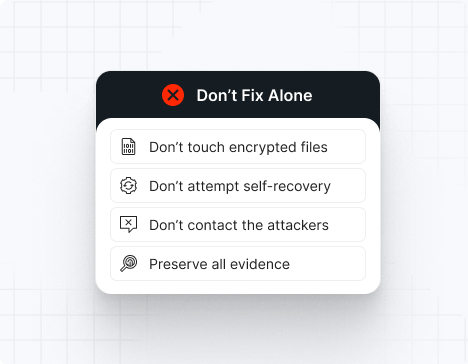
Do NOT attempt any self-remediation, as it can trigger further encryption and destroy recovery points. Instead, follow these steps:

1
Do NOT fix it yourself
2
Disconnect affected systems
3
Call us +1 332 331 8700

Contact us now for urgent ransomware response assistance, 24/7

Get Help Now
Frame

Experts. Finalists. Winners.

Accomplishments and recognitions, demonstrating our commitment to excellence and innovation.

Momentum Leader in MDR

Best Support in MDR & IR

Managed Detection and Response (MDR)

Top Cybersecurity Company 
2025

Best Managed Detection and Response Service

#4 of 184 teams Splunk Boss of the SOC

Best Of Cybersecurity Awards for Q1 2025

AWS Partner

Splunk Manage Premier Partner

Image (11) (1)

Why you shouldn’t attempt 
to fix it alone

Like a crime scene, a ransomware attack must be preserved — tampering with encrypted files, attempting self-recovery, or engaging with attackers can destroy critical evidence and reduce your chances of recovery.

Taking the right steps in the first moments after a Cicada3301 attack can make a huge difference and help you make a full recovery. Request 24/7 Cicada3301 ransomware recovery services to decrypt your data and maximize your chances of restoring operations.

Contact us now for urgent ransomware recovery assistance

Under attack?

Get Help Now

Cicada3301 ransomware statistics & facts

Cicada3301 decryptor
Cicada3301 IOCs
Cicada3301 attack vectors
Case outcomes
How to remove Cicada3301 ransomware?
How to recover from Cicada3301 ransomware?
Ransom amounts
Cicada3301 decryptor

No public decryptor exists for Cicada3301. The hybrid ChaCha20+RSA-4096 encryption scheme with private keys held by operators makes decryption impossible without paying the ransom or obtaining the private key through law enforcement action.

Cicada3301 IOCs

Indicators are identified through ESXi audit logs, cryptographic signatures on encrypted files, ransom note filenames, and network-level C2 communication patterns.

File extensions
Randomly generated 7-character alphanumeric extensions (e.g., .a7k2m9x, .b3f8k1w, .x9q4p2m). No standard extension is used across victims.

Ransom note filenames
RECOVER-[random-extension]-DATA.txt (e.g., RECOVER-a7k2m9x-DATA.txt), placed in ESXi datastores and VM directories

Cicada3301 hashes
SHA256 hashes of observed Cicada3301 binaries compiled with Rust 1.79.0 vary across samples; representative hashes are tracked by security vendors including CrowdStrike, Trend Micro, and Group-IB. Binaries are typically not distributed via email; instead, they are deployed directly on compromised ESXi systems via SSH or exploitation of management interfaces.

Cicada3301 tools
– ESXi exploitation: SSH brute-force or credential theft, vCenter API exploitation, vcenter-deploy malware
– Hypervisor control: esxcli (native ESXi CLI for VM management), vim-cmd (VMware command-line tool), vSphere APIs for snapshot deletion
– Encryption: Custom Rust-compiled binary with embedded ChaCha20 and RSA-4096 implementations
– C2 communication: HTTPS to Tor .onion site, alternative anonymous channels

Most common red flag
Execution of the following ESXi commands in rapid sequence: `esxcli vm process list`, `esxcli vm process kill`, `esxcli storage vmfs unmap`, indicating VM shutdown and datastore preparation for encryption.

Cicada3301 attack vectors

Attack vector

% of Cicada3301 incidents

Notes

Compromised vCenter credentials or SSH access

45%

Phishing, credential reuse, or previous breaches

Unpatched ESXi management interface vulnerabilities

35%

CVE-2024-xxxxx class vulnerabilities in vSphere

Lateral movement from Windows environment

15%

Cross-segment pivoting from compromised Windows servers

Supply chain / third-party access

5%

Managed service providers (MSPs) with ESXi access

Powered By WP Table Builder
Case outcomes

Victims report complete loss of VM functionality within 30–45 minutes of initial infection. Organizations without air-gapped backups face extended downtime measured in weeks. Two outcomes are typical: (1) organizations pay ransoms ($250,000–$1.5M for large environments) for decryption keys, or (2) they restore from off-site backups and accept business interruption costs. Regulatory penalties for healthcare (HIPAA) and finance (PCI-DSS) victims can add $500,000–$2M. One documented victim, a North American manufacturing firm, lost 80 VMs and paid $400,000 in ransom.

How to remove Cicada3301 ransomware?

1. Isolate all infected ESXi hosts from the network immediately—disable all vCenter communication and physical network connectivity.
2. Power off affected VMs to prevent further encryption propagation (if not already encrypted).
3. Preserve an unencrypted snapshot or disk image of an infected VMDK file for forensic analysis and potential future decryption.
4. Boot ESXi host into safe mode and scan the hypervisor filesystem for the Cicada3301 ELF binary (typically left in /tmp, /root, or within VM directories).
5. Remove the detected malware binary and any secondary backdoors or persistence mechanisms.
6. Restore ESXi SSH keys and certificates if attackers modified them; force password changes for all administrative accounts.
7. Rebuild vCenter infrastructure and re-establish communication channels only after the malware is confirmed absent.

How to recover from Cicada3301 ransomware?

1. Identify and restore VMs from air-gapped backups created before the attack. Verify backup integrity through VM boot tests on isolated infrastructure.
2. If no off-site backups exist, restore from Cicada3301 ransom note decryption keys (obtained via ransom payment or law enforcement recovery).
3. Restore individual VMDK files from backup repositories; validate through filesystem consistency checks and application-level verification.
4. Gradually restore VMs to production in waves, monitoring for signs of persistent infection or re-encryption.
5. Rebuild vCenter databases and management infrastructure from clean backups or fresh installations.
6. Implement immutable backup snapshots—store backups in read-only WORM (write-once, read-many) storage disconnected from the primary network.
7. Enable enhanced monitoring on all vCenter and ESXi systems to detect unauthorized access attempts.

Ransom amounts

Cicada3301 operators typically demand $250,000–$1,500,000 depending on the size and criticality of the virtualized environment. Negotiation may reduce initial demands by 30–50%. Payment is demanded in cryptocurrency (Bitcoin or Monero) to a Tor-accessible address.

Our customers say it best

Contact us now for urgent ransomware recovery assistance

Under attack?

Get Help Now

Frequently asked questions

What is Cicada3301 ransomware?

Cicada3301 is a Rust-compiled ransomware targeting VMware ESXi hypervisors and Linux systems, encrypting virtual machine datastores using ChaCha20-256 symmetric encryption paired with RSA-4096 public-key encryption. The malware automatically shuts down running VMs and deletes snapshots to eliminate recovery options before encryption. Cicada3301 likely represents a rebrand or successor to the ALPHV/BlackCat ransomware group, given identical encryption algorithms, attack patterns, and operational infrastructure.

Where is Cicada3301 gang located?

Operational indicators suggest Cicada3301 operators are based in Eastern Europe or the CIS region, operating during timezone-consistent hours. No definitive nation-state attribution exists, though the use of Rust (preferred by Eastern European developers) and Tor-based communication suggest a non-US origin.

How does Cicada3301 ransomware work?

The attack begins with credential compromise (phishing, credential reuse, or unpatched vCenter vulnerabilities). Attackers gain SSH or management interface access to ESXi hosts, execute hypervisor shutdown commands (esxcli vm process kill, vim-cmd commands) to halt all VMs, and delete snapshots using vim-cmd snapshot deletion operations. The Rust-compiled binary is then executed on the ESXi host, encrypting VMDK files with ChaCha20-256 and embedding the RSA-4096-encrypted symmetric key within each file. Ransom notes are deposited in datastores and VM directories.

How long do Cicada3301 attacks last?

From initial credential compromise to complete environment encryption, Cicada3301 attacks typically complete in 30–60 minutes. VM shutdown and snapshot deletion occur within the first 5–10 minutes; full datastore encryption follows within 15–45 minutes depending on total data volume and number of parallel encryption threads.

Can Cicada3301 ransomware be deleted or decrypted?

Cicada3301-encrypted files cannot be decrypted without the RSA-4096 private key held by attackers. No public decryptor exists. Deletion of the malware from the ESXi system prevents further encryption but does not recover encrypted files. Recovery requires either paying the ransom for the decryption key or restoring from air-gapped backups.

What happens when infected?

When Cicada3301 infects your ESXi infrastructure, running VMs are immediately powered off, snapshots are deleted, and all VMDK files are encrypted with random 7-character extensions. Access to the virtual environment becomes impossible, and any recovery snapshots are gone. Ransom notes appear in datastores, directing you to contact operators via Tor for payment and decryption. Organizations typically experience business interruption for days to weeks during recovery.

How can it be prevented?

Prevent Cicada3301 attacks by: (1) enforcing strong, unique passwords for vCenter and ESXi administrative accounts; (2) implementing multi-factor authentication on all management interfaces; (3) disabling SSH on ESXi hosts except when required and re-enabling MFA for SSH; (4) patching all vSphere and ESXi vulnerabilities immediately upon release; (5) segmenting ESXi management networks from general corporate networks; (6) implementing network-level intrusion detection to alert on suspicious esxcli or vim-cmd execution; (7) maintaining immutable, air-gapped backups of all VMs; and (8) monitoring and alerting on VM power-off and snapshot deletion operations.

What is a ransomware prevention checklist?

– Enable multi-factor authentication (MFA) on vCenter and ESXi administrative accounts
– Enforce strong, unique passwords (minimum 16 characters) for all management accounts
– Disable SSH on all ESXi hosts; enable SSH only when required and with MFA
– Apply all vSphere and ESXi security patches immediately upon release
– Segment ESXi management networks from general corporate networks using dedicated VLANs
– Deploy network-level intrusion detection monitoring esxcli, vim-cmd, and PowerShell execution
– Create daily immutable snapshots of all VMs with off-site backup storage
– Test VM restore procedures monthly from air-gapped backup repositories
– Monitor for and alert on snapshot deletion and VM power-off operations
– Implement vCenter audit logging for all administrative and VM management actions
– Disable vCenter guest customization and template cloning if not required
– Conduct quarterly vulnerability scans of vCenter and ESXi infrastructure

What makes Cicada3301 targets ESXi specifically?

Cicada3301 targets ESXi because virtualization provides maximum impact with minimal effort. Encrypting one hypervisor disables dozens or hundreds of dependent VMs simultaneously. Deletion of snapshots eliminates the primary recovery mechanism available to organizations, making ransomware recovery impossible without off-site backups. This amplified damage justifies higher ransom demands ($250K+).

What is the connection between Cicada3301 and ALPHV/BlackCat?

Cicada3301 shares identical encryption algorithms (ChaCha20-256 + RSA-4096), operational TTPs (VM shutdown, snapshot deletion), and Rust-based binary compilation with ALPHV/BlackCat ransomware. Security researchers believe Cicada3301 either is a rebrand of ALPHV/BlackCat infrastructure following a significant law enforcement action, or represents a splinter group of ALPHV affiliates operating independently.