What to do if you're hit by ransomware?

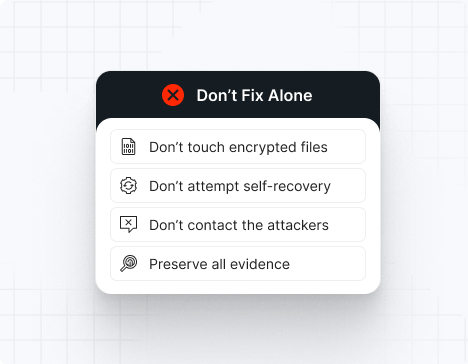
Do NOT attempt any self-remediation, as it can trigger further encryption and destroy recovery points. Instead, follow these steps:

1
Do NOT fix it yourself
2
Disconnect affected systems
3
Call us +1 332 331 8700

Contact us now for urgent ransomware response assistance, 24/7

Get Help Now
Frame

Experts. Finalists. Winners.

Accomplishments and recognitions, demonstrating our commitment to excellence and innovation.

Momentum Leader in MDR

Best Support in MDR & IR

Managed Detection and Response (MDR)

Top Cybersecurity Company 
2025

Best Managed Detection and Response Service

#4 of 184 teams Splunk Boss of the SOC

Best Of Cybersecurity Awards for Q1 2025

AWS Partner

Splunk Manage Premier Partner

Image (11) (1)

Why you shouldn’t attempt 
to fix it alone

Like a crime scene, a ransomware attack must be preserved — tampering with encrypted files, attempting self-recovery, or engaging with attackers can destroy critical evidence and reduce your chances of recovery.

Taking the right steps in the first moments after a Cactus attack can make a huge difference and help you make a full recovery. Request 24/7 Cactus ransomware recovery services to decrypt your data and maximize your chances of restoring operations.

Contact us now for urgent ransomware recovery assistance

Under attack?

Get Help Now

Cactus ransomware statistics & facts

Cactus Decryptor
Cactus IOCs
Cactus Attack Vectors
Case Outcomes
How to Remove Cactus Ransomware
How to Recover from Cactus Ransomware
Ransom Amounts
Cactus Decryptor

No legitimate public decryptor exists. Cactus uses RSA-4096 encryption with per-victim unique keys. Key recovery requires seizure of attacker infrastructure, which has not occurred to date. Some victims have negotiated key release after ransom payment with mixed success.

Cactus IOCs

Identify Cactus presence by searching for SSH processes spawned by SYSTEM account, Rclone and TotalExec process execution, .cts[digit] file extensions across network shares, and Tox contact addresses in ransom notes.

File Extensions
.cts1, .cts2, .cts3 (incremented per infection stage)

Ransom Note Filenames
cAcTuS.readme.txt, cactus.readme.txt (filename case varies)

Cactus Hashes
SHA256 samples vary significantly due to self-encryption. Monitor for executable files that decrypt themselves in memory—static hash matching is ineffective. Behavioral signatures are required for detection.

Cactus Tools
Reconnaissance: SoftPerfect Network Scanner, PowerShell enumeration scripts, ping sweeps
Persistence: SSH backdoors via command and control, Scheduled Tasks for binary execution
Data Exfiltration: Rclone (configured for cloud storage), TotalExec (SMB execution), custom scripts
Lateral Movement: Windows administrative shares (C$, ADMIN$), PsExec, custom SMB enumeration
Credential Dumping: LSASS process injection techniques
Security Bypass: Custom scripts to disable Windows Defender, disable Task Scheduler for security tasks

Most Common Red Flag
SSH process spawned by SYSTEM account combined with Rclone or TotalExec execution writing to external cloud storage, followed by rapid enumeration of network shares via PowerShell and ping sweeps across the /24 subnet.

Cactus Attack Vectors

Attack vector

% of Cactus incidents

Notes

VPN Vulnerability Exploitation

75%

CVE-2023-38035 (Fortinet), CVE in Ivanti MobileIron

Purchased Credential Access

15%

Brokers selling VPN/RDP credentials harvested from breaches

Supply Chain Access

7%

Compromise of managed service provider appliances

Phishing (Secondary)

3%

Used only after initial VPN access established

Powered By WP Table Builder
Case Outcomes

Three major victims refused ransom payment; Cactus operators re-entered networks 6 months later via SSH backdoor and encrypted systems again. One healthcare organization paid $11M; data was later discovered on 3 separate dark web forums despite gang promises of deletion. Law enforcement coordination recovered one victim’s encryption keys from attacker’s infrastructure before payments completed.

How to Remove Cactus Ransomware

Immediately terminate all SSH sessions and disable SSH service network-wide. Scan for scheduled tasks using rundll32.exe with suspicious paths and delete associated binaries. Disable SMB v1 and restrict SMB shares to essential systems only. Restore from offline backups verified clean prior to encryption detection. Monitor for Rclone and TotalExec process execution for 90 days post-recovery.

How to Recover from Cactus Ransomware

Recovery requires complete infrastructure rebuild due to persistent SSH backdoors. Assume all credentials compromised; force password resets network-wide with new MFA. Segment networks using zero-trust architecture to prevent lateral movement if re-infection occurs. Restore from verified clean backups, validate integrity via checksums, and monitor for re-infection indicators (Rclone, TotalExec, SSH anomalies) for 6+ months.

Ransom Amounts

Cactus demands range from $2 million to $15 million+ for Fortune 500 targets, typically 10-15% of annual revenue. Negotiation is uncommon; the group maintains inflexible pricing. Average settlement is $5-7 million, though gang track record of data deletion is poor even after payment.

Our customers say it best

Contact us now for urgent ransomware recovery assistance

Under attack?

Get Help Now

Frequently asked questions

What Is Cactus Ransomware?

Cactus is a closed-affiliate ransomware group that targets large enterprises exclusively, exploiting VPN vulnerabilities for initial access. The ransomware encrypts itself during transmission, making detection difficult, and uses hybrid encryption (RSA-4096 and AES) for file encryption. The group employs double extortion, stealing data before encryption and leveraging Tox peer-to-peer messaging for ransom negotiations to avoid law enforcement tracking.

Where Is Cactus Based?

Attribution analysis and operational patterns suggest the Cactus gang operates from Eastern Europe or Russia, with command infrastructure hosted on bulletproof hosting providers. The group has not claimed nation-state sponsorship but demonstrates sophisticated VPN exploitation expertise and enterprise-grade operational security.

How Does Cactus Attack?

Cactus exploits known VPN vulnerabilities (primarily Fortinet CVE-2023-38035) to gain direct network access, establishing SSH command and control for persistence. Operators then conduct internal scanning using SoftPerfect Network Scanner and PowerShell to identify high-value data and systems. Data is staged using Rclone for cloud exfiltration, and the self-encrypting ransomware binary is deployed across network shares via PsExec or custom SMB execution tools.

How Long Do Cactus Attacks Last?

Initial VPN exploitation to data exfiltration typically takes 24-48 hours, with encryption deployment following within 72 hours once the gang confirms data has reached secure cloud storage. Some targeted incidents show acceleration to 12 hours from initial access to encryption if the organization appears to have detected the intrusion.

Can Cactus Files Be Decrypted?

No legitimate public decryptor exists. Cactus uses 4096-bit RSA encryption with unique keys per victim, making brute-force recovery infeasible. Some victims who paid ransom have received keys, though gang track record of actually deleting exfiltrated data is poor. Recovery without decryption requires offline backups or paying the ransom with extreme caution.

What Happens After Cactus Encryption?

All encrypted files become inaccessible; the gang threatens to sell stolen data on dark web forums if ransom is not paid within the specified deadline (typically 7-14 days). Operational disruption is severe for enterprise targets—manufacturing halts, financial transactions fail, and critical data access is lost. SSH backdoors remain in place for months, allowing re-entry even after ransom payment.

How Can Organizations Prevent Cactus?

Patch all VPN appliances within 48 hours of CVE release; Cactus exploits known, patched vulnerabilities. Implement network segmentation to restrict lateral movement, disable SMB v1, enforce MFA on administrative accounts, and monitor VPN logs for suspicious access patterns. Restrict RDP exposure and use jump hosts. Deploy EDR solutions that detect SSH spawning from SYSTEM account and Rclone execution. Maintain offline backups tested regularly.

Cactus Prevention Checklist

– Patch Fortinet FortiOS appliances immediately upon CVE release
– Monitor VPN logs for failed authentication attempts and anomalous access patterns
– Disable SMB signing bypass; enforce SMB v3 with required signing
– Implement MFA on all VPN and administrative accounts
– Monitor for SSH processes spawned by SYSTEM account (abnormal)
– Restrict Rclone and TotalExec binary execution via application allowlist
– Maintain offline, encrypted backup copies verified quarterly
– Use zero-trust network architecture to restrict lateral movement
– Deploy EDR with detection rules for self-decrypting executables

What Tools Does Cactus Use That Are Detectable?

Cactus relies on legitimate Windows tools (PsExec, Rclone, TotalExec) and custom scripts for SMB enumeration. Unlike ransomware that brings custom tools, Cactus minimizes executable artifacts, making detection dependent on behavioral analysis—watching for unusual SSH activity, SMB enumeration, and cloud credential usage patterns. The self-encrypting binary is designed to defeat static signature detection entirely.

Why Is Cactus Targeting Larger Enterprises Rather Than SMBs?

Cactus operators have demonstrated sophisticated operational security and victim selection. Enterprise targets offer significantly higher ransoms ($5-15M versus $50K-500K for SMBs) while providing sufficient complexity to justify the group’s infrastructure investment. SMBs lack the organizational capacity to pay large ransoms, and the risk-to-reward ratio is poor for a closed, professional affiliate group.