What to do if you're hit by ransomware?

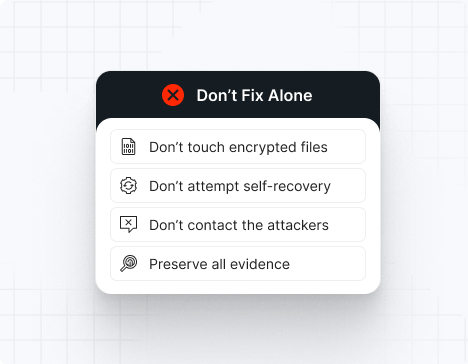
Do NOT attempt any self-remediation, as it can trigger further encryption and destroy recovery points. Instead, follow these steps:

1
Do NOT fix it yourself
2
Disconnect affected systems
3
Call us +1 332 331 8700

Contact us now for urgent ransomware response assistance, 24/7

Get Help Now
Frame

Experts. Finalists. Winners.

Accomplishments and recognitions, demonstrating our commitment to excellence and innovation.

Momentum Leader in MDR

Best Support in MDR & IR

Managed Detection and Response (MDR)

Top Cybersecurity Company 
2025

Best Managed Detection and Response Service

#4 of 184 teams Splunk Boss of the SOC

Best Of Cybersecurity Awards for Q1 2025

AWS Partner

Splunk Manage Premier Partner

Image (11) (1)

Why you shouldn’t attempt 
to fix it alone

Like a crime scene, a ransomware attack must be preserved — tampering with encrypted files, attempting self-recovery, or engaging with attackers can destroy critical evidence and reduce your chances of recovery.

Taking the right steps in the first moments after a Abyss attack can make a huge difference and help you make a full recovery. Request 24/7 Abyss ransomware recovery services to decrypt your data and maximize your chances of restoring operations.

Contact us now for urgent ransomware recovery assistance

Under attack?

Get Help Now

Abyss ransomware statistics & facts

Abyss Locker Decryptor
Abyss IOCs
Abyss Attack Vectors
Case Outcomes
How to Remove Abyss Locker Ransomware?
How to Recover from Abyss Locker Ransomware?
Ransom Amounts
Abyss Locker Decryptor

No public decryption tool is available for Abyss. The malware uses strong ChaCha20+asymmetric encryption with private keys held exclusively by the threat actor. Decryption requires ransom payment (with no guarantee of functionality) or restoration from clean backups. Some victims reported successful decryption post-payment; others experienced incomplete key recovery.

Abyss IOCs

Specific indicators include .abyss file extensions on encrypted files, “abyss_readme.txt” ransom notes on Windows, “.README_abyss” on Linux/ESXi, esxcli command execution for virtual machine enumeration and termination, and ChaCha20 encryption signatures. Network reconnaissance of ESXi hosts and data staging evidence indicates Abyss presence.

File Extensions
Windows systems: .abyss (e.g., database.mdf.abyss). Linux/ESXi systems: .abyss (e.g., virtual_disk.vmdk.abyss). The extension is consistent across both platforms, facilitating identification.

Ransom Note Filenames
Windows: “abyss_readme.txt” appearing in encrypted directories. Linux/ESXi: “.README_abyss” or “abyss_readme.txt” appearing in datastore directories and encrypted locations.

Abyss Hashes
Abyss samples show code patterns with Babuk and HelloKitty ransomware, indicating potential shared development resources or code reuse. Specific hash tracking requires behavioral analysis. Linux ELF variants require specialized binary analysis.

Abyss Tools
Legitimate administrative tools: vSphere Client, ESXi CLI (esxcli), RDP, WinRM, PowerShell; ESXi hypervisor management tools; virtual machine enumeration utilities; data exfiltration frameworks; potential Cobalt Strike usage for initial access.

Most Common Red Flag (Commands)
ESXi-specific commands: esxcli vm process list, esxcli vm process kill, esxcli storage filesystem list; PowerShell commands: Get-Process, Stop-Process on ESXi hosts; evidence of virtual machine snapshot enumeration; bulk data transfers from datastore mounts; unusual SSH activity on hypervisor hosts.

Abyss Attack Vectors

Attack vector

% of Abyss incidents

Notes

Exposed ESXi Services

45%

Weak credentials on vSphere or ESXi management interfaces

Phishing & Initial Access

30%

Email-based credential harvesting targeting administrators

Unpatched ESXi Vulnerabilities

15%

CVE-2021-21974, CVE-2021-21985 exploitation

Supply Chain/Third-Party Access

10%

Compromised vendor or partner access

Powered By WP Table Builder
Case Outcomes

Finance, manufacturing, and healthcare organizations reported significant disruption from ESXi encryption affecting virtual machine environments. Recovery timelines ranged from 2–6 weeks depending on backup integrity and restoration procedures. High-profile incidents resulted in ransom payments estimated at $1–5 million+. Some victims reported successful ESXi environment restoration from backups; others required decryption key provision.

How to Remove Abyss Locker Ransomware?

Immediately isolate compromised ESXi hosts from network and powered-down virtual machines to halt encryption. Preserve forensic evidence of ESXi command execution and encryption activity. Reset all vSphere admin credentials and service accounts. Restore ESXi configurations and virtual machine files from verified clean backup snapshots predating the infection. Scan all systems for persistence mechanisms, backdoors, and lateral movement artifacts. Implement enhanced monitoring on ESXi host access and virtual machine file modification.

How to Recover from Abyss Locker Ransomware?

Restore all encrypted virtual machines from clean backup snapshots verified to predate the infection. Verify backup integrity before restoration to confirm backups were not compromised or encrypted. Rebuild vSphere user credentials and implement multi-factor authentication on all hypervisor access. Deploy enhanced SIEM alerting for ESXi command execution (esxcli), mass file encryption, and virtual machine termination. Implement network segmentation to restrict ESXi host access to authorized administrators only. Deploy immutable backup solutions to prevent future encryption of recovery points. Consider vSphere security hardening and network isolation.

Ransom Amounts

Abyss demands range from $500,000 to $5,000,000+ depending on victim organization size and virtual machine environment criticality. Organizations managing thousands of virtual machines or running mission-critical applications face higher demands. Negotiated settlements typically reduce initial demands by 40–60%.

Our customers say it best

Contact us now for urgent ransomware recovery assistance

Under attack?

Get Help Now

Frequently asked questions

What is Abyss Locker Ransomware?

Abyss Locker is a sophisticated ransomware operation active since March 2023, distinguished by specialized Linux ELF encryptors targeting VMware ESXi hypervisor platforms. The group combines encryption of virtual machines with data exfiltration for double-extortion leverage. Abyss employs ChaCha20 encryption with asymmetric key exchange derived from Babuk/HelloKitty source code, demonstrating professional development practices. The group maintains a dedicated Tor-based leak site for victim shaming and data sale threats. The focus on virtualization infrastructure enables comprehensive network disruption and high recovery costs.

Where is the Abyss Gang Located?

The Abyss Locker threat actor’s geographic origin is unconfirmed but operational patterns suggest Eastern European or Russian-speaking operators. The group’s technical sophistication and understanding of enterprise infrastructure suggests organized cybercriminal operations. Law enforcement has not publicly attributed Abyss to specific nation-states or geographic regions.

How Does Abyss Locker Ransomware Work?

Abyss attacks follow a staged approach: Initial access via exposed ESXi management interfaces, weak vSphere credentials, or phishing-based credential harvesting. Lateral movement through vSphere infrastructure and organizational networks using compromised credentials. Reconnaissance of virtual machine environments using vSphere API and esxcli tools to identify critical VMs. Optional data exfiltration to attacker-controlled servers of virtual machine files, configurations, and organizational data. Virtual machine enumeration and process termination via esxcli vm process kill commands prior to encryption (optional). Deployment of specialized Linux ELF encryptor on ESXi hosts targeting virtual disk files (.vmdk), snapshots (.vmsn), and metadata (.vmsd). Ransom note placement in datastores. Victim notification via Tor leak site and direct contact.

How Long Does an Abyss Attack Take?

Abyss campaigns typically span 2–4 weeks from initial access to encryption deployment. The group conducts reconnaissance to identify virtual machine environments and critical applications. Encryption of large datastore volumes typically completes within 24–72 hours once ESXi access is established. Negotiation begins immediately upon victim discovery of ransom notes in encrypted datastore directories.

Can Abyss Locker Ransomware Be Decrypted?

No public decryption tools are available for Abyss. The malware uses strong ChaCha20 encryption with private keys held exclusively by the threat actor. Decryption requires ransom payment (with no guarantee of functionality) or restoration from clean backup copies. Some victims reported successful decryption post-payment; others experienced incomplete key recovery or failures.

What Happens If You Pay the Abyss Ransom?

Payment has resulted in decryption key provision in several documented cases. However, some victims reported that provided keys failed to decrypt files or decrypted only partial data. Exfiltrated data may still be published or sold despite payment. The group operates under no legal enforcement of agreements, creating risk that ransom payment does not achieve stated objectives.

How to Prevent Abyss Locker Infection?

Implement multi-factor authentication on all vSphere and ESXi management accounts. Restrict vSphere and ESXi access to dedicated administrative networks with strong network controls. Patch ESXi systems regularly against known CVEs (particularly CVE-2021-21974, CVE-2021-21985). Deploy EDR/XDR solutions with visibility into ESXi command execution. Monitor ESXi host access logs and alert on suspicious esxcli command execution. Segment ESXi infrastructure from general corporate networks. Implement immutable backup solutions with offline copies separate from production infrastructure. Maintain tested restore procedures for virtual machine recovery.

Abyss Locker Threat Checklist

– Audit all vSphere and ESXi management credentials – Deploy multi-factor authentication on hypervisor access – Monitor for esxcli commands and virtual machine process termination – Restrict ESXi management access to dedicated admin networks – Patch ESXi systems regularly (CVE-2021-21974, CVE-2021-21985) – Verify backup integrity and test restoration from backups – Implement immutable offline backup copies – Segment ESXi infrastructure from corporate networks – Engage incident response and law enforcement upon detection

Does Abyss Target Specific Industries?

Abyss shows strong preference for finance, manufacturing, healthcare, and information technology organizations with significant virtual machine infrastructure. The group targets any organization with mission-critical virtualized applications and large datastore volumes. No specific vertical is excluded, but those with operational dependency on VM environments face elevated risk.

What Makes ESXi Targeting Significant?

ESXi-specific attacks enable encryption of entire virtual machine environments simultaneously, creating unprecedented operational impact. The development of specialized Linux ELF encryptors demonstrates sophisticated understanding of hypervisor architecture. ESXi-focused attacks impact all virtual machines on affected hosts, creating cascading disruption across multiple applications and workloads. This approach maximizes damage and victim pressure to pay ransoms far exceeding traditional Windows-only attacks.