Security & Compliance Automation Platform
UnderDefense MAXI is the solution to day-to-day cybersecurity problems of IT leaders and teams. It builds your 24/7 business protection together with you on the driver’s seat.
UnderDefense MAXI Platform
UnderDefense Secures Top Honor at the 2025 Global Infosec Awards
We’re proud of being a winner at the 2025 Global Infosec Awards…
10-Point AWS Security Checklist for Executives
Quickly assess your cloud security posture with this executive-ready checklist covering IAM, monitoring, and compliance essentials.
Anti-Phishing Playbook
Your free PDF guide to spotting and stopping phishing attacks before they reach your team or data.
24/7 Threat Detection & MAXImum Responsiveness
Our human-led MDR service combines expert insight and automation and AI for fast, precise threat response. Get full context in 2 minutes and cut MTTC to 15, staying ahead of ransomware and other attacks.
Calculate your MDR price
Pay only for the services you actually need, with no hidden costs.
10-Point AWS Security Checklist for Executives
Quickly assess your cloud security posture with this executive-ready checklist covering IAM, monitoring, and compliance essentials.
Anti-Phishing Playbook
Your free PDF guide to spotting and stopping phishing attacks before they reach your team or data.
Spot threats faster and respond smarter than tools alone
24/7 MDR and SOC services led by award-winning security experts. We act as an extension to your team or as a fully remote team, providing detailed threat insights and actionable responses to secure your environment immediately.
UnderDefense is an AWS Partner
We’re excited to announce that UnderDefense is now an AWS partner and available on AWS Marketplace…
Managed SOC at Your Service
Augment your SOC with 24/7 monitoring, threat detection, and expert response—without the overhead. Integrated with your existing tools, our SOCaaS stops attacks before they cause harm.
Managed SIEM Pricing Guide
Download a clear, practical overview of Managed SIEM pricing, featuring detailed breakdowns by service type, pricing model, real-world pros and cons, and key cost factors.
Managed SOC at Your Service
Augment your SOC with 24/7 monitoring, threat detection, and expert response—without the overhead. Integrated with your existing tools, our SOCaaS stops attacks before they cause harm.
Managed SIEM Pricing Guide
Download a clear, practical overview of Managed SIEM pricing, featuring detailed breakdowns by service type, pricing model, real-world pros and cons, and key cost factors.

Flocker ransomware recovery team on standby
Flocker is a lock-screen ransomware targeting Android devices and smart TVs, known for impersonating law enforcement agencies to coerce victims into paying fines via prepaid vouchers. If enterprise devices are affected, isolate them immediately and contact UnderDefense — do not attempt to unlock or pay without expert guidance.
Average Mttc
Ransom-Free recovery rate
Avoided in ransom
Global availability
Systems restored
IR experts
Ransomware cases resolved
IR experience
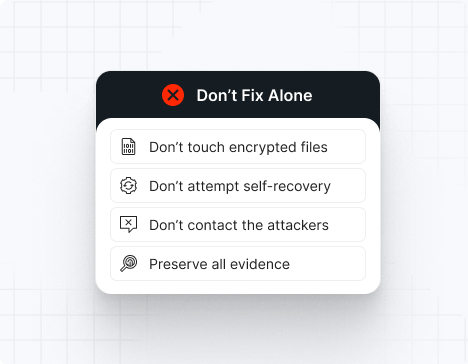
Do NOT attempt any self-remediation, as it can trigger further encryption and destroy recovery points. Instead, follow these steps:
Contact us now for urgent ransomware response assistance, 24/7
Get Help Now
Accomplishments and recognitions, demonstrating our commitment to excellence and innovation.
Momentum Leader in MDR
Best Support in MDR & IR
Managed Detection and Response (MDR)
Top Cybersecurity Company 2025
Best Managed Detection and Response Service
#4 of 184 teams Splunk Boss of the SOC
Best Of Cybersecurity Awards for Q1 2025
AWS Partner
Splunk Manage Premier Partner
Like a crime scene, a ransomware attack must be preserved — tampering with encrypted files, attempting self-recovery, or engaging with attackers can destroy critical evidence and reduce your chances of recovery.
Taking the right steps in the first moments after a Flocker attack can make a huge difference and help you make a full recovery. Request 24/7 Flocker ransomware recovery services to decrypt your data and maximize your chances of restoring operations.
Flocker infections manifest as complete device lock-screens displaying law enforcement impersonation messages, rendering devices unusable without payment. Android victims report device immobilization within minutes of infection; smart TV users experience channel locks and interface freezes. Unlike traditional ransomware, Flocker may not encrypt files but rather locks the device at the OS level, making traditional recovery tools less effective.
Flocker uses OS-level device locking rather than file encryption. On Android, it exploits Device Administrator privileges and Accessibility Service permissions to prevent unlock attempts. Smart TV variants manipulate firmware-level boot sequences.
Primarily malware-as-a-service distributed through compromised app stores, SMS phishing, and trojanized free apps (game emulators, streaming apps). Operators pay minimal development costs and rely on volume-based payment (thousands of devices locked, even if conversion rate is low).
ingle extortion via lock-screen: fake law enforcement badge, false accusation (illegal content, unpaid fines), immediate payment demand ($50–$500). No data exfiltration; psychological manipulation is the sole tactic. Some variants claim to contact local authorities unless paid.
Android (primary, API level 18–14+), smart TV platforms (Samsung Tizen, LG WebOS, Android TV). Rooted or jailbroken devices are more vulnerable. Desktop computers are not targeted.
Lock-screen message typically reads: "[Police Department Logo] DEVICE LOCKED. Your device has been used for illegal activity. Contact [number] or pay fine via [payment method]. You have 24 hours." Messages vary by region and threat profile.
Device unlock possible through Android Safe Mode, factory reset (data loss), or restoration from backup. Advanced users can ADB (Android Debug Bridge) into devices to remove Accessibility Service permissions. No decryption tool needed; device restoration is the primary recovery method.
File Extensions
No file extension (device-level lock). Some variants append .flocker or .locked to app files.
Ransom Note Filenames
Lock-screen overlay (not file-based). System UI hijacking observed in: /data/data/com.flocker.lock/ directories.
Flocker Package Hashes
Common package names: com.security.lockscreen, com.police.alert, com.fbi.android, com.device.protection, com.antivirus.guard (impersonation of legitimate apps). APK hash monitoring essential for network detection.
Flocker Tools
– Privilege Escalation: Device Administrator exploitation, Accessibility Service abuse
– Persistence: System app installation via ADB, boot-time script execution
– UI Hijacking: Lock-screen overlay, intent hijacking
– Malware: Often bundled with banking trojans or info-stealers for follow-on attacks
Most Common Red Flag
Logcat entries showing: `AccessibilityService binding request`, rapid Device Administrator registration attempts, UI framework system calls: `WindowManager.addView()` with overlay flags. On smart TVs: boot log modifications, firmware checksum mismatches.
Attack vector | % of Flocker incidents | Notes |
Malicious App Store (third-party) | 50% | Common on Android devices |
SMS/Email Phishing | 30% | Fake security alerts directing to malicious APK |
USB/Sideloading | 15% | Trojanized APKs shared via file-sharing apps |
Rooted Device Exploitation | 5% | Devices with existing Accessibility Service permissions |
Flocker has locked an estimated 200,000+ devices since 2023. Payment rate: 3–5% (very low conversion due to low victim trust in fake law enforcement). Most users factory reset rather than pay. Smart TV infections less common but growing; estimated 5,000+ TV devices locked globally.
Device factory reset is the primary removal method: Settings > System > Reset Options > Erase All Data. For advanced users: boot into Android Safe Mode, use ADB to disable Accessibility Services (`adb shell settings put secure enabled_accessibility_services “”`), then uninstall suspicious apps. Smart TV removal requires firmware rollback or secure boot modifications.
Recovery is straightforward compared to file-based ransomware. Restore from cloud backup (Google Drive, OneDrive) post-factory reset. If no backup exists, use Android’s emergency SOS mode to access critical contacts. Smart TV users can force factory reset via recovery menu during startup. Data loss depends on backup recency; most users lose minimal critical data.
Flocker demands: $50–$500 per device. Payment via iTunes cards, Google Play credits, or Bitcoin. Actual ransom collection extremely low (3–5% payment rate), indicating unsophisticated attacker group relying on high-volume distribution rather than premium targeting.
10 reasons why you should choose the UnderDefense ransomware recovery consulting services:
Get Help NowFlocker is a mobile and IoT ransomware that locks Android devices and smart TVs at the operating system level, displaying fake law enforcement messages to extort payment. Unlike traditional file-encryption ransomware, Flocker uses OS-level lock mechanisms (Accessibility Services, Device Administrator abuse) to prevent device access without dropping the lock. It’s primarily distributed through compromised app stores, malicious APKs, and SMS phishing.
Flocker poses limited direct threat to enterprise infrastructure but creates indirect risk through BYOD (Bring Your Own Device) policies. Infected personal devices with corporate app access (Gmail, Slack, VPN) could be initial compromise vectors. Enterprise impact: reputational harm if employees perceive company BYOD policy as unsafe, potential data leakage if infected devices connect to corporate networks.
Flocker displays a full-screen lock with police department logo, badge imagery, and false accusation (accessing illegal content, traffic violations, outstanding warrant). The message creates urgency and shame, exploiting users’ fear of legal consequences. Regional variants tailor messages to local law enforcement agencies (FBI in US, Gendarmerie in France, etc.), increasing psychological impact.
Reboot alone won’t remove Flocker unless you access Safe Mode before infection fully establishes. If the lock-screen appears immediately after boot, the malware has already gained Accessibility Service or Device Administrator permissions. Factory reset is the reliable removal method.
Flocker locks the device, not individual files. It exploits Android’s permission system rather than deploying file encryption. This makes it less technically sophisticated but more effective at scale: higher infection volume through app stores, lower development costs, and low-friction distribution via SMS phishing.
If the device is locked at the OS level, attackers can’t easily extract files unless the malware includes secondary payloads (banking trojans, info-stealers). However, many Flocker variants include spyware components that harvest SMS messages, contacts, and browsing history before displaying the lock-screen.
1) Install apps only from official Google Play Store; 2) Disable installation from unknown sources; 3) Use MDM (Mobile Device Management) to enforce app whitelisting; 4) Monitor for Accessibility Service abuse via security logs; 5) Regular device patching for OS vulnerabilities; 6) User training on malicious app indicators (poor reviews, odd permissions, recently created accounts).
1) Do not pay the ransom; 2) Boot into Recovery Mode (hold Power + Volume Down); 3) Factory reset the device; 4) Restore from backup (Google, iCloud, or corporate MDM); 5) Reinstall corporate apps through official channels; 6) Force password reset for all corporate accounts accessed from the device; 7) Review corporate network logs for unauthorized access during infection period; 8) If corporate data was on the device, trigger breach response protocol.
Smart TVs increasingly connect to home networks and corporate WiFi in offices. A compromised smart TV could provide network access for pivoting into corporate infrastructure. Additionally, smart TV locks are harder to recover from (firmware issues, recovery menu access varies by manufacturer), making infection more persistent.
Flocker is sometimes confused with traditional ransomware due to its ransom-demanding behavior, but it’s more accurately classified as “scareware” or “lock-screen malware.” No data is encrypted; the device is simply locked. This distinction matters for recovery: traditional ransomware requires negotiation or decryption tools, while Flocker typically requires only factory reset or ADB command-line access.