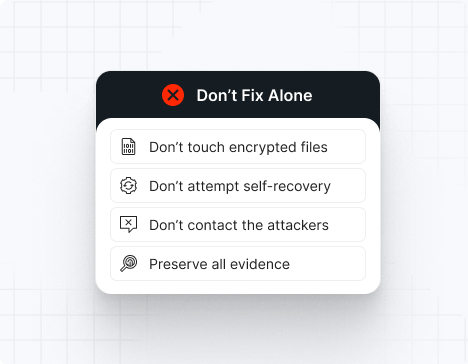
What to do if you're hit by ransomware?

Do NOT attempt any self-remediation, as it can trigger further encryption and destroy recovery points. Instead, follow these steps:

1
Do NOT fix it yourself
2
Disconnect affected systems
3
Call us +1 332 331 8700

Contact us now for urgent ransomware response assistance, 24/7

Get Help Now
Frame

Experts. Finalists. Winners.

Accomplishments and recognitions, demonstrating our commitment to excellence and innovation.

Momentum Leader in MDR

Best Support in MDR & IR

Managed Detection and Response (MDR)

Top Cybersecurity Company 
2025

Best Managed Detection and Response Service

#4 of 184 teams Splunk Boss of the SOC

Best Of Cybersecurity Awards for Q1 2025

AWS Partner

Splunk Manage Premier Partner

Image (11) (1)

Why you shouldn’t attempt 
to fix it alone

Like a crime scene, a ransomware attack must be preserved — tampering with encrypted files, attempting self-recovery, or engaging with attackers can destroy critical evidence and reduce your chances of recovery.

Taking the right steps in the first moments after a NoEscape attack can make a huge difference and help you make a full recovery. Request 24/7 NoEscape ransomware recovery services to decrypt your data and maximize your chances of restoring operations.

Contact us now for urgent ransomware recovery assistance

Under attack?

Get Help Now

NoEscape ransomware statistics & facts

NoEscape decryptor
NoEscape IOCs
NoEscape attack vectors
Case outcomes
How to remove NoEscape ransomware?
How to recover from NoEscape ransomware?
Ransom amounts
NoEscape decryptor

Unfortunately, there is no known public decryptor for NoEscape ransomware. The good news — UnderDefense’s incident response team is on standby to contain the attack, eliminate the malware, prevent reinfection, and restore your systems using verified, uncompromised backups so you can safely resume operations.

NoEscape IOCs

Important note: IOCs often change because NoEscape constantly updates its tools. This list includes recurring, widely confirmed indicators based on HHS, SentinelOne, Quorum Cyber, DarkAtlas, and IR case data.

 File extensions
The original ransom extension is the most common. NoEscape typically appends a unique extension to encrypted files based on the affiliate configuration.

Ransom note filenames
The standard ransom note filename is:

HOW_TO_RECOVER_FILES.txt

*The exact filename may vary depending on the affiliate or attacker group.

NoEscape hashes
These are SHA256 hashes used for encrypting payloads in known attacks:

68ff9855262b7a9c27e349c5e3bf68b2fc9f9ca32a9d2b844f2265dccd2bc0d8
68e5caa3f0fd4adc595b1163bf0dd30ca621c5d7a6ad0a20dfa1968346daa3c8
82dbd49b3c5b07d6528624f57177270dfd09df6d8030d72a7769a70581ea58c5
8FAF3B4047CD810CA30A6D7174542DC1E1270AD63662AE2F53D222A8A9113AF8

NoEscape tools
For EDR disabling:

Restart Session Manager abuse
Safe Mode execution
UAC disabling

For credential dumping:

Mimikatz
LaZagne
OS Credential Dumping techniques

For reconnaissance:

Network Share Discovery
Query Registry
System Service Discovery

For data exfiltration:

Archive via Utility
Web Protocols
Exfiltration to Cloud Storage

For lateral movement:

Remote Desktop Protocol (RDP)
Valid Accounts
External Remote Services

Malware:

Phishing campaigns
Malicious email attachments
Dropped by other malware

Most common red flag
NoEscape almost always runs these commands:

vssadmin Delete Shadows /All /Quiet
wmic SHADOWCOPY DELETE /nointeractive
wbadmin DELETE SYSTEMSTATEBACKUP -deleteOldest
wbadmin DELETE BACKUP -keepVersions:0
bcdedit /set {default} recoveryenabled No
bcdedit /set {default} bootstatuspolicy ignoreallfailures

*If you detect these commands, data encryption is moments away.

NoEscape attack vectors

Attack vector

% of NoEscape incidents

Notes

Phishing + malware loaders

35–40%

Malicious email attachments, fake updates

Exploited vulnerabilities

28–32%

RDP compromise, VPN vulnerabilities

Compromised RDP

15–18%

Brute-force or purchased credential

Valid Accounts

10–12%

Stolen or leaked credentials

External Remote Services

8–10%

VPN access, remote management tools

Insider/Internal misuse

2–4%

Rare but high-impact

Powered By WP Table Builder
Case outcomes

NoEscape is a highly aggressive RaaS operation that emerged in mid-2023, believed to be a rebrand of the defunct Avaddon ransomware gang.

NoEscape affiliates employ triple-extortion tactics: encrypting files, exfiltrating data, and launching DDoS attacks (available for an additional $500,000 fee). The group operates a TOR-based data leak site where they publish victim information and stolen data within days if negotiations stall.

Most NoEscape affiliates do not provide reliable decryptors, even after payment. Decryptors may be slow, unstable, or incomplete. Some victims experience repeated extortion attempts, even after paying. Partial data recovery failures are common when backups were destroyed or tampered with during the attack.

NoEscape is known to publish data rapidly and escalate threats aggressively when victims delay or refuse payment.

How to remove NoEscape ransomware?

Note: Attempting to remove NoEscape ransomware and self-remedy may lead to greater data loss.

To remove NoEscape ransomware, immediately engage NoEscape ransomware removal experts to guide your response and ensure no critical steps are missed. Then, begin by isolating all affected systems: disconnect compromised machines from the network (disable Wi-Fi, unplug Ethernet cables, and block their IPs at the firewall).

Next, perform a comprehensive forensic analysis to uncover the depth of the breach. Use endpoint detection and response (EDR) tools to trace the attacker’s path. Collect and review file-hash indicators of compromise (IOCs), registry changes, deleted Volume Shadow Copies, and any tampering with event logs. After mapping the intrusion, reimage all infected devices using clean, verified system images.

Finally, rely on NoEscape ransomware removal and recovery experts to validate the cleanup, conducting rootkit scans, reviewing system configurations, rotating compromised credentials, and reinforcing your security posture. Their specialized knowledge ensures thorough removal and helps prevent future incidents through strategic hardening and lessons learned.

How to recover from NoEscape ransomware?

To recover from NoEscape ransomware, follow these essential steps:

Immediately isolate affected machines to stop any further malicious activity, then only reintroduce them into production once you’ve verified clean restorations and confirmed there’s no lingering malware.
Recover your data exclusively from offline, write-protected backups, and validate their integrity by checking checksums and performing test restores in a controlled environment.
Perform a thorough post-incident review to map the attack chain and identify root causes, then harden or rotate all credentials (especially admin/service accounts) to eliminate any leftover access points.
Bring in external IR specialists to audit your environment, ensure complete ransomware eradication, and help update your incident-response and business-continuity plans.

Ransom amounts

NoEscape ransom demands typically range from hundreds of thousands of dollars to over $10 million, depending on the size of the victim organization and the amount of data stolen. Ransoms are almost always demanded in cryptocurrency, primarily Bitcoin or Monero.

Because NoEscape conducts triple-extortion attacks, victims face three simultaneous financial threats:

The ransom itself
The cost of leaked, stolen, or destroyed data
DDoS attacks disrupting business operations

Organizations should never attempt ransom negotiation alone — NoEscape is known to escalate threats quickly, publish data when provoked, or disappear after receiving payment if communication is mishandled.

Average ransom:

Small business: $200,000 – $500,000
Medium business: $500,000 – $2,000,000
Large enterprise: $2,000,000 – $10,000,000+

Our customers say it best

Contact us now for urgent ransomware recovery assistance

Under attack?

Get Help Now

Frequently asked questions

What is NoEscape ransomware?

NoEscape is a highly aggressive Ransomware-as-a-Service (RaaS) operation that emerged in May 2023, believed to be a rebrand of the now-defunct Avaddon ransomware group. The group breaches networks, steals sensitive data, disables security tools, and rapidly encrypts systems using ChaCha20 + RSA-2048 encryption before demanding ransoms. Stolen data is then published on NoEscape’s dark-web leak site to pressure victims into paying.

Where is NoEscape ransomware gang located?

The NoEscape ransomware group operates as a decentralized RaaS collective, using Tor-based communication portals, anonymized servers, and constantly shifting infrastructure to obscure its origins. While it’s widely believed that they are run by Russian-speaking actors with links to former Avaddon operators, there is no officially confirmed physical location. Like Avaddon, NoEscape avoids targeting countries of the former Soviet Union.

How does NoEscape ransomware work?

NoEscape ransomware typically infiltrates through phishing emails, compromised RDP/VPN access, or unpatched vulnerabilities. Once inside, attackers steal credentials, map the network, and move laterally. They exfiltrate data before encryption, disable security defenses and shadow copies, then rapidly encrypt files with ChaCha20+RSA-2048, appending a random 10-character uppercase extension. Finally, they drop ransom notes titled “HOW_TO_RECOVER_FILES.TXT” across the system and may establish persistence via backdoors.

How long do NoEscape ransomware attacks last?

NoEscape’s encryption phase is shockingly fast — small networks can be locked down in under 10 minutes, mid-size environments in 1–2 hours, and large enterprises in under 8 hours. But the attack usually begins days or weeks earlier: attackers spend 4–21+ days inside the network undetected, stealing data, destroying backups, and preparing for rapid, simultaneous encryption across all systems.

Where can I find a NoEscape victims list?

There is no official public list of NoEscape victims, but confirmed cases are typically published on NoEscape’s own dark-web leak site and later reported by cybersecurity researchers, CTI platforms, and media outlets that track ransomware disclosures. Security teams often monitor these leak portals, threat-intel feeds, and DFIR reports to stay updated on newly named victims.

Can NoEscape ransomware be deleted?

You can remove the NoEscape malware itself, but that does nothing to decrypt files or stop the attack. Because there is no public decryptor for NoEscape and the threat actors often leave backdoors behind, proper recovery requires professional incident response, full environment cleanup, and restoration from uncompromised backups.

What happens when you get NoEscape ransomware?

NoEscape attackers typically infiltrate your network days or weeks before encryption, quietly stealing data, disabling backups and EDR tools, and spreading laterally through key servers. When the ransomware detonates, files across Windows, Linux, and ESXi systems are rapidly encrypted with a random 10-character extension, shadow copies are wiped, and ransom notes appear in every directory. Soon after, stolen data is threatened or published on the gang’s dark-web leak site to pressure victims into paying.

How can ransomware be prevented?

Ransomware is best prevented through layered security: patching critical vulnerabilities quickly, enforcing phishing-resistant MFA, deploying EDR + SIEM with 24/7 monitoring, segmenting networks to limit lateral movement, hardening identity and admin access, securing email gateways, and protecting backups with immutability and MFA-controlled access so attackers cannot tamper with them. Employee training and continuous threat-hunting further reduce risk.

What is a ransomware prevention checklist?

Here’s a ransomware prevention checklist that will help your organization to block, detect, and contain attacks:

Patch critical vulnerabilities within 48 hours
Use MFA for all accounts
Deploy EDR on all endpoints
Centralize logs into your SIEM
24/7 monitoring for lateral movement
Disable unused RDP and enforce VPN access controls
Apply network segmentation and restrict admin privileges
Harden backup servers and enforce immutability
Run phishing simulations and security awareness training
Perform regular IR tabletop exercises