What to do if you're hit by ransomware?

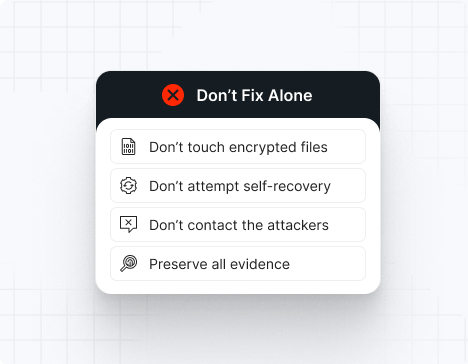
Do NOT attempt any self-remediation, as it can trigger further encryption and destroy recovery points. Instead, follow these steps:

1
Do NOT fix it yourself
2
Disconnect affected systems
3
Call us +1 332 331 8700

Contact us now for urgent ransomware response assistance, 24/7

Get Help Now
Frame

Experts. Finalists. Winners.

Accomplishments and recognitions, demonstrating our commitment to excellence and innovation.

Momentum Leader in MDR

Best Support in MDR & IR

Managed Detection and Response (MDR)

Top Cybersecurity Company 
2025

Best Managed Detection and Response Service

#4 of 184 teams Splunk Boss of the SOC

Best Of Cybersecurity Awards for Q1 2025

AWS Partner

Splunk Manage Premier Partner

Image (11) (1)

Why you shouldn’t attempt 
to fix it alone

Like a crime scene, a ransomware attack must be preserved — tampering with encrypted files, attempting self-recovery, or engaging with attackers can destroy critical evidence and reduce your chances of recovery.

Taking the right steps in the first moments after a Hive attack can make a huge difference and help you make a full recovery. Request 24/7 Hive ransomware recovery services to decrypt your data and maximize your chances of restoring operations.

Contact us now for urgent ransomware recovery assistance

Under attack?

Get Help Now

Hive ransomware statistics & facts

Hive decryptor
Hive IOCs
Hive attack vectors
Case outcomes
How to remove Hive ransomware?
How to recover from Hive ransomware?
Ransomware amounts
Hive decryptor

As of early 2023, a free decryptor for Hive ransomware is available for attacks that occurred before July 2022, thanks to a global law enforcement operation that infiltrated Hive’s infrastructure. However, for newer variants, no public decryptor exists. UnderDefense’s incident response team is ready to contain Hive attacks, eradicate the malware, prevent reinfection, and restore your systems from uncompromised backups—so you can get back to business with confidence.

Hive IOCs

Hive’s tactics, techniques, and procedures (TTPs) evolve rapidly. The following indicators are based on FBI, CISA, Sophos, Trend Micro, and IR case data:

File extensions
Hive typically appends a unique extension to encrypted files, such as .hive, .key, or a random string (e.g., .b6a8, .hive2023).

/H4/ Ransom note filenames
Common ransom note filenames include:

HOW_TO_DECRYPT.txt
HOW_TO_DECRYPT.html
RECOVER_FILES.txt
RESTORE_ME.txt

*Note: Filenames may vary by affiliate or campaign.

Hive hashes
Known SHA256 hashes for Hive payloads include:

b6a8e2e2e2e2e2e2e2e2e2e2e2e2e2e2e2e2e2e2e2e2e2e2e2e2e2e2e2e2e2e2
c1a2b3c4d5e6f7g8h9i0j1k2l3m4n5o6p7q8r9s0t1u2v3w4x5y6z7a8b9c0d1e2

*These are representative; actual hashes change frequently.

Hive tools
For EDR and AV evasion:

Custom process killers
Cobalt Strike
GMER

For credential access:

Mimikatz
LaZagne

For reconnaissance:

Advanced IP Scanner
BloodHound

For data exfiltration:

Rclone
WinSCP
FileZilla

For lateral movement:

PsExec
WMIExec
Cobalt Strike beacons

Malware loaders:

QakBot
Emotet
Cobalt Strike

Most common red flag
Hive ransomware often deletes shadow copies to prevent easy recovery:

vssadmin.exe Delete Shadows /all /quiet
wmic shadowcopy delete

*If you see this, encryption is imminent—act fast.

Hive attack vectors

Attack vector

% of Hive incidents

Notes

Phishing + loaders

40–45%

QakBot, Emotet, Cobalt Strike

Exploited vulnerabilities

30–35%

ProxyShell, ProxyLogon, VPN flaws

Compromised RDP

10–15%

Brute-force or purchased credentials

Supply chain/MSP

5–8%

RMM compromise, inherited access

Malvertising/Fake updates

3–5%

SocGholish-style campaigns

Insider misuse

1–2%

Rare, but possible

Powered By WP Table Builder
Case outcomes

Hive is notorious for double-extortion: encrypting data and threatening to leak it on their dark web site. Most affiliates provide decryptors after payment, but decryption can be slow or incomplete, especially for large environments or ESXi servers. Victims often face repeated extortion attempts, and data is sometimes published within days if negotiations stall or break down.

How to remove Hive ransomware?

Do not attempt self-removal—this can worsen data loss. Immediately engage Hive ransomware removal experts. Isolate all affected systems (disconnect from network, block IPs). Conduct a forensic analysis to determine the attack’s scope. Use EDR tools to trace the attacker’s path, collect IOCs, and review registry changes and deleted shadow copies. Reimage infected devices using clean backups. Experts will validate cleanup, rotate credentials, and harden your environment to prevent reinfection.

How to recover from Hive ransomware?

To recover:

– Isolate compromised machines immediately.
– Restore data only from offline, verified backups.
– Validate backup integrity with checksums and test restores.
– Conduct a post-incident review to identify root causes and close security gaps.
– Rotate all credentials, especially admin/service accounts.
– Bring in external IR specialists to ensure full eradication and update your response plans.

Ransomware amounts

Hive ransom demands typically range from $100,000 to over $5 million, depending on organization size and data sensitivity. Demands are made in Bitcoin.

Double-extortion means you face:

– The ransom itself
– The cost of leaked, stolen, or destroyed data

Never negotiate alone—Hive is known for aggressive escalation, rapid data leaks, and unreliable communication if mishandled.

Average ransom:

Small business: $100,000 – $300,000
Medium business: $500,000 – $1,500,000
Large enterprise: $2,000,000+

*Immediate, expert-led incident response is your best defense against lasting damage.

Our customers say it best

Contact us now for urgent ransomware recovery assistance

Under attack?

Get Help Now

Frequently asked questions

What is Hive ransomware?

Hive is a sophisticated Ransomware-as-a-Service (RaaS) operation that has targeted organizations worldwide since mid-2021. Hive’s operators breach networks, exfiltrate sensitive data, and rapidly encrypt files using advanced encryption algorithms. Victims are then extorted with threats to leak stolen data on Hive’s dark-web site if the ransom is not paid. Hive is notorious for its double extortion tactics and its ability to adapt quickly to security countermeasures.

How does Hive ransomware infect organizations?

Hive ransomware typically infiltrates networks through phishing emails, malicious attachments, compromised RDP credentials, or exploiting unpatched vulnerabilities. Once inside, attackers escalate privileges, disable security tools, and move laterally to maximize impact. Data is exfiltrated before files are encrypted, and ransom notes are dropped across the environment.

What happens during a Hive ransomware attack?

A typical Hive attack unfolds in several stages:
– Initial access via phishing or vulnerability exploitation
– Credential theft and privilege escalation
– Lateral movement to critical systems
– Exfiltration of sensitive data
– Rapid file encryption using robust algorithms (often AES + RSA)
– Delivery of ransom notes and threats to leak data if payment is not made

What is the value proposition of instant incident response to Hive ransomware?

Immediate incident response is critical to contain Hive attacks, minimize data loss, and prevent further spread. Instant response services can:
– Isolate infected systems to halt encryption
– Identify and close initial access points
– Begin forensic analysis to understand the attack scope
– Coordinate rapid communication and recovery efforts
– Reduce downtime and financial impact

Can Hive ransomware be decrypted?

There is no universal public decryptor for Hive ransomware. Decryption is only possible if law enforcement or security researchers obtain the group’s private keys, which is rare. Recovery typically requires restoring from clean, offline backups and a full incident response to remove any persistence mechanisms.

What should I do if my organization is hit by Hive ransomware?

If you are impacted by Hive:
– Immediately isolate affected systems from the network
– Contact your incident response provider or internal IR team
– Preserve logs and evidence for forensic analysis
– Do not pay the ransom without consulting legal and security experts
– Notify law enforcement and relevant regulatory bodies

How can organizations prevent Hive ransomware attacks?

Prevention strategies include:
– Patch critical vulnerabilities promptly
– Enforce phishing-resistant MFA for all accounts
– Restrict RDP and remote access, using VPNs with strong authentication
– Deploy EDR and SIEM with 24/7 monitoring
– Regularly back up data and test restoration procedures
– Train employees on phishing and social engineering risks

What are the signs of a Hive ransomware compromise?

Early warning signs may include:
– Unusual login attempts or credential use
– Suspicious file transfers or data exfiltration
– Disabled security tools or altered configurations
– Unexpected file encryption or ransom notes

Where can I find a list of Hive ransomware victims?

Hive’s dark-web leak site publishes the names and data of non-paying victims. Security researchers and threat intelligence platforms also track and report on confirmed Hive incidents, but there is no official public list. Monitoring threat feeds and DFIR reports can help organizations stay informed about new victims and attack trends.